




Thumbtack: Hire Service Pros review
 Analysis by Appsdrops
When a household job needs doing, the hard part is often not finding a possible solution but deciding whom to trust, what to ask, and whether the job is worth arranging through an app at all. I see Thumbtack as a practical starting point for that decision: it helps people look for local home-service professionals, from cleaners and handymen to plumbers and repair specialists. It is free to download, but that does not make the work itself free, so the useful question is whether its process helps you choose with enough confidence to justify the effort.
Start with the job, not the app
Before searching, I’d describe the task as concretely as possible. “Fix a leaking kitchen tap” gives a professional a clearer starting point than “plumbing help,” while details such as the location of the problem, urgency, and whether you have already tried a repair can help clarify what is needed. A little preparation makes it easier to compare responses on the actual work rather than on vague impressions.
This is particularly useful when you are unsure which kind of professional to seek. A small repair might sound like a handyman job, while a leak or electrical concern may call for someone with a more specific trade. Thumbtack is most helpful when you have a job in mind but would rather browse local options than rely on a single recommendation from a neighbor or a general web search.
I would also decide what matters most before choosing anyone: availability, experience with this particular task, communication, or the ability to handle a wider project. That prevents the first appealing profile or quick reply from setting the terms of your decision. The app can help bring options into view, but the homeowner still needs to judge whether those options fit the job.
What Thumbtack is good at
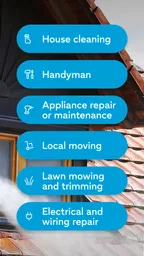
Thumbtack is a House & Home app from Thumbtack, built around finding service professionals near you. Its breadth is a real advantage for people who have more than one kind of household task to manage. You might be arranging a regular cleaning one week and looking into a repair another time; having both kinds of searches in one place is more convenient than starting from scratch with a separate source for every trade.
The app’s role is best understood as a connection and comparison point, not a guarantee that every listed professional will suit you. It can help you move from “I need someone” to a shortlist, but the final decision still depends on asking sensible questions and checking that a person’s proposed work matches your needs. The strongest reason to use it is having a structured place to begin comparing local help.
For a straightforward job, I’d use the search process to narrow the field, then make the conversation specific. Ask what the professional understands the task to involve, whether there are details they need before estimating it, and what could change the scope once they see the situation. Those questions are more valuable than a quick choice based only on a short description.
A realistic household workflow
Imagine a tap begins dripping on a busy weekday. You want to stop the problem from dragging on, but you also do not want to hire the first person who appears. I’d open Thumbtack, look for a relevant local professional, explain where the leak is and what you have noticed, and compare the replies for how directly they address that description. A response that asks a useful follow-up may be more reassuring than one that offers a confident answer without understanding the situation.
Before agreeing to anything, I’d confirm the expected work and ask what happens if the cause turns out to be different from the visible symptom. That is a practical safeguard for repairs: a small leak can have a simple cause, but the initial description cannot always reveal what is behind it. The app can help start the exchange; it cannot inspect the tap or settle a disagreement about scope on your behalf.
For cleaning, the same principle applies in another way. Specify whether you need a one-off visit or ongoing help, and clarify which rooms or tasks matter most. A request that spells out priorities makes it easier to assess whether a professional’s response is relevant. It also reduces the chance that you and the provider are imagining different versions of the job.
How to compare people, not just profiles
When several options appear plausible, I would compare them against the same short checklist. Does the person seem to understand the requested work? Are they clear about what they need to know before discussing the job? Do they communicate in a way you are comfortable with? These checks are useful across cleaning, plumbing, repairs, and handyman work because they focus on fit rather than a polished first impression.
A less obvious but useful tactic is to separate the job into “must be done” and “nice to have.” For example, if a repair is urgent, resolving the immediate problem may matter more than adding unrelated improvements. For a cleaning visit, agreeing on the priority rooms can be more practical than describing the whole home without saying what matters most. This makes comparisons fairer and helps avoid expanding a small request into a larger one before you understand the options.
I would keep the key details of the job consistent when contacting different professionals. If each person receives a different description, their responses may not be comparable. A concise, accurate explanation gives you a better basis for judging who has understood the task, while still leaving room for follow-up questions when a professional needs more context.
Where another route can make more sense
Thumbtack is not automatically the best choice for every household. If you already have a trusted plumber, cleaner, or handyman, contacting that person directly may be faster and more reassuring than looking for alternatives. The same is true when a neighbor’s personal recommendation matters more to you than browsing a wider set of local options.
For a highly specialized or safety-sensitive project, I would not treat a broad home-services search as the whole vetting process. You may need to check qualifications or other requirements relevant to the work in your area and ask detailed questions before hiring. If the task involves an immediate hazard, arranging prompt local help may take priority over spending time comparing multiple possibilities.
There is also a difference between finding a provider and managing a project. If your job involves several trades, a complicated renovation, or a long sequence of decisions, you may prefer a dedicated project manager or a referral from someone who has overseen similar work. Thumbtack can still be a place to look for individual professionals, but a set of separate contacts may not provide the coordination a complex project needs.
The effort involved in switching to an app-based search
Using Thumbtack costs no money to install, but it does require some time and attention. You need to describe the work, review possible matches, communicate clearly, and decide which responses deserve follow-up. For a small, familiar job, that effort may feel unnecessary if you already know whom to call. For an unfamiliar task, the ability to begin with several local possibilities can make the search feel more manageable.
There is a small learning curve in figuring out how much detail to provide. Too little information can lead to vague replies; too much speculation can make the request harder to follow. I’d start with the observable problem, the desired result, and any practical constraints such as timing, then answer follow-up questions as they arise. That approach is more useful than trying to diagnose the issue yourself before contacting a professional.
If you later choose a different route, the main cost is repeating the search and explaining the job again. Keeping a brief note with the problem, your priorities, and questions you still need answered can make that easier. It also helps you compare an app-found professional with a personal referral without relying on memory alone.
What the app’s standing tells you—and what it doesn’t
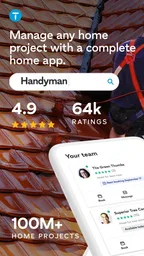
Thumbtack has a 4.9 average from around 66,000 ratings, and it has been installed over 5 million times. Those figures suggest that many people have used and rated the app, but they cannot tell you whether a particular professional is the right fit for your home or job. I’d treat that broad reception as a reason to consider the service, not as a substitute for checking the details of an individual hire.
The app is free and rated for Everyone. It was released on March 13, 2017, and version 446.0 requires Android 9 or later. Those basics make it easy to assess whether it suits your device and whether you want to try it, but the more important choice is still whether you need a local-service search tool in the first place.
One practical question people often have is whether they can use it for small jobs as well as bigger ones. The range of home-service categories makes it a reasonable place to look for either, but the value depends on whether local professionals are available for the task and whether the request is clear. Another common concern is whether browsing alone guarantees a good hire: it does not. I’d use the app to find candidates, then make the hiring decision through careful questions and a clear agreement about the work.
Who I’d recommend it to
I’d recommend Thumbtack to renters and homeowners who have a household job but no established person to call, especially when they want to compare local service options across different types of work. It is also useful if you are coordinating several ordinary tasks and want one place to begin looking rather than searching each category from scratch.
I’d be less enthusiastic about it for someone who already has a dependable professional, or for a project where personal referrals and specialized credentials are essential to the decision. In those cases, an existing relationship or a more targeted vetting process may be a better first step. The app’s convenience is real, but convenience should not outweigh the level of scrutiny the job requires.
My overall view is that Thumbtack is a useful starting point, not a shortcut around judgment. It gives you a way to search for local help with cleaning, repairs, plumbing, handyman work, and other household needs, while leaving the crucial work of comparing, questioning, and agreeing on scope to you. If you approach it with a clear description and a short list of priorities, it can make an unfamiliar hiring decision easier to organize. If you expect the app itself to guarantee the right person or manage a complicated project, you may be better served by a trusted referral or a more specialized route.
What we like
- Compare quotes from multiple local professionals.
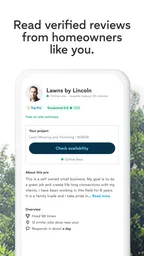
- Browse customer ratings and reviews before hiring.
- Request estimates directly through the app.
- Find providers across a wide range of home services.
- Save time searching for help in your area.
What could be better
- Prices and availability vary by location.
- Some providers may take time to respond.
- Service quality can differ between professionals.
- Not every job receives multiple quotes.
- You may need to share project details to get estimates.





