Tesla review
 Analysis by Appsdrops
I’d choose the Tesla app based on one simple question: do you already use a Tesla vehicle or Powerwall, and do you want to manage it from your phone? If so, a dedicated companion app can be more useful than a general lifestyle or car-management app. If you don’t have either product, there is little reason to install it. That sounds obvious, but it is the best way to judge this app: its value comes from its connection to Tesla hardware, not from offering a broad set of services to everyone.
Decide whether a dedicated Tesla companion suits you
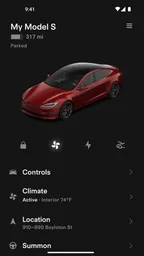
Tesla is a free lifestyle app from Tesla, Inc. Its central purpose is to let owners communicate with their vehicles and Powerwalls away from home. I see it as a remote-control and check-in tool rather than a replacement for the controls and information you use while standing beside the car. The distinction matters: the phone is convenient when you are at work, at home, or walking across a parking lot, but it is not a reason to expect every task to be better on a small screen.
The practical decision is less about whether you want another app and more about which parts of ownership you want to handle remotely. Someone who often checks on a vehicle between errands may value having the companion on hand. A household with a Powerwall may also appreciate one place to keep an eye on its Tesla equipment. By contrast, if you only want broad driving logs, vehicle comparisons, or general smart-home controls, a more neutral tool may fit your needs better—provided it supports the products you own.
The app sits in the lifestyle category, but its audience is quite specific. It has a 4.6 average from about 69,000 ratings, with roughly 11,000 written reviews, and more than 5 million installs. Those figures suggest a well-established owner audience, though they don’t tell me whether its particular remote functions match your habits. I’d treat them as useful context, not as a substitute for checking whether the app supports the Tesla equipment you intend to manage.
Where it earns a place on your phone
The strongest case for using it is continuity. Rather than treating the car as something you can interact with only while seated inside it, the app gives you a phone-based connection for moments when you are elsewhere. That is useful in small, ordinary ways: checking in before heading out, managing a vehicle from another part of the day, or keeping Tesla home energy equipment in view without turning the task into a separate research session.
One realistic example is a busy afternoon when plans change. You may be away from the car, need to make a quick ownership-related check, and want to use the same familiar companion you already associate with the vehicle. The convenience is not that the app makes the car drive itself or eliminates every ownership task; it is that you can reach for a dedicated interface instead of waiting until you are back beside the vehicle. I find that sort of convenience most valuable when it saves a repeated interruption, not when it is used simply because a phone is available.
A useful way to get more from a vehicle companion is to decide in advance which remote checks are genuinely helpful to you. If you open the app repeatedly without a clear purpose, it can become another source of distraction. I would make a habit of using it around real transitions—before leaving, after parking, or when coordinating a household task—rather than checking it out of routine. That small boundary keeps a practical tool from becoming a notification-driven habit.
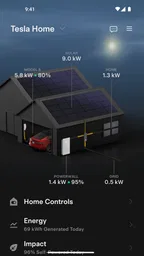
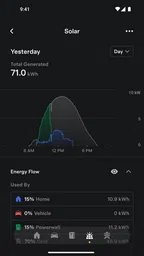
For Powerwall owners, the appeal is different from the car use case. The app’s scope includes communicating with both vehicles and Powerwalls, so it can be relevant to someone managing Tesla equipment at home as well as on the road. If your household uses both, having a single Tesla-focused companion can make ownership feel more coherent. If you only own a vehicle, the Powerwall side may be irrelevant; if you only have home energy equipment, you should judge the app by that relationship rather than assuming the vehicle experience is the main attraction.
There is also a useful trade-off in choosing an official, manufacturer-specific app. It is naturally aimed at Tesla owners and their equipment, which makes it a more direct fit than a general-purpose app that tries to cover many brands. The other side of that specialization is that its usefulness is tied to being in the Tesla ecosystem. It is not a universal dashboard for a mixed collection of unrelated cars and home devices.
What a focused app does better than broad alternatives
Compared with a general vehicle tracker, the Tesla app has a clear advantage in purpose: it is built around Tesla products rather than attempting to be a neutral record-keeping layer. That can reduce the mental overhead of switching between a maker’s companion and a third-party tool for basic ownership interaction. I would start here if my priority were staying connected to Tesla equipment, then add another app only if I had a specific need it did not cover.
General car apps can make more sense for people who want to organize vehicles from different manufacturers in one place, or who mainly care about trip records and comparisons across a household fleet. Those tools may serve a different job, so I would not assume they are direct substitutes. A Tesla owner who wants a dedicated relationship with their vehicle has a different goal from a driver who wants one common logbook for several makes. The right choice depends on which of those jobs is more important.
The same distinction applies to home-energy tools. A general smart-home platform may be preferable when you want to coordinate many brands and types of equipment, while a Tesla-focused app is the more natural starting point for someone whose relevant hardware is Tesla’s. Before choosing, I’d ask whether I need a broad control center or a direct channel to one manufacturer’s products. Trying to make one app serve both roles can lead to frustration.
Another reason to keep expectations grounded is that a dedicated app does not automatically make every ownership interaction simpler. A phone is easy to reach, but it still requires attention and a working connection between the app and the equipment. For an urgent task, I would not build a routine that depends solely on checking a screen at the last possible moment. The better use is convenient remote access when it suits the situation, with ordinary in-person controls and judgment still part of ownership.
Limitations and the cost of switching
The biggest limitation is the narrow audience. Without a Tesla vehicle or Powerwall, the app has little practical role, so its large install base should not persuade a non-owner to download it. Even for owners, it may not be the right answer if the main need is a multi-brand dashboard, a detailed personal driving journal, or an all-purpose smart-home organizer. I would avoid installing extra tools until I could name the exact task I want each one to handle.
There is also a change in habit when you move from relying mostly on the vehicle or home equipment itself to checking a companion on your phone. That can be a benefit, but it also means remembering another app and deciding when remote access is useful. If you share a vehicle or household responsibilities, agree on who uses which tool and for what. Otherwise, multiple people may make separate checks or develop different expectations about where to look for information.
For a new owner, the simplest approach is to install the official app, sign in with the account associated with the relevant Tesla products, and explore it when you have time rather than during a rushed moment. I would first identify the few actions I expect to use regularly, then see whether the app handles those needs comfortably. That is more informative than judging it by how many times I open it during the first day. It also makes it easier to spot whether a separate third-party app would add genuine value or only duplicate what I already have.
People considering a switch from another vehicle or smart-home app should think about what they are leaving behind. If the existing tool’s main benefit is organizing several brands or keeping a particular kind of personal record, moving to a manufacturer-specific companion may not replace that function. You may prefer to keep the broader app for that purpose and use Tesla’s app for direct interaction with Tesla equipment. That paired approach is sensible when each app has a distinct job; it is clutter when both are opened for the same basic check.
The app is free, rated for Everyone, and its current version is 4.62.5-4740; it was released on January 31, 2013, and supports Android 7.0 or later. The long-running presence may reassure owners looking for an established companion, while the Android requirement is worth checking if you use an older phone. I would also keep the app updated through the app store, since version details can change over time. Its price removes a purchase decision, but it does not remove the more important question of whether you own compatible Tesla equipment.
My recommendation for owners and prospective users
I recommend Tesla to Tesla vehicle and Powerwall owners who want a direct phone-based way to stay connected to their equipment. It is most compelling when remote access fits naturally into your routine, especially if you manage Tesla products in more than one setting. I would install it as the first place to look for Tesla-specific interaction, then decide later whether a broader tool is needed for a separate task.
I would skip it if you are not a Tesla owner, or if your main goal is to manage a mixed fleet or a wide range of non-Tesla home devices. In those cases, a general vehicle-management or smart-home app is likely to be a better starting point, assuming it supports your equipment. The Tesla companion’s focus is its strength and its boundary at the same time.
Overall, I see it as a practical ownership tool, not an app everyone needs. Its value comes from making Tesla hardware reachable through a familiar phone interface when you are away from it. If that solves a real, recurring inconvenience for you, the free download is an easy decision. If you expect it to replace every vehicle, energy, and household app you use, I would narrow down your needs first and choose tools according to the jobs they actually perform.
What we like
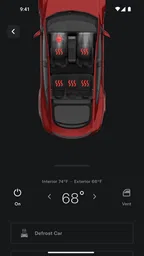
- Remote climate controls let you prepare the cabin before a trip.
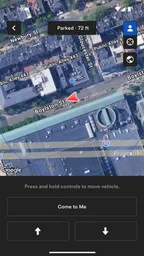
- Live location sharing makes it easier to find your parked car.
- Charging progress updates help you plan when to return.
- Service scheduling is available directly in the app.
- Digital key access can reduce the need to carry a key fob.
What could be better
- Many features require a compatible Tesla vehicle.
- Some remote commands depend on a stable internet connection.
- Digital key reliability can vary with phone settings and battery level.
- App features may differ by vehicle model and software version.
- Remote climate control can use battery power while the car is parked.





