Tattoo Maker: Design & Art review
 Analysis by Appsdrops
I judge a tattoo design app less by how many ideas it promises and more by whether it helps me think clearly before making a lasting decision. Tattoo Maker: Design & Art is a free beauty app from MegaMod Studio built around trying tattoo concepts on a body image. That makes it most useful as a visual sketchpad: a way to explore placement and style before taking an idea to a professional, rather than a substitute for an artist or a guarantee of how ink will look on real skin.
Trying an idea on a body image
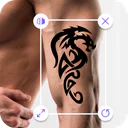
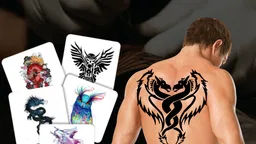
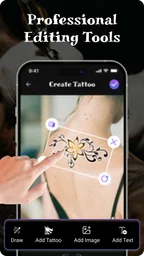
The appeal is easy to understand. A design that looks compelling on its own can feel entirely different when placed on an arm, shoulder, or another part of the body. Previewing an idea against a body image gives me a more practical question to answer: does this composition suit the area I have in mind? For someone still deciding whether a tattoo should be small and discreet or more prominent, that visual step can make the choice less abstract.
Tattoo Maker: Design & Art is aimed at personal exploration, not professional tattoo production. I would use it to compare concepts, get a rough sense of scale, or show a friend the direction I am considering. I would not treat a screen preview as a reliable simulation of healed ink, precise sizing, or how a tattoo will move with the body. The image is a planning aid, and its value lies in helping me notice preferences before I commit.
The app has a modest public track record: it has a 3.4 average from around 820 ratings, with 500K+ installs. Those figures suggest that plenty of people have tried it, while the middling average is a reason to keep expectations measured. I would approach it as a convenient idea tool, not assume that every part of the experience will feel polished or suit every user.
Where it fits among tattoo tools
Compared with browsing inspiration galleries, a body-image preview can make an idea feel more personal because I can consider placement rather than simply collect pictures. Compared with drawing software, a focused tattoo maker is a more approachable starting point for someone who does not want to learn a full illustration workflow. The trade-off is that a dedicated design app may not offer the control an experienced artist needs for clean, technically prepared artwork.
For example, if I am deciding between a fine-line botanical design on my forearm and a larger version higher up, I can use a mock-up to see which direction feels more balanced in a photo. I would then take the reference to a tattoo artist and ask them to adapt it to my body and skin. That handoff matters: a preview helps communicate an idea, but the artist should judge line weight, placement, and what will work as a real tattoo.
Trust starts with what I can actually see
For an app built around placing designs on body images, trust is not an abstract issue. A personal photo can reveal more than the intended tattoo area, so I would pause before selecting or sharing an image and consider what is visible in the frame. A cropped, well-lit picture with the background removed from the decision is a sensible choice when the goal is simply to test a placement.
I do not assume anything about image handling, account settings, or permissions without clear, visible information in the app. Before choosing a photo, I would read any permission prompt carefully and grant only what is needed for the action I am taking. If the app presents a choice about access, I would use the narrowest option that still lets me try the feature. If a prompt is unclear, I would stop rather than grant access just to move forward.
This cautious approach is useful even if the image is not especially sensitive. A tattoo concept may reveal personal taste, a meaningful symbol, or an idea someone has not shared with family or coworkers. I would keep that in mind before saving or sending a mock-up. The app can help me visualize; I remain responsible for deciding which image and design I am comfortable using.
A careful workflow makes the preview more useful
I get more value from this kind of tool when I separate design decisions instead of trying to judge everything at once. First, I would settle on the broad subject and style. Then I would compare placement on a body image. Finally, I would revisit the design at a comfortable viewing size and ask whether it still reads clearly. This reduces the chance that a striking image distracts me from a poor fit or an overly complicated composition.
One non-obvious tip is to use the same body photo for each placement comparison. Changing the pose, lighting, or crop between mock-ups can make one option appear better for reasons unrelated to the tattoo itself. Keeping the image consistent gives me a fairer visual comparison. I would also avoid treating a screen-size preview as proof of actual dimensions: if exact scale matters, I would discuss measurements directly with the artist.
Another useful check is to look at the design from a little farther away, not only zoomed in. Small details can look impressive close up but become indistinct at ordinary viewing distance. A mock-up can help reveal that the main shape needs to be simpler or bolder. This is especially relevant for delicate lettering or intricate patterns, where a digital image may make fine details seem more legible than they will be as skin ages.
What the app can and cannot decide
The strongest use case is early-stage decision-making: exploring a personal idea, making a rough placement comparison, or preparing a clearer conversation with a tattooist. It could also help someone who has never had a tattoo overcome the blank-page problem. Rather than arrive with only a vague description, they can bring a visual direction and explain what they like about it.
The limitation is that a convincing mock-up is not the same thing as custom design work. If I already know I want a technically precise piece, need a design adapted to a specific body contour, or care about professional-ready artwork, I would go straight to an artist or a more capable drawing tool. The same applies if I expect a digital preview to settle questions about pain, healing, ink color, or long-term appearance: those decisions need information and advice beyond a visual overlay.
I would also keep the app’s role modest when making a permanent choice. A preview may help me discover that I prefer a different location, but it cannot tell me whether I will still want the design years later. I would save the concept, take time away from it, and return with fresh eyes before booking. That pause is not a limitation of this app so much as a sensible safeguard for any tattoo decision.
Practical details and who should try it
The app is free, rated for Everyone, and currently at version 1.1.8. It was released on June 6, 2024, and its minimum operating-system requirement is 7.0. That makes it a straightforward option to consider for casual experimentation, though the rating and version are not a promise that the experience will match a full-featured design suite.
I would recommend giving it a try if you want a low-commitment way to picture a tattoo concept on a body image and you are comfortable making careful choices about photos and permissions. It is less suitable for people who need professional illustration controls, exact real-world sizing, or a definitive prediction of how a tattoo will look after it is inked. The key question is whether you want a visual starting point or a finished design; this app is best approached as the former.
A cautious, useful starting point
My overall view is that Tattoo Maker: Design & Art can help turn a vague tattoo idea into something easier to discuss and compare. Its focused purpose is appealing, especially for someone trying to choose a location or communicate a direction without investing in complex design software. I would keep personal images and visible choices in mind, avoid overreading a mock-up, and use the result as a conversation aid rather than a final blueprint.
If that is the kind of help you need, the free app is worth a look. If your priority is custom artwork, precise body-fit design, or clear answers about image privacy before you proceed, take time to review the choices shown in the app and consider working directly with a tattoo professional instead. For me, its best contribution is not making the decision for you, but helping you arrive at that conversation with a more concrete idea.
What we like
- Easy-to-use tools make it approachable for first-time tattoo designers.
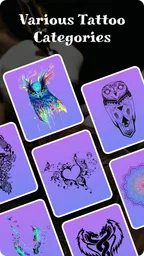
- A wide range of designs helps inspire custom concepts.
- Previewing artwork on a photo can help assess placement.
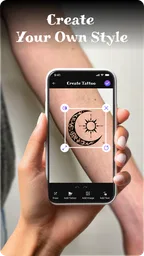
- Editing features let users personalize designs without drawing from scratch.
- Digital concepts can be saved for later reference.
What could be better
- The app cannot show how a tattoo will look on real skin.
- Some designs or tools may require in-app purchases.
- Screen previews may not match the final tattoo size or color.
- Artwork quality can vary across the available designs.
- A professional artist may need to redraw concepts before tattooing.





