
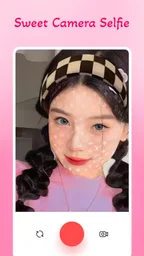
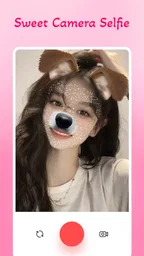
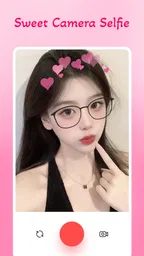
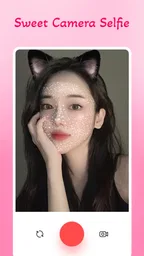
Sweet Camera Selfie review
 Analysis by Appsdrops
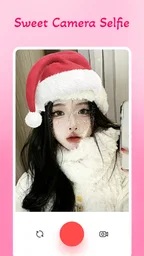
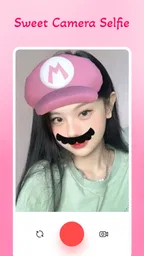
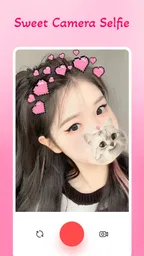
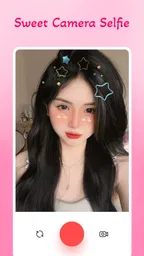
I would approach Sweet Camera Selfie as a quick, playful beauty camera rather than a complete photo-editing studio. Its appeal is the promise of trying eye-catching filters, including looks that shift a selfie toward a cute, doll-like style. That makes it an easy app to consider when you want a lighthearted portrait for a chat or social post, but it is less compelling if your priority is restrained, realistic retouching or detailed control over every edit.
It is a free beauty app from Galaxy studio apps, with optional in-app purchases. The app is rated for Everyone, and its audience is broad: anyone curious about selfie effects can try it, though younger users should involve a parent or guardian before making purchases. The current version is 4.0.1, and it runs on Android 5.0 or later. Those details make it relatively approachable to try on a compatible Android device, but they do not guarantee that every phone will handle the camera experience in exactly the same way.
Getting past the first-use friction
With a camera app, the first hurdle is often not the filter itself but getting to a usable preview. If the camera view does not appear, I would start with the basics: check that the app is installed on a supported Android version, close and reopen it, and make sure the device’s camera is not already occupied by another app. If Android asks for camera access, allow it if you want to take a new selfie; without that access, a live camera workflow may not work as expected.
It is also worth distinguishing a camera problem from a filter problem. If the preview works but an effect does not look right, try another effect and compare the same pose in similar lighting. Beauty effects can be sensitive to angle, shadows, and how much of the face is visible. A filter that seems unconvincing in a dim room may look very different near a window, so I would test in steady natural light before deciding that the effect is broken.
Before relying on the app for a time-sensitive photo, take a few minutes to check whether you can open it, see a preview, and complete the basic capture flow. That small test is more useful than discovering a snag just as you are trying to take a group selfie. If the app opens but feels slow, closing other camera-heavy apps and restarting the phone are reasonable general troubleshooting steps; they do not require changing any settings you do not understand.
Some users may also wonder whether the app is suitable for an older phone. The minimum operating-system requirement is Android 5.0, but compatibility is only one part of the experience: camera quality and device performance still shape the result. If your phone struggles with other camera apps, it may struggle here too. I would avoid treating an effect’s appearance as a direct measure of your phone’s camera quality, since the lighting and filter treatment both influence the image.
Make the test useful, not just quick
For a fair first impression, take one ordinary selfie and one under better lighting, keeping your face angle similar. That simple comparison helps reveal whether a filter is changing the look in a way you actually like, rather than merely compensating for a poor setup. It also gives you a practical reference for future use: if the result only works with a particular angle or light, you will know how to reproduce it when you need a photo.
I would also check the final image before sharing it. A preview can feel fun on screen, but the saved result is what matters if you are sending it to someone or posting it elsewhere. Look for an effect that seems too strong, an awkward crop, or a lighting mismatch. This is a useful habit with any selfie camera, especially one whose main attraction is changing your appearance rather than simply recording a scene.
A simple workflow for getting a usable selfie
My practical routine would be to open the app with a clear idea of the image I want, find a bright spot with even light, and try a small number of looks rather than tapping through effects indefinitely. Since the app is built around playful beauty filters, the strongest result may not be the most flattering one for every purpose. For a casual message, a noticeably cute transformation can be part of the joke; for a profile picture, a softer or more natural-looking result is usually easier to reuse.
A non-obvious trade-off with stylized selfie filters is that they can make a photo feel distinctive while making it less flexible. A heavily transformed portrait may suit a playful post but look out of place in a professional profile or a family album. I would decide where the image is going before choosing a look. That saves time and avoids editing toward an effect that is entertaining in the moment but wrong for the audience.
If a capture does not come out as expected, I would recover in stages: return to the camera view, adjust the light or angle, test a different filter, and take another photo. Changing one thing at a time makes it easier to identify the cause. If every effect looks poor, the room’s lighting or the camera lens may be the issue; if only one effect looks odd, it is more likely that the effect simply does not suit that pose or scene.
For a realistic everyday example, imagine you are meeting friends and want a quick selfie to send to a group chat. I would use the app for a few playful attempts, then choose the image that still looks clear at normal viewing size. If the group wants a natural record of the day, the standard camera may be the better choice. If the goal is a deliberately cute or exaggerated portrait, this app’s focus is more relevant.
Another useful workflow is to separate taking the picture from deciding whether it is worth sharing. A filter can make you laugh while you are shooting, but that does not mean it belongs in every conversation or post. I would keep the app as a small creative option rather than a default camera replacement. That approach also prevents a quick selfie from turning into a long session of trying every look without a clear result.
When restarting and retrying are sensible
If the app closes, freezes, or stops responding, begin with ordinary recovery steps: close it, reopen it, and try again after shutting down other apps that may be using the camera. If the issue continues, restart the device and check that the operating system meets the app’s minimum requirement. These steps can clear temporary device or app conflicts, but they are not a promise that every problem will disappear.
If the camera works in other apps but not here, that points toward an app-specific issue rather than a general camera failure. If it fails everywhere, check the phone’s camera behavior first. Keeping these situations separate helps avoid unnecessary changes to the device and makes it clearer whether the problem follows the app or the camera itself.
When you are considering whether to keep the app, give it a short, focused test instead of judging it from one awkward image. Try a bright setting, a straightforward pose, and a couple of different effects. If the style is not for you after that, more experimentation may not change the basic fit: this is a playful beauty camera, not a universal fix for every portrait.
How it compares and who should choose it
Compared with the phone’s built-in camera, the main reason to use Sweet Camera Selfie is its emphasis on cute, stylized filters. A standard camera is generally the safer pick when you want a dependable, natural-looking record without committing to a particular beauty effect. Compared with a full photo editor, this app is better suited to a quick selfie experiment than to careful work such as adjusting several parts of an image, building a consistent visual style, or preparing a polished portrait for a specific professional purpose.
That difference matters if you are choosing between several kinds of beauty apps. If you mainly want to take a fun picture with minimal planning, a focused selfie app can be more direct than opening a general editor after the fact. If you want precise retouching, repeatable adjustments, or a broad set of editing controls, a more comprehensive editor is likely to be a better fit. I would not install this expecting it to replace either the built-in camera or a serious editing tool.
The app has a 4.6 average from around 22,000 ratings, with more than five million installs. Those figures suggest that many people have tried it, but popularity alone does not say whether its particular filter style will suit you. I would treat them as context, then make the decision based on the look you want and how smoothly the app works on your own phone.
Because the app is free to install and includes optional purchases ranging from $0.99 to $99.99 per item, I would be attentive to any purchase prompts, especially if someone else is using the device. You can try the basic app without paying, but optional spending can change the overall cost if you choose to buy something. For a casual user, my advice is to explore the free experience first and only consider a purchase if its value is clear to you.
Sweet Camera Selfie is a better match for someone who enjoys cute, noticeable selfie effects and wants a quick way to experiment with that look. It is less suitable for someone who wants natural portraits by default, detailed editing, or a reliable replacement for the phone camera in every situation. Its beauty category focus is narrow, and that is both its strength and its main limitation: you can approach it with a clear purpose instead of expecting an all-purpose photography suite.
My practical verdict
I would recommend giving Sweet Camera Selfie a try if you want playful portraits and are happy to spend a moment finding the lighting and angle that work best. It is a sensible option for casual selfies, friendly group-chat photos, and experiments where a cute transformation is part of the fun. The most useful tip is to test the saved result, not just the live preview, and to choose the effect according to where you plan to share the picture.
I would skip it if your main goal is understated, natural-looking photos or if you need a broad editing toolkit. In those cases, the built-in camera or a more capable editor will probably serve you better. For everyone else, the app is worth judging on a simple trial: check that it runs on your device, test a few effects in good light, and decide whether the style feels like something you will actually use. That is a more reliable guide than expecting every filter to suit every face, setting, or occasion.
What we like
- Beauty filters can soften portraits with little effort.
- Live previews make it easy to compare effects before taking a photo.
- The interface is approachable for casual selfie editing.
- Stickers add a playful touch to portraits.
- Basic editing tools can help polish photos quickly.
What could be better
- Some effects may make skin look overly smoothed.
- The finished image can look different from the live preview.
- Prominent ads may interrupt editing.
- Many effects can make the interface feel crowded.
- Some features may require an internet connection.





