




Survey Spin: Get paid cash! review
 Analysis by Appsdrops
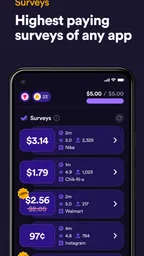
Survey apps sound easy to fit into spare time: open one, answer a few questions, and collect a reward. In practice, the experience depends on more than the questions. A survey may need a steady connection to load, record answers, and finish cleanly, so I judge Survey Spin as much by how it fits around everyday mobile use as by its promise of earning money. It is a free lifestyle app from SocialLoop, aimed at people who are comfortable using short pockets of screen time for surveys.
When the connection is part of the task
The central appeal is straightforward: Survey Spin brings survey-taking into a phone app, rather than asking you to make it a separate desktop activity. That can be handy when you have a few minutes before an appointment or while waiting for a ride. The catch is that a survey is not a great task to begin in the middle of an unstable connection. If a page is still loading or your signal is wavering, the time you meant to spend answering can turn into time spent waiting or trying again.
I would treat each survey as a small task that deserves a reasonably reliable connection. Start when you can stay with it, rather than tapping into a questionnaire just as you are about to enter a lift, board a train, or walk into a dead-signal area. This is a practical habit, not a claim that every survey behaves the same way: the app’s experience can be affected by the network conditions around your phone, and a connection drop can interrupt the flow of any online form.
That makes the app better suited to deliberate breaks than to fragmented, one-hand use. If you have five minutes of calm and a dependable signal, opening it makes sense. If you only have a moment between two other tasks, it may be more satisfying to leave the survey for later than to rush through answers while watching your connection.
Choose the right moment, not just the spare minute
A useful routine is to check that your phone has a stable connection before starting, then avoid switching networks or moving between coverage areas while answering. For example, I would rather begin at home or in a café than start while walking between stations. This small choice reduces the chance that a short survey becomes an awkward stop-and-start session.
There is also a difference between having spare time and having attention to spare. Surveys ask you to read and respond, so trying to complete them while multitasking can make the session feel longer and less reliable. If you are interrupted, pause only if the app’s current screen makes it clear that your answer is saved; otherwise, finish the question or wait until you can focus. I would not assume that closing the app or losing signal preserves unfinished progress.
Where it fits in a mobile day
Survey Spin’s phone-first format is most useful in predictable pockets of downtime: sitting at home after dinner, waiting in a lobby, or taking a quiet break with a good connection. In those situations, it is easy to open the app, see what is available, and decide whether you have enough time to participate. It is less appealing during a commute with patchy reception, when each interruption competes with your attention.
One realistic use case is a person who checks the app during a lunch break, sees a survey, and decides whether the remaining break is long enough to complete it without rushing. That is a better approach than treating the app as something to keep open all day. Survey work is optional spare-time activity, not a dependable task queue, and a sensible routine should leave room to stop when the timing or connection is poor.
The app is free, which makes it easy to try without paying to get started. Still, free access should not be confused with guaranteed earnings or a predictable return for every minute spent. The store summary says it is about earning real money, but I would approach that as the app’s intended appeal rather than as a promise of a particular amount or schedule. If you need reliable income, a survey app is not a sound substitute for paid work.
What to do when a session stalls
Network problems can be frustrating precisely because they often arrive mid-task. If a survey stops responding, I would first give the current screen a moment rather than tapping repeatedly. Then check whether the phone still has a connection before trying to continue. Rapidly reopening or restarting things can make it harder to tell whether the session recovered or whether you are looking at a fresh attempt.
If the app returns to a previous screen, look carefully for a clear indication of where you are before answering again. Repeating answers without knowing whether the earlier attempt was recorded can waste time and create uncertainty. When progress is unclear, it is better to stop than to assume a survey has been submitted. The useful lesson is to make the final submission screen part of the task: allow time to reach it, and wait for a visible confirmation before leaving.
This is also why I would avoid starting a survey when the phone battery is nearly empty or when you know you will have to close the app shortly. Those situations do not necessarily cause a failure, but they raise the cost of an interruption. A few minutes of preparation—stable signal, enough battery, and a quiet moment—can make the experience feel much less fussy.
Use it thoughtfully on mobile data
Survey Spin is a natural fit for a connected phone, but people who closely manage mobile data should be selective about when they use it. I would prefer a trusted Wi-Fi connection for longer sessions when convenient, especially if I am trying to conserve a limited data allowance. On mobile data, checking a survey briefly is more sensible than leaving the app open while unsure whether content is still loading.
There is no need to turn every spare moment into a survey session. Checking only when you have time and a good connection helps avoid unnecessary screen use and the frustration of starting a task you cannot finish. It also keeps the app in its proper place: an occasional activity for downtime, rather than something that needs constant attention.
Privacy-minded users should make their own comfort level part of the decision. Surveys involve answering questions, and I would read each prompt before responding rather than treating every questionnaire as a formality. Share only what you are comfortable sharing. If a question feels too personal, or if you do not want to spend time on the subject, skipping that opportunity is a reasonable choice.
Who will enjoy it, and who may prefer another option
The app has an average rating of 4.6 from around 68 thousand ratings, with roughly 8.8 thousand written reviews and over 500 thousand installs. Those figures suggest that many people have tried it, but they do not tell me whether it will match your schedule or expectations. Its Everyone age rating makes it broadly accessible, while the survey format still suits people who are patient enough to read questions and decide whether each session is worth their time.
I would recommend trying it if you like answering surveys, have occasional downtime, and can use a stable connection when you do. It is also a reasonable option for someone who wants a simple phone-based alternative to browsing survey opportunities on a computer. The current version is 26.10.22, and the app has been available since July 27, 2022. Those details place it as an established app rather than a brand-new experiment, but the quality of an individual session still depends on the survey and the conditions in which you take it.
If you dislike questionnaires, need a fixed payout for a fixed amount of work, or often use your phone where reception is unreliable, I would look elsewhere. A different kind of spare-time app may suit you better if it works without sustained attention, while people seeking dependable earnings should consider options with clearer, scheduled compensation. Survey Spin is not a replacement for either of those needs; its appeal is the chance to use otherwise idle minutes for surveys.
My connectivity verdict
What I like most about Survey Spin is the ease of trying a survey during a quiet moment without turning the activity into a major commitment. What I like less is that the usefulness of that moment depends on timing, attention, and a connection that stays steady long enough to complete the task. That is a real trade-off for a mobile survey app, not a reason to dismiss it outright.
I would keep Survey Spin for planned pockets of downtime: open it when you have a stable signal, enough time to finish, and the patience to read each question. I would not rely on it while rushing between places or count on it as predictable income. As a free lifestyle app from SocialLoop, it is worth considering for people who genuinely enjoy surveys and are comfortable fitting them around their day. The best experience comes from choosing the moment carefully; when connectivity is uncertain, waiting is often the smarter move.
What we like
- Offers a simple way to earn rewards during spare moments.
- The survey format is easy to understand for new users.
- A range of survey topics may help keep tasks varied.
- You can check for available surveys directly in the app.
- Rewards provide an incentive to share your opinions.
What could be better
- Survey availability may vary by location and profile.
- Some surveys may screen you out before completion.
- Earnings can be modest relative to the time required.
- Reward redemption options may differ by region.
- You may need to share personal details to qualify for surveys.





