



Survey Junkie review
 Analysis by Appsdrops
I look at Survey Junkie less as a way to make meaningful income than as a small, occasional task I can fit around other things. It is a free lifestyle app from Survey Junkie, rated for Everyone, and its purpose is straightforward: answer surveys in exchange for cash or rewards. In my view, its usefulness depends not just on whether surveys are available, but on whether the process feels manageable for you—how comfortably you can read questions, enter answers, and stay focused through a questionnaire.
Getting oriented and reading the questions
The app’s basic idea is easy to grasp: find a survey, answer it, and collect a reward. That simplicity is helpful if you are new to survey apps and do not want to learn a complicated system before trying one. Its name is also unambiguous, and the app’s average rating of 4.3, drawn from around 110,000 ratings, suggests that many people have at least found it worth considering. Ratings cannot tell me whether the experience will suit a particular person, though; the day-to-day fit matters more.
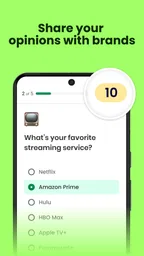
When deciding whether a survey app is comfortable to use, I pay attention to the work hidden inside a seemingly simple task. A questionnaire may ask you to read several choices, compare details, recall a habit, or enter information accurately. That can be tiring even when the app itself is uncomplicated. I would approach each survey as a short reading task rather than assume that every one will be quick or equally clear.
A practical habit is to start a survey only when you can give it uninterrupted attention. If you are interrupted halfway through, you may lose your place or have to work out what you already answered. I would also take a moment to read the opening information before committing, especially if I am using the app in a hurry. The most useful question is not simply “How much is the reward?” but “Can I comfortably finish this task right now?”
Survey Junkie has been available since July 11, 2018, and its current version is 1.32.14-na. Those details matter mainly if you are checking whether you have the current app installed; they do not tell you how comfortable its interface will feel on your device. It supports operating systems from version 9 onward, so I would check compatibility before relying on it with an older phone or tablet.
What the survey format asks of you
Survey work is not always passive tapping. Some questions require sustained attention, and a response can depend on noticing a small distinction between answer choices. If reading dense text is difficult for you, or you lose focus when a task runs long, it is sensible to treat surveys as optional rather than a daily obligation. Choose a calm moment and stop if the questionnaire becomes uncomfortable; the reward is not worth pushing through a task you cannot complete confidently.
I would not assume that a survey app automatically adapts to every reading preference or sensory need. If you rely on a particular display setting, assistive tool, or input method, test the app with a low-stakes session before planning around it. The important point is to judge the actual interaction on your own phone, rather than infer accessibility from the app’s simple purpose.
Motor and sensory comfort in everyday use
Answering surveys can involve repeated taps, scrolling, and sometimes typing. That makes Survey Junkie a less suitable choice when hand movement is painful, precise touch is difficult, or repetitive actions quickly cause fatigue. A longer response may also be awkward if typing on a small screen is uncomfortable. I would try one survey at a time, take breaks, and avoid beginning a questionnaire when you already know you have limited energy.
Sensory comfort is individual, too. A bright screen, prolonged focus, or switching between tasks can be draining even if the content seems ordinary. I find it more practical to use a survey app in a quiet, well-lit setting where I can adjust my device to what feels comfortable, rather than attempting to squeeze in answers while walking or dealing with competing demands. If you use speech input or other device-level tools, test whether they work smoothly with the answer fields before relying on them for a long session.
A useful trade-off is that a phone makes surveys easy to carry into spare moments, but that convenience can encourage starting at the wrong time. A queue, a noisy break room, or a commute with unreliable attention may not be a good setting for questions that need careful reading. I would save survey-taking for a pause when I can focus, and use a brief idle moment for something that does not require me to remember earlier answers.
Where it fits—and where it does not
For a realistic everyday example, imagine having a quiet half-hour at home after dinner. You could open Survey Junkie, see whether a survey looks manageable, and decide whether the time and concentration it asks for feel worthwhile. That is a better use case than treating it as a dependable source of money for a bill: survey availability and suitability can vary, and completing questionnaires takes real attention.
The app has reached over 1 million installs, which makes it a familiar option in its niche, but popularity does not remove the basic limits of survey-based rewards. If you want a predictable hourly return, a survey app is probably the wrong tool. If you enjoy giving opinions and are comfortable exchanging spare time for modest rewards, it may be a reasonable add-on to your routine. I would not make it the only option if you need a more dependable way to earn.
Compared with other ways of earning small rewards, the main trade-off is the activity itself. Survey apps ask for personal opinions and concentration; cashback tools generally tie rewards to purchases, while task platforms may involve different kinds of work. Those alternatives are not automatically better. Cashback is relevant only if you were already going to shop, and a task-based service may be a poor match if its tasks involve abilities or effort you would rather avoid. I would choose based on what you are comfortable doing, not on the promise of a reward alone.
One practical workflow is to decide in advance how much attention you want to spend. Check the available options when you have time, read the survey’s initial details, and begin only if you can finish without rushing. If a survey feels too demanding, leave it for another occasion rather than continuing just because you have already started. This small boundary helps keep the app from turning spare time into an obligation.
Friction to consider before you rely on it
The biggest limitation is not a complicated feature set; it is the uncertainty built into survey work. A questionnaire may not suit every person, and the effort required can feel disproportionate if you expected a quick, effortless reward. You should also be prepared for repetition: surveys naturally ask about opinions and experiences, so the activity may become dull if you do not enjoy that format.
Privacy-minded users should make a deliberate choice before sharing answers. The point of a survey is to collect responses, so you should read the explanations shown in the app and decide what you are comfortable providing. I would not answer sensitive questions casually just because they appear in a reward app. If you prefer not to share personal opinions or details in questionnaires, a survey-based service is not a good fit.
Another barrier is the mismatch between a small screen and careful reading. If you have difficulty distinguishing answer choices, need more space, or find scrolling tiring, the phone-first convenience may not compensate for the effort. You might prefer a larger device or a different kind of rewards activity, provided that alternative better suits your needs. That is a personal usability decision, not a reason to force yourself through an uncomfortable interface.
Survey Junkie is free to install, but “free” does not mean costless in practice: your time, attention, and willingness to share opinions are part of the exchange. I would judge each opportunity by its total effort, including reading and completing the questions, rather than focusing only on the reward shown. That keeps expectations grounded and makes it easier to stop when a survey is no longer worthwhile to you.
Who I would recommend it to
I would suggest trying it if you like answering questionnaires, have occasional quiet breaks, and are comfortable using a phone for sustained reading and tapping. It may also suit someone who wants a low-commitment way to exchange opinions for rewards, as long as those rewards are treated as a bonus rather than regular earnings. The Everyone content rating means the app is intended for a general audience, but each person should still decide whether the questions and interaction are suitable for them.
I would steer away from it if you need predictable income, dislike questionnaires, have little time for focused tasks, or find repeated screen interaction uncomfortable. The same applies if you are not comfortable sharing the kinds of opinions a survey may request. In those cases, another activity—or no rewards app at all—may be a better use of your time.
My overall view is that Survey Junkie is best treated as an occasional opinion-sharing app, not a dependable earning plan. Its appeal is the direct, familiar survey format; its limitation is that the format itself demands reading, attention, and repeated interaction. I would test it in a relaxed setting, notice whether the questions and navigation work for your abilities, and keep using it only if the effort feels reasonable.
For anyone choosing an app with accessibility in mind, that trial matters more than a broad promise. Survey Junkie may be convenient for one person and tiring for another, depending on vision, motor comfort, concentration, and the setting in which they use it. I appreciate the straightforward premise, but I would recommend it only when the actual experience feels comfortable and the rewards remain a welcome extra. Start with one manageable survey and let your own comfort decide whether it earns a place in your routine.
What we like
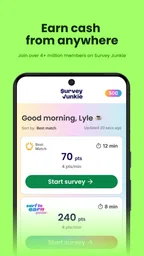
- The clean layout makes survey options easy to browse.
- Profile questions help match users with relevant surveys.
- The dashboard shows points earned and redemption progress.
- Some surveys can be completed in short sessions.
- The app is free to download and use.
What could be better
- Survey availability can vary by location and profile.
- Some surveys screen users out after they start.
- Point values may not justify the time required.
- Cashout options and thresholds can depend on your region.
- The app requires personal details to match you with surveys.





