
Sunrun review
 Analysis by Appsdrops
When I want to check how a home-energy system is doing, I would rather have a clear place to start than dig through paperwork or contact support for a routine question. That is the practical appeal of Sunrun: it gives Sunrun customers a mobile way to keep an eye on their system, handle bills, and reach support. I see it as a companion to an existing Sunrun service, not as a general-purpose energy monitor for anyone with solar panels.
Monitoring is the central reason to open the app
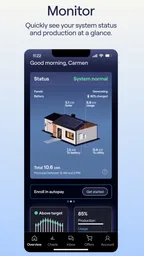
Sunrun, Inc developed this free House & Home app for its customers. Its most useful role is putting system monitoring alongside account tasks, so checking on a system does not have to be separate from sorting out a bill or seeking help. That combination makes sense for homeowners who want a convenient account hub rather than a collection of unrelated tools.
The app has an average rating of 3.5 from around 1,500 ratings, with 696 written reviews. Those numbers suggest a mixed reception rather than universal satisfaction. I would treat it as a reason to set realistic expectations: an account app can be valuable when it makes a specific task easier, but it still needs to fit the way a customer actually manages their Sunrun service.
Its monitoring focus is especially useful because it gives customers a reason to check in between bigger household decisions. Instead of thinking of the app only as a place to visit when a bill is due, I would use it as a quick reference point when I want to look at my system and decide whether I need to do anything else. The distinction matters: a status check can reassure or prompt a follow-up, but it is not the same as diagnosing a technical problem.
What a monitoring app can—and cannot—replace
I would not treat Sunrun as a substitute for understanding the full terms of a home-energy agreement or keeping personal records. For important account decisions, I would still keep relevant statements and service details accessible. The app is best viewed as a convenient front door to customer tasks, while documents and direct support remain important when a question needs a detailed explanation.
It also should not be confused with an independent solar dashboard chosen by a user who wants to compare equipment from different providers. Sunrun is built around the Sunrun customer relationship. That narrow scope is a strength if your service is already with the company, but it is a clear reason to skip it if you are looking for a single monitoring tool for systems from multiple providers.
A practical routine for checking system status
In everyday use, I would make monitoring a short, purposeful check rather than a habit of refreshing the app repeatedly. For example, after noticing something unusual in household energy use, I could open the app to see what it shows about my Sunrun system, then decide whether the issue calls for a closer look or a support conversation. The useful workflow is not “the app fixes the system”; it is “the app helps me orient myself before I choose the next step.”
That approach can save time because it gives a customer one place to begin. If the information looks normal, there may be no need to make a call over a passing concern. If something seems off, the customer can approach support with a clearer account of what prompted the check. I would avoid drawing technical conclusions from a quick glance alone, though; a monitoring view is a starting point, not proof of the cause of a problem.
A second, less obvious use is to check the system before contacting support about an unrelated account concern. If I am already opening the app to look at a bill, I can also make a quick system check and keep those questions mentally separate: one is about account administration, the other about system performance. That small distinction can make a support conversation more focused and reduce the chance of mixing several concerns into one vague request.
For someone who travels or spends long stretches away from home, app-based access can also make it easier to stay connected to a Sunrun account without being physically near the equipment. I would still avoid treating remote access as a guarantee that every issue can be handled from a phone. Its value is in checking and organizing customer tasks, not in replacing on-site service when that is needed.
Where billing and support fit into the same workflow
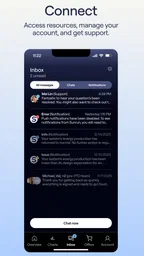
Monitoring is the main lens I would use to judge the app, but having bills and support within the same customer experience adds practical value. A good habit is to use the app when a bill needs attention, then make a note of any separate system question rather than assuming both tasks are connected. Keeping those threads distinct can help when following up later, especially if the billing issue is resolved but a technical concern remains.
For a realistic example, imagine receiving a bill while planning household expenses and also wondering whether the system is behaving as expected. I could use the app to handle the payment task and check the system in the same session, then contact support only if a specific question remains. That is more efficient than opening several channels without first establishing what I need to ask.
Still, convenience depends on the customer’s situation. If a payment question involves a detailed explanation, or if a system concern needs troubleshooting, an app-based account view may not answer everything. I would use the built-in support route as a way to move toward help, not assume that the app itself contains every answer. Customers who prefer talking through complex issues may find a direct conversation more useful than managing everything on a small screen.
Tradeoffs: a focused tool, not a complete energy command center
The main tradeoff is that Sunrun’s usefulness depends on being a Sunrun customer. It is not an all-purpose home-energy organizer, and I would not install it expecting broad compatibility with other solar providers or unrelated household devices. Its value comes from keeping Sunrun-specific monitoring and account needs close together; outside that relationship, the reason to use it largely disappears.
Another tradeoff is that monitoring can invite over-checking. A system dashboard is most helpful when it answers a practical question or establishes a baseline for when to seek help. Looking at it constantly can turn ordinary variation into a source of worry, particularly if the customer expects every change to have an obvious explanation. I would check when there is a reason, note what seems unusual, and use support for concerns that the app view alone cannot settle.
The app’s current version is 3.3.0, and it requires Android 7.0 or later. It is rated for Everyone and has passed 100,000 installs. These details make it clear that the app is available to a broad range of Android users, but they do not change the central decision: it is most relevant to people who already need access to Sunrun’s customer services. Customers should also make sure their device meets the minimum system requirement before planning to use it.
Compared with a phone call or paper account records, the app’s advantage is having customer tasks available in a mobile format. Compared with a broader energy-management product, its advantage is its direct connection to a Sunrun account, while its limitation is that narrower scope. I would choose between those options based on the job: use Sunrun for Sunrun account and monitoring needs, and consider another approach if the goal is to bring several providers or household systems into one view.
Who is likely to get the most from it
I think the app makes the most sense for a Sunrun customer who likes to check system information, prefers managing routine account tasks on a phone, and wants an accessible route to support. It is also a sensible fit for someone who handles household bills and wants to keep their Sunrun-related tasks together rather than relying on memory or scattered notes.
It is less compelling for someone who rarely uses mobile account tools, has no need to monitor their system, or expects a universal dashboard for equipment and services from different companies. If your main need is a detailed technical diagnosis, I would not rely on an app check alone; contacting support is the more appropriate next move when the issue cannot be understood from the information at hand.
Sunrun is free to use, which makes it easy for eligible customers to try as an account companion. I would install it with a specific expectation: make routine monitoring and customer administration easier, not transform how the home’s energy system works. That modest promise is also the fairest way to judge it. If the app helps me check in, deal with a bill, or get closer to the right support channel, it has earned a place on my phone.
Overall, Sunrun is a focused choice for people already using Sunrun services. I would recommend it to customers who want a convenient mobile starting point for system checks and account tasks, while advising anyone seeking provider-independent monitoring to look elsewhere. Its strongest quality is practical access to a specific customer relationship; its limit is that same specialization.
What we like
- The app provides a convenient way to check solar system performance.
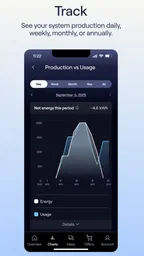
- Users can view energy production data from their mobile device.
- Account access makes solar information easier to manage on the go.
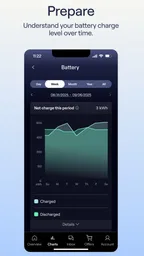
- The app can help users monitor their home energy system over time.
- It offers a digital alternative to contacting support for basic account details.
What could be better
- Features may depend on having a Sunrun solar system and account.
- Some system data may not appear in real time.
- App usefulness can vary depending on the equipment installed.
- Users may need to contact support for issues the app cannot resolve.
- Availability of features may differ by region or service plan.





