

Sunoco: Pay fast & save review
 Analysis by Appsdrops
I judge a fuel app less by how polished its screens look than by whether I can use it when I am in a hurry, at a pump, or trying to make a quick decision about where to stop. Sunoco: Pay fast & save is centered on Sunoco’s own fuel rewards program, so its value depends on how often Sunoco fits into your routine and how comfortably you can use a phone while planning a fill-up.
Sunoco is a free Auto & Vehicles app from Sunoco, and its main draw is Sunoco Go Rewards. It has an average rating of 4.3 from around 5,800 ratings, with more than 500,000 installs. Those figures suggest that many drivers find a reason to keep it, but they do not tell you whether it will suit your needs: the important question is whether a Sunoco rewards workflow is useful and accessible in your everyday setting.
Getting around without making the app the whole trip
My first practical test for this kind of app is whether I can understand its purpose before I am standing beside a car with a queue behind me. The focus here is relatively easy to grasp: it is a Sunoco app with a fuel rewards program, rather than a broad motoring toolkit. That narrower purpose can make it easier to decide whether it belongs on your phone.
The app is currently version 4.5.0, and it runs on Android 7.0 or later. Those details matter when you are considering an older phone that still handles everyday tasks well. I would check the app’s current store page on the device you plan to use, since version compatibility alone does not guarantee that every phone will feel equally responsive or comfortable to operate.
For readable navigation, I recommend exploring the app at home before relying on it during a stop. Find the rewards-related parts you expect to use, and make sure you can return to the relevant screen without having to search through menus while distracted. That small rehearsal is especially useful if you use larger text, magnification, or a screen reader and want to learn how the interface behaves before you are under time pressure.
A focused rewards app is not automatically a better choice than a general navigation or fuel-price app. Those alternatives may help you compare routes or nearby options, while Sunoco’s purpose is tied to Sunoco and its rewards. I would use it alongside a navigation tool if route planning matters, rather than expecting a single fuel-brand app to answer every question about a journey.
Make the rewards routine fit your habits
The most useful way to assess a loyalty app is to connect it to an existing habit. If you already stop at Sunoco, the app may give you a reason to keep your rewards activity in one place. If your usual route rarely passes a Sunoco, opening the app just to pursue a reward could add friction without changing where you buy fuel.
One practical tip is to decide before leaving whether a stop is already convenient. A reward should be a bonus on a route you would reasonably take, not the sole reason to make a detour. This is a more grounded way to think about savings than treating a loyalty program as a guarantee that every trip will cost less.
I would also make the phone workflow part of trip preparation, not something to learn while driving. When parked, check what the app asks you to do for the rewards process and whether you can complete those steps comfortably. Then you can decide whether it works for your routine without handling the phone in a moving car or feeling pressured at the pump.
Different abilities, different ways of using a phone
There is an important difference between an app having a clear purpose and being equally easy for everyone to use. A driver with limited vision may need text that remains legible at a larger system setting; a person with motor difficulties may find repeated taps or precise touch targets tiring; someone with hearing loss may prefer that essential instructions are not communicated only through sound. I would test the actual screens on your own phone rather than assume those needs are covered.
For a visual check, increase text size or display scaling in the phone settings and see whether important labels remain understandable and controls stay reachable. If you use a screen reader, try moving through the rewards flow with it enabled. Notice whether controls have useful spoken names and whether the order of focus makes sense. These checks are not a claim that the app has a particular accessibility certification; they are a way to see how it works for you.
For motor access, try the app with the hand and posture you expect to use at a stop. A phone resting on a stable surface is easier to operate than one held awkwardly while carrying other things. If a step requires careful tapping, complete it while parked and give yourself time. That is a sensible precaution for anyone, but it can be especially valuable for people with tremor, reduced dexterity, or pain.
Sensory comfort matters too. Bright outdoor light, glare, engine noise, and the bustle of a busy station can make a screen harder to interpret even when it is readable indoors. I would avoid making your first attempt in those conditions. Learn the basic sequence in a quiet place, then see whether the screens remain clear enough in the environment where you actually plan to use them.
When and where the app is most useful
Consider a familiar errand: you are already driving past a Sunoco on the way home, and you want to use the rewards program without turning the stop into a project. Before setting off, open the app while parked, get oriented, and confirm that the rewards steps make sense to you. At the station, keep attention on the pump and surroundings; use the phone only when safely stopped and when it is practical to do so.
This kind of preparation can help people who need extra time to read, process instructions, or operate a touchscreen. It also helps anyone who gets flustered by a queue. The app’s usefulness is not just about having rewards available; it is about whether the process can be completed at a pace that feels manageable in a real environment.
There are settings where it is a poor fit. If you are a passenger who cannot easily see or reach the driver’s phone, if you need a fuel app to compare multiple brands, or if you do not visit Sunoco, this app may not solve your immediate problem. In those cases, a route planner, a general station finder, or another option suited to your needs may be more helpful. I would not choose a brand-specific rewards app as a substitute for tools that support your route or access requirements.
Age rating is another practical point for families sharing a device: the app is marked Mature 17+. That does not by itself explain every screen or use case, but it is a reason for adults to check the app-store information before installing it for a younger user. For an adult driver, it is simply part of deciding whether this is the right app for the person and device.
Trade-offs and barriers worth checking
The clearest trade-off is brand dependence. A rewards program can be worthwhile when its station network overlaps with your normal routes, but less useful when your choices are driven by location, accessibility, price comparison, or convenience. I would not change a safe or comfortable travel plan just to make an app feel worthwhile.
Another barrier is the general demand of using a phone during a fuel stop. Even a straightforward screen can be awkward in sunlight, with gloves, in rain, or when attention is divided. The best workaround is to do anything that requires reading or setup before you arrive. If a step still feels difficult in practice, you can skip relying on the app for that stop rather than trying to force it under pressure.
For someone who cannot use a touchscreen reliably, the app may not be the right primary way to manage rewards. A companion or another method may be more practical, depending on what is available at the station and what support you need. I would verify that a fallback suits your situation rather than assume the app alone will cover every interaction.
Ratings can be a useful signal, not a substitute for a personal test. Sunoco has around 1,600 written reviews, but individual experiences can differ with device, habits, and expectations. I would pay particular attention to recent feedback about the parts of the app you intend to use, while remembering that your phone’s display settings and assistive tools can change the experience.
Who I would recommend it to
I would consider installing Sunoco if I regularly pass its stations, want to use Sunoco Go Rewards, and am comfortable handling the necessary phone steps while safely parked. Its no-cost entry point makes it relatively easy to try, and the brand-specific focus keeps the purpose clear. The app is most compelling when rewards can fit into a stop you would make anyway.
I would be more cautious if I depend on a highly accessible interface, have difficulty operating touchscreens in bright or noisy surroundings, or need one app to compare fuel options across brands. In those situations, test the exact tasks you need before depending on it. A general travel tool may serve the main need better, with this app as an optional extra if the Sunoco rewards flow proves comfortable.
My overall view is that Sunoco: Pay fast & save is best approached as a convenient companion to an existing Sunoco routine, not as a reason to reorganize a trip. Its value comes from whether the rewards process is easy for you to understand, navigate, and use in context. I would explore it at home, adjust the phone for your needs, and make a first real-world attempt only when parked and unhurried. If that trial feels comfortable and Sunoco already fits your route, it is a sensible app to keep; if not, choosing a tool that better matches your access needs is the more practical decision.
What we like
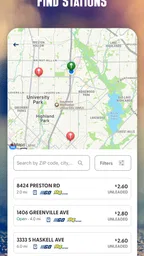
- Find nearby Sunoco stations while planning a route.
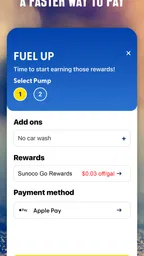
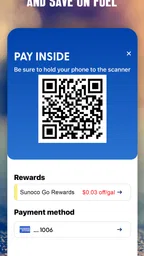
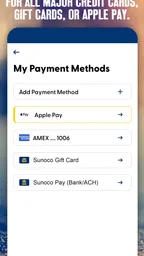
- Pay at the pump without entering the store.
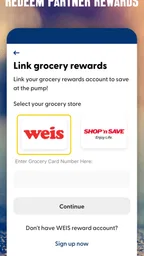
- Earn rewards through eligible purchases.
- Save favorite stations for easier access.
- View fuel prices at participating locations.
What could be better
- Mobile payment may not be available at every station.
- Some features require location access.
- Rewards may have eligibility restrictions.
- Fuel price information can be outdated.
- App performance may vary by device.





