



StyleSeat: Book Hair & Beauty review
 Analysis by Appsdrops
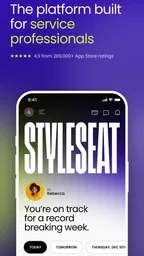
Booking a haircut sounds simple until I am trying to find a suitable time between work, errands, and everything else on my calendar. StyleSeat is a beauty appointment app built around finding and scheduling services with beauty professionals and barbers. Its usefulness depends on more than the booking idea, though: I need a working connection to browse current options and make a reservation, so the best experience is usually when I have a moment to compare rather than when I am rushing through a weak signal.
Finding an appointment works best with a steady connection
StyleSeat is a free app in the Beauty category, developed by Styleseat. It has a 4.8 average from around 62,000 ratings and has been installed over a million times. Those figures suggest that many people use it as a practical route to beauty appointments, but I would still judge a particular professional by the details of their listing and whether the available times suit me.
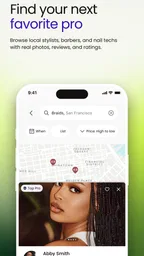
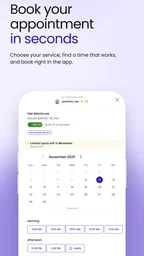
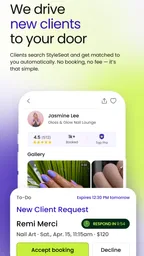
The app’s core appeal is bringing appointment discovery and scheduling into a mobile workflow. Instead of calling several salons and waiting to hear back, I can use the app to look for a professional and work toward a time that fits. That is particularly useful for routine services, where I know roughly what I want and mainly need a convenient opening.
Because appointment information is part of the decision, a stable connection matters while I am browsing. I would avoid choosing a professional or time slot while moving through a subway station or dealing with a spotty public network. If pages or availability take a while to load, the experience can feel less dependable than a quick phone call to a salon I already know.
Compare the appointment, not just the first open slot
A useful habit is to decide what matters before opening the app: the kind of service, the part of town that is practical, and the time window I can genuinely make. That keeps browsing focused. An appointment that looks convenient on screen is not a good choice if travel time makes it stressful or if it leaves no room for a late-running meeting.
I would also treat availability as something to check close to the moment I intend to book. Scheduling is inherently time-sensitive, and a displayed opening is only useful if the booking process completes. If the connection drops while I am selecting a time, I would reopen the app and confirm the appointment status rather than assuming that a tap alone secured it.
This is one place where StyleSeat differs from simply searching maps or social media for a salon. Those alternatives can help me discover nearby businesses or see examples of their work, but they do not necessarily make scheduling the central task. A phone call can be more reassuring when I need to explain a complicated request, while the app is more appealing when my needs are straightforward and I want to handle the booking without a back-and-forth conversation.
Useful in small gaps, less suited to rushed decisions
On a phone, the most natural use is a short planning session: I might check for an opening during lunch, compare it with my calendar, and finish the booking before returning to work. The app’s mobile format makes that kind of task feel more direct than calling a salon during its busy hours. I would still give myself enough time to review the choice rather than trying to book while walking or juggling other tasks.
Consider a realistic weekday situation: I realize my haircut needs attention before a weekend event, but I do not want to spend my evening calling around. I can use StyleSeat to look for a suitable professional and appointment time, then check that the timing works with my travel plans. If I am on unreliable mobile data, I would wait until I am on a stronger connection to complete the reservation. That small pause is better than having to sort out uncertainty later.
The app is most useful when I already have a reasonably clear idea of the service I want. If I am unsure whether I need a particular treatment, have a detailed accessibility question, or want to discuss a major change in style, direct contact may be the better first step. The convenience of an app does not replace a conversation when the decision itself needs explanation.
StyleSeat is also not automatically the best choice for someone who always returns to one salon and prefers its familiar booking method. A direct call or that salon’s own system may be quicker, especially if the relationship involves preferences that are easier to discuss personally. I see the app’s advantage more in the search-and-schedule stage than as a reason to change a routine that already works.
What to do when a booking flow falters
Network interruptions are the main practical complication to keep in mind. If a screen stalls, I would first check whether my connection is back, then reopen the relevant booking view and verify what has happened before trying again. Repeating a booking action without checking could create confusion, particularly if the first attempt did go through but the confirmation was delayed.
For a time-sensitive appointment, I would make a simple recovery plan: note the professional and time I was trying to select, return to the app when the connection is stable, and confirm the final status before treating the appointment as settled. If the app does not show a clear result, contacting the professional through an available channel is more sensible than assuming either success or failure.
This is not a special flaw unique to StyleSeat; any live scheduling tool can be frustrating when the network is unreliable. The distinction is that a phone call can sometimes resolve an urgent question in one exchange, whereas an app-based search offers more convenience when there is time to browse. I would choose between them based on urgency, not on a belief that one method always works better.
Keep mobile data use intentional
If I am watching data use, I would do the exploratory part of my search when connected to a trusted Wi-Fi network, then use mobile data only for the final check and booking if needed. I would not assume that appointment details or search results remain current after leaving a connected session; scheduling decisions are worth refreshing before I commit.
That approach also helps with battery and attention. Looking through options while commuting can turn into repeated refreshing in poor reception, which is an inefficient way to make a decision. I prefer to use a brief, focused session: set the service and timing priorities, compare a manageable number of choices, and stop once I find an appointment that fits.
For privacy-conscious users, the everyday principle is straightforward: use a connection you trust when handling account or appointment details, and avoid leaving a booking task open on a shared device. I do not need to make the process more complicated than that, but I would apply the same care I use with any app that helps arrange personal services.
Who will get the most from it
I would recommend StyleSeat to people who are open to comparing beauty professionals and prefer to handle scheduling on their phone. It should be especially handy for someone settling into a new neighborhood, trying to fit a routine appointment around a busy week, or looking for an alternative when their usual provider has no convenient time.
It is less compelling if I need a long consultation before booking, have a salon relationship that already runs smoothly through another channel, or regularly make appointments in places with poor connectivity. In those cases, a direct conversation or a familiar salon-specific option may be the less frustrating route. The app is a scheduling aid, not a substitute for deciding whether a professional is right for a particular need.
StyleSeat is rated for Everyone, and it is free to install. It was released on October 25, 2011, and its current version is 170.0.0, with iOS 8.0 listed as the minimum operating system. I find that history reassuring as a sign of an established product, while still preferring to focus on whether the current booking flow fits my own habits.
My connectivity verdict
After weighing how I would actually use it, I see StyleSeat as a convenient option for planned, ordinary beauty appointments rather than a tool I would rely on in a last-minute scramble. A dependable connection makes browsing and confirming a booking much smoother; poor reception turns the very convenience of mobile scheduling into an extra uncertainty.
My practical recommendation: use it when you have a clear service in mind, enough time to compare suitable options, and a reliable connection for the final booking check. If you need to explain a complex request or settle an urgent appointment, contact the professional directly instead. Styleseat has made the app’s central task easy to understand, and for a connected, organized user, StyleSeat can be a useful way to fit beauty appointments into a busy routine.
What we like
- Browse beauty professionals by service and location.
- View provider profiles before choosing whom to book.
- Manage upcoming appointments from the app.
- Find appointment times that fit your schedule.
- A convenient option for booking without calling salons.
What could be better
- Availability depends on participating local providers.
- Service prices may vary between professionals.
- Some providers may require a deposit or cancellation fee.
- A suitable appointment may not be available at short notice.
- Booking options can differ by provider and service.





