






StyleKorean review
 Analysis by Appsdrops
I think of StyleKorean as a focused way to browse K-beauty and lifestyle products, rather than as a replacement for every shopping app on my phone. Its appeal is straightforward: it brings a Korean beauty retailer’s selection into a mobile app, so I can look around when I have a few spare minutes and return to a product later. That works best when I already have an idea of what I want to explore. If I expect a personalized skincare consultation or an all-purpose beauty encyclopedia, I would set expectations differently.
Browsing is simple; deciding still takes care
Shopping for skincare on a phone can become tiring quickly. Product names may be unfamiliar, several items can sound similar, and a long browsing session makes it easy to forget why I opened the app. StyleKorean is most useful to me when I treat it as a place to investigate a specific kind of purchase—such as a cleanser, sunscreen, or makeup item—rather than endlessly scrolling without a plan.
The app is a beauty shopping app developed by stylekorean.com. It is free to download and is rated for Everyone, so there is no purchase price just to try the browsing experience. The app’s average rating is 3.6 from 704 ratings, a mixed enough reception that I would regard it as a practical shopping option, not assume every part of the experience will suit me.
One common point of friction in beauty shopping is not finding products but choosing between them. My practical advice is to start with a need and a short list of requirements: for example, a sunscreen that fits a daily routine, or a moisturizer that does not add another complicated step. That makes product pages easier to compare and helps prevent attractive packaging or a low price from becoming the whole decision.
Another useful habit is to separate browsing from buying. If I am exploring unfamiliar Korean beauty products, I can use a first session to note a few candidates, then revisit them when I have time to read their descriptions carefully. This is a small workflow choice, but it reduces impulse decisions and makes it easier to notice when two products are not actually serving the same purpose.
When a product page leaves you with questions
Beauty products are personal, and a shopping app cannot make a formula suitable for everyone. I would not assume that a product is right for my skin just because it is popular or appears beside other appealing items. I look for details that matter to my own routine, such as the product’s intended use and how it fits alongside things I already use. If a description does not answer a question that affects my decision, I would pause rather than fill in the gap with guesswork.
This matters especially when shopping across categories. A makeup item, a skincare step, and a lifestyle product call for different kinds of comparison. I find it more useful to assess each on its own terms than to treat the whole selection as one undifferentiated trend feed. If I need tailored advice for a skin condition or a product interaction, a retailer app is not a substitute for a qualified professional.
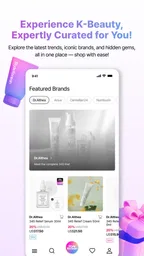
StyleKorean’s store summary positions it around current K-beauty and lifestyle shopping trends. I read that as a reason to explore, not as a promise that every trending item is a sensible purchase for me. Trends can help me discover products I might not have encountered otherwise, but they are a poor substitute for checking whether the item matches my needs, budget, and existing routine.
Setup checks before blaming the app
If the app does not open or a screen takes longer than expected, I start with ordinary checks before assuming the shopping service itself is at fault. I confirm that my phone is running a compatible operating system; the listed minimum is version 7.0. I also check whether the connection is working by opening another reliable app, since a weak or interrupted network can make shopping pages appear stuck.
The current version is 1.0.47. If I have an older installation and something behaves oddly, checking the app store for an available update is a sensible first step. I would also close and reopen the app, then try again on a steady connection. These are basic recovery steps, not a guarantee that every issue will disappear, but they can distinguish a temporary device or connection hiccup from a persistent problem.
It is worth keeping the task small while diagnosing a problem. If browsing stalls, I would try loading one page again rather than repeatedly tapping several controls. Repeated taps can make it unclear whether the app is responding slowly or whether I have triggered the same action more than once. A deliberate retry gives me a clearer read of what is happening.
A calmer way to recover a shopping session
When I lose my place during a product search, I avoid trying to recreate the whole session from memory. I return to the category or search idea I started with and narrow the choice again. If I had been comparing several items, I make a quick note of the names or the details that mattered before leaving the screen. That simple record is useful when a notification, a phone call, or an accidental app closure interrupts shopping.
For a planned purchase, I also decide in advance what would make me stop browsing. It might be finding one product that fits my routine, or realizing that the available descriptions do not provide enough information for a confident choice. This is more useful than continuing to scroll in the hope that the app will somehow resolve a question that only the product details—or advice from another source—can answer.
If a page appears incomplete, I try a fresh load once the connection is stable and give the app a moment to respond. If the same issue persists, I can leave the purchase for later instead of making a decision from partial information. For me, a shopping app should support a considered choice, not pressure me into one simply because I have already spent time browsing.
When the cause may be outside the app
Not every frustrating shopping moment points to a fault in StyleKorean. A slow connection, limited phone storage, an outdated operating system, or a temporary issue with a device can affect how any mobile shopping app behaves. Checking whether other apps are also sluggish helps me avoid misdiagnosing a general phone problem as a StyleKorean-specific one.
There is a separate kind of friction that no technical fix can solve: uncertainty about a product. If I cannot tell whether an item is appropriate for my skin or how it fits into a routine, restarting the app will not provide that missing judgment. I would compare the product information with trusted guidance and, where health concerns are involved, seek professional advice rather than treating a retail description as personal care advice.
Likewise, shoppers who need a broad comparison across many retailers may prefer a general marketplace or a specialist beauty resource first. StyleKorean’s point of difference is its focus on Korean beauty and lifestyle shopping, while a general retailer may make cross-brand or cross-category comparisons easier. I would use the app when that focused selection is what I want, and another source when the main task is comparing the entire market.
Who will get the most from it
I can see StyleKorean fitting someone who already enjoys Korean beauty products, wants a dedicated place to browse them, or is looking for new items to consider without visiting a desktop site. It can also suit a shopper who prefers to explore in short sessions and has enough product knowledge to judge whether a listing fits their routine.
It is less compelling for someone who wants extensive one-to-one recommendations, needs detailed medical guidance, or prefers to compare prices and availability across many unrelated retailers before choosing. It is also not the right tool for a shopper who dislikes browsing and wants a tightly curated answer without doing any product research. In those cases, a trusted adviser or a broader comparison service may be more useful.
The app has been available since September 1, 2020, and has passed 100,000 installs. Those figures suggest it has reached a sizeable audience, but they do not tell me whether its product selection or shopping flow will match my own habits. I would judge it by whether I can find relevant items, understand what I am considering, and complete my shopping task without unnecessary friction.
My practical verdict
StyleKorean is worth trying if K-beauty and related lifestyle products are already part of what you shop for. I like the idea of having a focused mobile destination for that interest, and the free download makes it easy to see whether its browsing style suits me. Its strongest use is discovery followed by deliberate comparison, not blind reliance on trends or a quick assumption that a product is right for every routine.
My best tip is to enter with a clear shopping question, keep a short list of candidates, and pause when a product detail that matters to you is unclear. That approach makes the app more useful and protects you from turning a casual browse into an unconsidered purchase. If you want a dedicated K-beauty shopping experience, I would give it a look; if you need expert skin advice or broad retailer comparison, I would pair it with a more suitable source.
What we like
- Offers a wide selection of Korean beauty brands.
- Product pages include ingredient and usage details.
- Frequent promotions can make popular products more affordable.
- Supports international shopping in many regions.
- Lets shoppers browse skincare and makeup by category.
What could be better
- Shipping fees and delivery times vary by destination.
- Some products may sell out before an order is placed.
- Import duties may apply depending on your location.
- Product descriptions may not cover every skin concern.
- Returns can be less convenient for international orders.





