
Sticker Maker & Funny Emoji review
 Analysis by Appsdrops
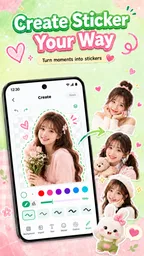
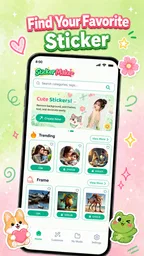
When a message needs a little more personality, a custom sticker can say what plain text cannot. Sticker Maker & Funny Emoji is aimed at that everyday moment: turning an image into a sticker, tidying its background, and giving it a meme-style twist. I like the appeal of that simple idea. Rather than treating sticker creation as a complicated design project, the app presents it as a quick route from something you want to share to a more expressive visual.
From an image to a shareable idea
The first step in this kind of workflow is deciding what you want to turn into a sticker. It might be a reaction, a familiar face, a pet, or another image that works better as a compact visual than as a full photo. The app’s focus on a background eraser and meme making suggests a practical starting point: choose an image, isolate the part that matters, and shape it into something suited to casual conversations.
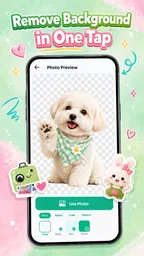
That focus is useful because a good sticker is more than a cropped picture. Busy surroundings can distract from the subject, while a clean cutout makes the expression or object easier to recognize at a glance. Automatic background removal is the feature that gives this app its clearest purpose. It can make the path from source image to sticker feel more approachable for someone who does not want to spend time tracing every edge by hand.
In practice, I would begin with an image where the subject is easy to distinguish from its surroundings. That gives an automatic tool a more straightforward job and makes the final sticker more legible at small sizes. A detailed image can still be fun to experiment with, but the result depends on whether the important shape remains clear after the background is removed. This is a useful point to keep in mind before building a whole sticker around a complicated photo.
A straightforward creative flow
Once you have a subject in mind, the natural next move is to bring that image into the sticker-making process. From there, the background eraser is intended to help separate the subject from the rest of the picture. The aim is not merely to make an image look different; it is to prepare it for a new role, where a clean silhouette and a readable expression matter more than all the original photo details.
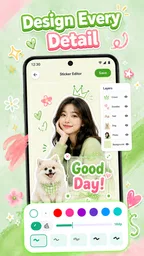
After that cleanup, the meme-making angle gives the image a more playful direction. A funny reaction often works because the picture and its implied message support each other. Even without turning the process into a full design session, a user can think about the mood they want the sticker to convey: surprise, excitement, mild annoyance, or a joke shared between friends. The strongest results tend to come from an image whose expression already fits that purpose.
This is where custom stickers feel different from simply sending the original photo. A sticker is meant to be reused as a compact reaction, so its subject needs to remain recognizable when viewed quickly. I would prioritize a clear face or shape and keep the central idea simple. That approach suits the app’s emphasis on making stickers and memes, and it also helps prevent the result from feeling visually crowded.
Keeping the subject clear
Background removal is especially appealing when the surroundings are not part of the joke. Removing visual clutter can help a face or object stand out, which is often exactly what a chat sticker needs. Still, automatic cleanup is best thought of as a shortcut rather than a guarantee of perfection. The usefulness of the result depends on the image itself: strong contrast and a clearly defined subject generally give the process a better starting point than tangled outlines or similar colors blending together.
That distinction matters because sticker art is unforgiving in a small format. A little leftover background may be much more noticeable once the image is reduced, while a fine detail that looks obvious in a large photo can disappear entirely. I would judge a finished sticker by whether its central expression survives at a glance, not by how much of the original image has been preserved. For quick reactions, clarity usually beats complexity.
The app’s combination of an eraser and meme maker gives the workflow a sensible sequence: prepare the subject, then lean into the humor. That order is easy to understand even for someone who has never made a sticker before. It also keeps the creative task grounded. You are not starting with an empty canvas and facing a long list of design decisions; you are taking an existing image and giving it a more conversational purpose.
The handoff from creation to conversation
A sticker only becomes useful when it fits naturally into the way you communicate. The moment after making one is therefore important: you want to move from editing to using the result without losing the playful idea that inspired it. Sticker Maker is built around creating custom stickers, so its main appeal is the creative step itself. The everyday value comes from having an image ready to act as a reaction rather than needing to find and crop the same picture again.
That handoff also shapes how I would use the app. I would make stickers for expressions or moments that are likely to come up more than once, rather than turning every image on my phone into a project. A small set of distinctive reactions can be more useful than a large collection of near-identical cutouts. The best sticker is one you can recognize quickly and actually want to send, not simply one that took the most effort to produce.
For people who enjoy making jokes from pictures, the meme element broadens the idea beyond basic cutouts. It encourages you to think about the image as a punchline or reaction, not just a decorative graphic. That gives the app a clear place in the personalization space: it is about adapting visual material to your own style of communication. The workflow feels most rewarding when the finished sticker reflects a specific sense of humor or an inside joke.
What the finished result should do
A successful sticker does not need elaborate effects to work. It needs to be recognizable, expressive, and easy to understand in the context where you send it. That is why the background-erasing concept matters so much here. By emphasizing the subject, it can help an image feel less like a miniature photograph and more like a deliberate reaction. The meme-making focus then gives you a reason to use that reaction with a bit of personality.
I would also keep the intended audience in mind. A sticker that makes perfect sense to a close friend may be an odd fit in a work conversation, while a universally readable expression can travel between chats more easily. The creative freedom is part of the fun, but a little restraint can make the collection more useful. Think of each sticker as a tiny piece of communication: its image should carry the mood before anyone has to explain the joke.
There is a satisfying feeling in turning an ordinary image into something with a second life. Instead of leaving a funny photo buried in a gallery, you can shape the subject into a repeatable visual response. Sticker Maker’s core idea is easy to grasp, and its emphasis on an automatic background eraser gives the process a practical starting point. For casual creators, that combination is more inviting than a tool that expects them to begin with advanced editing skills.
Where the workflow can feel less smooth
The most likely friction comes from the source image and the limits of any automatic cutout. If a subject blends into the background, has wispy edges, or is partly obscured, removing the surroundings may not produce the cleanest shape. That does not make the idea less useful, but it does mean that choosing a suitable image is part of the work. If the first result looks messy, trying a clearer image may be a better use of time than expecting every photo to become a polished sticker.
There is also a difference between making a sticker and building a complete visual identity. This app’s stated strengths are sticker creation, background removal, and meme making; those are enough to support a playful workflow, but the appeal is primarily for people who want quick, personal graphics. Someone expecting a full professional design suite may find that this is not the same kind of creative task. I see that focus as a useful boundary rather than a flaw: the app is easy to understand when you approach it as a casual sticker tool.
Another practical consideration is how often you intend to create. If you only need a sticker now and then, a simple process matters more than a deep set of options. If you enjoy making a growing library of reactions, the app’s central concept has more room to become part of your routine. The value comes from the images you choose and the jokes you build around them, so the experience will naturally be more engaging for people who like visual humor.
Who may enjoy Sticker Maker
Sticker Maker & Funny Emoji is a good fit for anyone who wants to personalize everyday chats with images of their own choosing. Its free-to-download positioning makes it easy to explore, while optional in-app purchases are offered at prices ranging from $2.99 to $19.99 per item. The app is rated for Everyone, and it has reached over a million installs. It holds a 4.4 average from around 2,500 ratings, which suggests that many users have found the concept appealing.
It is also a natural choice for people who enjoy memes but would rather use familiar images than rely only on ready-made reactions. The app is developed by SHINK COMPANY, and its current version is 1.0.1. It was released on August 22, 2026, and requires Android 8.0 or later. Those details make it straightforward to assess whether it suits your device and whether its basic creative premise matches what you want from a personalization app.
My overall impression is that Sticker Maker is most compelling when you treat it as a short, focused creative loop: start with a suitable image, separate the subject, turn the idea toward humor, and use the result as a reaction. The automatic background eraser is the practical hook, while the meme-making angle supplies the personality. It will not make every source image an instant success, and the outcome still depends on your choice of subject, but that is part of the hands-on appeal.
If you want a quick way to turn personal images into expressive chat material, this app has a clear reason to be on your shortlist. I would start with one unmistakable face or object, see how the cutout looks, and build from there. When the image is easy to read and the joke lands, the finished sticker can feel more personal than a generic reaction. That simple journey from photo to punchline is the app’s strongest idea.
What we like
- Create custom stickers from personal photos.
- Add text to make stickers more expressive.
- A simple interface helps beginners get started.
- Reuse saved sticker designs in future chats.
- A playful way to personalize conversations.
What could be better
- Sticker quality depends on the source image.
- Some features may require in-app purchases.
- Exported stickers may not work in every messaging app.
- Ads can interrupt the editing experience.
- Creating detailed stickers can take time.





