






status - sims but social media review
 Analysis by Appsdrops
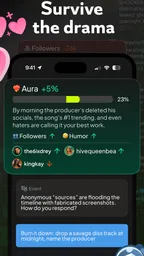
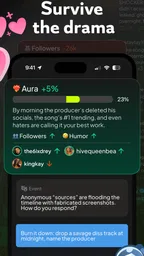
I’m drawn to social games that let me play with an online persona without making my real feed feel like a performance. Status aims at that blend: it’s a lifestyle app built around imagining a social-media life, with a Sims-like appeal for anyone who enjoys shaping a character’s public presence. The idea is immediately easy to understand, but the more important question is whether that playful setup stays enjoyable after the first burst of curiosity.
Why the first week feels inviting
The core appeal is the chance to treat social media as a small world to play in rather than a tool for keeping up with people you already know. That distinction matters. I’d approach this as light, self-directed entertainment: a place to explore a made-up online identity, not as a replacement for an established social network or a serious life simulator.
That makes it a natural fit for short sessions. If I had a few minutes between errands, I could open the app to see whether tending to this imagined social life still felt fun, then leave without needing to coordinate with friends or commit to a long play session. The appeal is less about mastering a complicated system and more about enjoying the premise and deciding what kind of online presence I want to build.
The first-week test is whether the central fantasy gives you enough to play with. People who like customizing a character’s public image or inventing a playful digital persona may find that the concept sparks ideas quickly. People looking for realistic simulation, deep strategy, or a fully featured social platform may find the premise thinner than they hoped. I’d go in expecting a casual, stylized experience, not a detailed model of how social media works.
That also shapes how I’d recommend trying it: treat the first sessions as a low-pressure experiment. See whether you enjoy returning to the same imagined identity, rather than judging it by how much it resembles your real accounts. If the fantasy itself is appealing, the app has a fair chance to become a pleasant little routine. If you mainly want a place to chat with friends or share real updates, a conventional social app is likely a better match.
A different kind of social app
Compared with familiar social networks, Status puts the emphasis on constructing a social-media life rather than simply browsing other people’s posts. Compared with life-simulation games, its framing is more specifically about online identity. That middle ground is the most distinctive part of the pitch—and also the point where expectations need managing. It isn’t the same thing as having a real audience, and I wouldn’t choose it for genuine networking or practical communication.
WishRoll is the developer, and Status sits in the lifestyle category. It is free to install, with optional in-app purchases priced from $0.99 to $199.99 per item. That wide range is worth noticing before spending: I’d play first and decide whether any paid item genuinely improves my enjoyment, rather than treating a purchase as necessary to understand the app. A free starting point lowers the barrier to trying it, but it doesn’t mean every later choice will be free.
What gives it a chance to last
The best reason to keep an app like this is not novelty alone, but whether its central activity can fit into an existing habit. I’d use Status as a brief creative break: check in, make a small decision about my imagined presence, and stop when the session has run its course. That approach is more sustainable than expecting it to provide a constant stream of new excitement.
A useful personal test is to notice what brings you back. If you return because you like developing the same persona, that’s a stronger sign of lasting value than opening it only to see what changed. If you keep waiting for the app to become a real-world social space, the mismatch may become frustrating. The social-media framing can make the experience sound more connected than a solo, character-focused game, so it helps to decide which kind of engagement you actually want.
Another practical tip is to set a spending boundary before browsing optional purchases. The app’s broad per-item price range makes it sensible to separate curiosity from commitment: enjoy the free experience first, then consider a purchase only if you can name what you expect it to add. That keeps the decision grounded in your own use rather than in the excitement of a new app.
Month-to-month value depends on your play style
For a casual player, the long-term value is likely to come from revisiting the fantasy, not from treating every day as a task to complete. If the idea of shaping an online persona remains amusing, a few short visits can be enough. If you need frequent new goals, extensive simulation, or a competitive layer to stay interested, you may find the concept runs out of room sooner.
I’d also compare it with alternatives by asking what I want from the word “social.” A messaging app is better for conversations; a standard social network is better for following people and sharing real events; a deeper life simulator is better if I want broader control over a fictional character’s daily world. Status makes the most sense when the specific appeal is playfully imagining a social-media identity, without expecting it to replace those other experiences.
That distinction is useful for families and younger players too. The content rating is Teen, so I’d treat that as a cue to check whether the app’s style and any optional purchases suit the intended user, rather than assuming a playful concept is automatically appropriate for every age. It may be a better fit for someone who enjoys casual identity-based play than for someone who wants a structured educational or communication tool.
Keeping the habit light
Maintenance is part of whether an app earns space on my phone. For Status, I’d keep the commitment modest: open it when the premise sounds fun, not because I feel obliged to maintain a streak or keep up with a real audience. That’s a helpful way to avoid turning a playful diversion into another feed that demands attention. If the app stops feeling entertaining, stepping away should be an easy choice.
The version available is 1.9.64, and the minimum operating-system requirement is 7.0. It has an average rating of 4.2 from around 588,000 ratings, with roughly 20,000 written reviews and over one million installs. Those figures suggest that many people have tried it, but they can’t tell me whether its particular premise will suit my taste. I’d use them as context, not as a substitute for a few sessions of my own.
One maintenance habit I’d recommend is reviewing purchases and attention together. If you’re opening the app only because you’ve already spent money on it, that’s not a good reason to keep going. Let the experience earn repeat visits on its own. Conversely, if a short session reliably gives you a cheerful creative break, it may justify its place without needing to become your main game or app.
Where the novelty can wear thin
The biggest risk is that the initial “build a social-media life” idea may be more compelling than the recurring activity. Any app centered on a single fantasy needs enough variety in how it lets people engage with that fantasy; otherwise, sessions can start to feel repetitive. I wouldn’t assume that a familiar social-media theme guarantees an endless supply of fresh play.
There’s also a potential mismatch between the promise of social life and the experience someone expects from a network. If you install it hoping to meet people, grow a real following, or keep up with friends, you may be disappointed. I’d reserve it for fictional, low-stakes play and use actual social tools for genuine connection. That’s not a flaw for the right audience, but it’s an important distinction before downloading.
Finally, the optional purchase range means a free install is only the beginning of the cost question. I’d avoid spending just to make the app feel more complete, especially before I know whether I’ll still open it next month. For players who are sensitive to in-app spending, setting a clear limit—or simply sticking with the free experience—is the sensible route.
Who should give it a try
I’d recommend Status to someone who likes casual simulation, enjoys inventing a digital persona, and wants a light activity that can be picked up in spare moments. It’s also a reasonable experiment for a player who is curious about social-media-themed games but doesn’t need a realistic platform or a demanding progression system. The app is free to start, so the easiest way to judge it is to see whether the central idea keeps you coming back without pressure.
I’d skip it if your priority is direct communication, a genuine social community, elaborate life simulation, or a game that depends on deep strategic choices. Those expectations point toward different kinds of apps. Status is most appealing when you already like the premise and are comfortable with a casual experience that may be more about the fantasy than about a large, constantly changing world.
My long-term verdict
Status earns lasting space only if you enjoy returning to its imagined online identity after the novelty settles. I like the focused concept and the low-pressure way it can work as a quick creative diversion, but I wouldn’t recommend it as a universal social app or assume it will hold every player’s attention indefinitely. Its Teen rating, free entry, and optional purchases make it approachable, while the broad cost range is a reason to be deliberate.
Released on January 28, 2025, it has attracted a substantial audience, but the decision is still personal: do you want to play at building a social-media life, or do you want to use social media for real-world connection? If it’s the former, Status is worth trying and judging on your own terms. If your interest fades after a few visits, there’s no need to force a routine; if the persona keeps making you smile, that modest, repeatable enjoyment is a perfectly good reason to keep it installed.
What we like
- A familiar Sims-inspired style makes status updates feel playful.
- The social format encourages sharing creative ideas with other players.
- Short interactions suit quick gaming sessions.
- Customization lets players express a personal style.
- The concept may appeal to fans of casual social games.
What could be better
- The Sims-inspired premise may feel familiar to longtime fans.
- Social features are less useful when few players are active.
- Progress may depend on repeated check-ins.
- In-app purchases may limit access to some content.
- Online play may require a stable internet connection.





