






Snapchat review
 Analysis by Appsdrops
I find Snapchat easiest to understand when I think of it as a camera-first way to keep up with people, rather than a conventional messaging inbox. Opening it puts visual conversation at the center: you can capture a moment, add a personal touch, and send it to selected friends. That makes it feel informal and immediate, but it also means it suits people who enjoy sharing photos and short videos more than those who want a quiet, text-led place to organize conversations.
Quick exchanges are the app’s natural pace
Snap Inc’s communication app has been around since October 2012, and its central appeal is still easy to grasp: sharing something as it happens can take less effort than composing a polished update. I like that the camera-led approach encourages small exchanges—a funny detail from a walk, a reaction to a meal, or a quick view of what a friend is doing—rather than making every message feel like a permanent announcement.
The app is free to download, and the audience is substantial: it has more than a billion installs, with an average rating of 4.2 from around 40 million ratings. Those numbers suggest broad familiarity, but they do not mean it will fit every communication style. In my view, Snapchat works best when the people you want to talk with already use it and are comfortable with visual, casual conversation.
Against text-first messengers, Snapchat makes the camera feel like part of the reply itself. That can be more expressive than typing “look at this,” especially when a picture or clip supplies the context. The trade-off is that finding a past detail or keeping a formal, carefully organized conversation may feel less natural than in an app built around persistent chat threads. If your priority is searchable, text-heavy communication, a conventional messenger is often the better choice.
Make the first seconds count
Because the experience begins with visual sharing, the practical speed question is not only how quickly the app opens. It is also how quickly I can get from an idea to a message that feels worth sending. For a spontaneous exchange, a direct camera workflow can feel more immediate than opening another app, choosing a conversation, and then deciding what to attach. It is a useful fit for moments that lose their charm if you spend too long preparing them.
That same pace can be a drawback when I want to write a careful message, compare several images, or sort out a plan with multiple people. The app’s lively, camera-oriented character does not automatically make it the fastest place for every task. I would use it for a quick visual check-in and switch to a text-first option when the conversation needs a clear record or a lot of detail.
A practical tip is to think about the recipient before taking the photo or recording a clip. A small, relevant moment usually makes for a better exchange than sending something simply because the camera is open. This keeps visual chats personal rather than noisy, and it makes the app’s main strength—sharing context quickly—work in your favor.
What happens during a busy day
Snapchat is more demanding in attention than a plain text conversation because visual sharing invites you to look, capture, and respond. During a busy day, that can be enjoyable in short bursts: I might send a quick view from a coffee break, then check replies later. But if several conversations are active, frequent visual updates can pull me back into the app more often than I intended. The issue is less about a single message and more about the rhythm of ongoing exchanges.
For a realistic everyday example, imagine friends coordinating where to meet after work. A quick photo of the entrance or nearby street can clarify the location faster than a vague description. If the group then needs to settle a time, change plans, and keep track of who has confirmed, text may be easier to scan. I would use Snapchat for the visual clue and a more conventional thread for details that everyone may need to revisit.
When the app feels busy, I find it helpful to treat each conversation as a deliberate check-in instead of responding to every new prompt immediately. That is a habit rather than a technical fix, but it matters: camera-first communication can make even small exchanges feel inviting, and that can turn into more screen time than you planned. People who want their messaging to stay low-distraction may prefer an app whose main interaction is a simple text inbox.
Reliability is about the whole exchange
I judge reliability by whether I can make sense of a conversation and continue it when I need to, not just by whether the interface appears responsive. Snapchat’s visual style gives messages a lively, in-the-moment quality, but it is not my first choice for information I expect to retrieve repeatedly. If I am sharing a casual reaction, that is a reasonable trade. If I am discussing an address, a set of instructions, or a decision that matters later, I would keep a clearer written record elsewhere.
There is also a social side to reliability. A messaging app is only useful for a particular group if those people actually check it. Before moving a family plan or a club conversation to Snapchat, I would make sure everyone is comfortable using it; otherwise, a familiar group messenger may be more dependable in practice. An app can be well established and still be the wrong shared space for a specific circle.
Snap Inc’s app has a 1.8 million review count, which reflects a large volume of user feedback, but I would not treat popularity as a promise that every device or connection will behave identically. My sensible expectation is that ordinary communication should be the main test: can I open a conversation, send what I intended, and understand the reply? If I need a guaranteed archive or a formal work record, I would choose a tool designed around those needs rather than rely on a casual social exchange.
Keep device and account needs in mind
The current Android version is 14.29.0.50, and the stated minimum Android requirement is version 6.0. That makes the app accessible to a broad range of Android software versions, but a minimum requirement is not a promise of identical speed on every phone. Older or more modest devices may feel different from newer ones, particularly in an app centered on camera use and visual content. I would leave practical room for the app and its media rather than assume that an older phone will feel as responsive as a recent one.
If you are deciding whether it is worth installing, consider how you use your phone’s camera and how often you expect to exchange visual messages. Someone who mainly sends short text updates may not get enough value from a camera-led app to justify adding another place to check. Someone whose friends already share everyday moments there may find that the format makes keeping in touch feel more natural.
The age rating is Teen, so it is worth considering whether the app’s social environment is suitable for the person using it, rather than focusing only on the camera features. Parents and younger users should discuss expectations around who they communicate with and how they want to use social apps. That conversation is more useful than assuming that a familiar name alone makes an app right for every household.
Know what is free and what may cost extra
Snapchat is free to install, while optional in-app purchases range from $0.49 to $399.99 per item. I would treat the free download as a chance to see whether the core style suits you, and check any purchase carefully before confirming it. The wide spread means it is sensible to review the specific item and its cost rather than assume every optional purchase is a small add-on.
For most people deciding whether to try the app, the more important question is whether their friends use it and whether they enjoy sending visual updates. I would not install it solely because it is popular, nor would I assume that paid extras are necessary for basic communication. If you want a straightforward text messenger with minimal visual emphasis, you can skip Snapchat without missing the type of experience you are seeking.
Who will get the most from it
I would recommend Snapchat to someone who likes quick, personal visual exchanges and has friends who already meet them there. It is especially appealing when a picture communicates more naturally than a sentence: a glimpse of a new place, a small celebration, or a moment that is funny only because it is happening right now. The app’s identity is specific enough that it can make those casual conversations feel distinct from ordinary texting.
I would not make it my main tool for work, long-running plans, or conversations where reliable retrieval matters more than spontaneity. A text-first messenger is usually better for finding an old instruction, while a shared planning tool is better when several people need to track responsibilities. Snapchat can complement those tools, but asking it to replace every kind of communication would ignore where its format is strongest.
My overall impression is that Snapchat’s performance should be judged in context: it is designed for quick visual contact, not for being the most orderly place to store every conversation. The app is free to start, rated Teen, and developed by Snap Inc, but the deciding factor for me is simpler: do the people I want to reach use it, and do I enjoy communicating through images as much as words? If yes, it can make everyday check-ins feel more immediate. If not, a quieter, text-led alternative will probably serve you better.
What we like
- Quick photo and video sharing makes everyday conversations feel lively.
- Creative lenses and filters offer plenty of ways to personalize snaps.
- Stories make it easy to share updates with friends for a limited time.
- Snap Map can help you see where friends are when they choose to share.
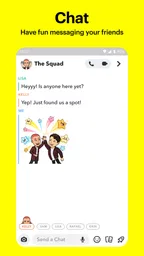
- Group chats support casual conversations and shared media.
What could be better
- Many features and menus can feel confusing to first-time users.
- Location sharing may expose your whereabouts if settings are not reviewed.
- Some content and filters include sponsored promotions.
- Discover can surface content that may not match your interests.
- The app can use significant battery and mobile data during frequent use.




