







UC Browser-Safe, Fast, Private review
 Analysis by Appsdrops
I find UC Browser most useful when I want a flexible place to browse the web rather than a bare-bones window for opening pages. It is a communication app built around browsing, with tools that extend into saving files and working with content. That wider scope can be handy on a phone, but it also means there is more to consider than speed alone: privacy, optional features, and whether I actually want one app to do several jobs.
Browsing plus tools for saved content
UC Browser-Safe, Fast, Private comes from UCWeb Singapore Pte. Ltd. and is free to install. Its current positioning brings together browsing, VPN, AI features, UC Drive, and AI Notes for making quick summaries. The combination makes the app feel less like a stripped-down browser and more like a small toolkit for handling what I find online.
That breadth is useful if your phone is where you read, research, and collect things. You can move from a page to a saved item or a short note without immediately reaching for a separate app. I would still treat those extras as conveniences, not as a reason to give the browser every task. A focused browser may be easier to manage if all you want is a clean address bar and dependable tabs.
The app has been available since October 25, 2011, so it is not a newcomer trying to establish a browsing routine. Its reach is substantial: it has more than one billion installs, an average rating of 4.4 from around 22 million ratings, and roughly 174,000 written reviews. Those figures show widespread use, but they do not guarantee that its extra tools or browsing style will suit every person.
What the newer tool mix changes
The most notable shift in how the app presents itself is the emphasis on AI Notes and instant summaries alongside browsing and UC Drive. For someone reading a long article on a commute or checking several pages for a purchase, a summary can help identify the main points before deciding what deserves a closer read. I would use it as a starting aid, then return to the original page before relying on details or context.
That workflow matters more than the feature label. A summary is most useful when it helps me sort material quickly; it is less useful when I need exact wording, careful interpretation, or a complete account of a complicated subject. Keeping the source page available is a sensible habit, especially when a summary compresses qualifications that matter.
The browser also presents a VPN as part of its wider feature set. That may appeal to people who want privacy-related tools close at hand, but I would not treat the presence of a VPN label as a substitute for understanding what protection is active and when. If your main reason for installing a browser is a specific security requirement, compare the available controls and privacy information with the standard you need before making it your default.
How it fits an ordinary day
Picture looking up a few options for a household purchase while waiting for a bus. I might open several pages, save useful material for later, and use a brief summary to narrow down which pages deserve a full read. UC Browser’s appeal is that those steps can sit within one browsing-oriented app instead of turning into a trail of open tabs and copied snippets across multiple tools.
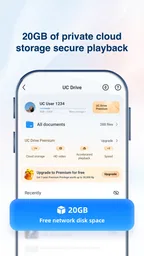
For that kind of casual research, UC Drive can be useful as a place to keep content associated with browsing. I would decide in advance what I want to preserve: a page to revisit, a file to keep, or a note capturing a decision. That small distinction prevents a collection of saved items from becoming a vague pile. For anything important, I would also keep a copy in the storage or notes system I already trust, rather than assuming one browser should be my only archive.
Another practical use is reading on a phone when I have short stretches of free time. The summary feature can help me choose whether a longer page is worth my attention, while ordinary browsing remains available for checking the full story. The trade-off is that a browser with many tools can feel busier than one designed around reading alone. If I find myself tapping through features I never use, the extra breadth is not saving me time.
What existing users should expect
For someone who already uses UC Browser, the current AI Notes and UC Drive emphasis suggests a broader content workflow than simply opening websites. It may be worth revisiting the app if you previously used it only for browsing and now want a quick way to summarize or retain material. The useful question is not whether the app has more capabilities, but whether those capabilities fit habits you already have.
I would not assume that a newer presentation means every older routine has changed or that every tool behaves identically across devices. Before moving a daily workflow over, try one real task: browse a page, make a note from it, and check how easy it is to find that material again. This reveals more than a feature list because retrieval is where saving tools either become useful or quietly get abandoned.
The app is rated for Everyone and supports Android 8.0 or later. That makes its stated age suitability broad, while device compatibility still depends on meeting the operating-system requirement. If you are setting it up on a shared phone, I would pay attention to which features are used and what content is saved, just as I would with any browser that can collect pages, files, or notes.
Where the trade-offs show up
UC Browser is free to download, but it offers in-app purchases ranging from ten cents to $99.99 per item. That does not mean a typical browsing session requires a purchase, but it is worth noticing if you prefer apps with no optional spending at all. I would check any purchase screen carefully and distinguish between the basic browser experience and paid extras before confirming anything.
The larger limitation is complexity. Combining browsing, VPN, AI tools, and cloud-style storage may reduce the need to switch apps, yet it also creates more settings and choices to understand. If you want a browser primarily for minimal distraction, or you prefer keeping storage, notes, and privacy tools in separate apps with clearly defined roles, a simpler alternative may be a better fit.
There is also a difference between a quick AI summary and careful reading. Summaries can be convenient for triage, but they should not become the only version of a source you consult when accuracy or nuance matters. My practical rule is to use the summary to decide where to spend time, then verify important claims in the original material.
Who I would recommend it to
I would consider UC Browser if I regularly browse on Android and like the idea of collecting useful material, making quick notes, and summarizing pages without immediately switching to separate apps. It is particularly appealing to people whose browsing sessions involve research or saving things for later, rather than only opening a single search result and closing the browser.
I would hesitate to recommend it as the first choice for someone who values a very spare interface, wants browsing and file storage kept apart, or needs a privacy tool for a specific, demanding purpose. In those cases, a dedicated browser or dedicated VPN may offer a more focused experience. Likewise, readers who rely on exact detail should treat AI-generated summaries as an aid, not a replacement for the source.
The app’s long history and broad adoption make it an established option, not an automatic match for every user. Its current direction is clearly toward doing more around the pages people visit. Whether that is an improvement depends on how often you will use those additions and how comfortable you are keeping several parts of a digital workflow together.
A sensible way to try it
If you install it, I suggest starting with one week of ordinary use rather than migrating everything at once. Browse as you normally would, try a summary on a page where you can check it against the original, and save only a few items to UC Drive. Then see whether those items are easy to return to and whether the extra tools make your routine simpler.
That trial also gives you a chance to decide what should remain elsewhere. Keep important notes in your usual system if you depend on them, and avoid treating a saved browser item as your only copy of something valuable. These are modest precautions, but they make a multi-purpose app easier to evaluate without committing your whole workflow prematurely.
UC Browser has a credible case for people who want browsing connected to summaries and saved content, and I like that its newer emphasis points toward practical reading tasks rather than just adding features for their own sake. Still, its breadth is the central trade-off: useful when the tools match your habits, unnecessary when they do not. I would try it for a content-heavy browsing routine, but choose a simpler or more specialized app if focus and clearly separated tools matter more.
What we like
- Built-in ad blocking can make pages less cluttered.
- Night mode helps reduce eye strain in dim settings.
- Video tools support convenient playback and downloads.
- Customizable themes let users personalize the browser.
- A compact interface keeps common browsing controls accessible.
What could be better
- Some websites may not work correctly with its ad blocker.
- Downloaded videos may be restricted by copyright or site rules.
- Frequent notifications can feel intrusive.
- Privacy features may not replace a dedicated VPN.
- Its interface can feel crowded with extra tools.





