






Gmail review
 Analysis by Appsdrops
I think of Gmail less as a place to collect messages and more as a practical choice about how I want to handle everyday communication. It suits people who move between personal mail, work conversations, receipts, and shared documents, especially if they already use Google services. It is free, and Google LLC makes it as a communication app for everyone. Its reach is enormous: it has over ten billion installs, with an average rating of 4.1 from around fifteen million ratings. Those figures suggest broad familiarity, but the useful question is whether its way of organizing email fits your habits.
Choose by the way you handle email
Before choosing an email app, I would ask how often I search old messages, whether I need several accounts in one place, and if email is part of a wider work routine. Gmail is strongest when messages are not isolated: a conversation may lead to a calendar plan, a file, or a document someone needs to review. If I mainly want a quiet inbox for occasional personal notes, a simpler mail app may feel easier.
The app’s central trade-off is breadth versus calm. Gmail gives you a familiar inbox with tools for sorting, searching, and acting on messages, but the number of options can feel busy if all you want is a short list of unread mail. I find it works best when I spend a little time deciding what deserves attention, rather than treating every incoming message as equally urgent.
A useful test is to imagine a normal week, not an ideal one. If you receive delivery updates, school messages, work threads, and sign-in notifications, search and organization matter. If you rarely need to retrieve anything and prefer a minimal interface, Gmail may offer more machinery than you need. The right choice depends less on how many features an app has and more on whether those features solve recurring annoyances.
Where Gmail earns its place
Search is one of the strongest reasons I would keep Gmail as a main inbox. When I need to find an old confirmation or a specific detail in a long conversation, searching is often more practical than manually filing every message into folders. This is especially useful for people who receive a steady stream of mail but do not want to maintain a perfect filing system. A small habit helps: search for a person, subject, or distinctive phrase, then narrow the results instead of scrolling through months of messages.
Conversation threads can also make ongoing exchanges easier to follow. Rather than treating every reply as a separate item, Gmail groups related messages so I can see how a discussion developed. That is convenient for planning a trip or resolving a work question, though long threads can become harder to scan when several people change the subject or refer to different attachments. When a thread gets tangled, I would start a new message with a clear subject instead of continuing it just because the reply button is there.
Another practical strength is the connection to Google Workspace. If a colleague sends a document or a group needs to coordinate around shared work, Gmail can serve as the communication entry point rather than a separate island. The advantage is not that every message needs an attachment or a follow-up task; it is that email can sit alongside the tools people already use to create and collaborate. For someone whose daily routine already revolves around that environment, this can reduce the friction of moving between conversations and work.
Here is an ordinary example: I receive a message about a change to a meeting, then later need to find the original note with the location or attached details. In Gmail, I can return to the conversation through search rather than relying on memory about where I filed it. For a small team, that same approach can help when a decision is buried in a discussion. The practical tip is to use a distinctive search term from the message, not just a broad word like “meeting,” which may return too much.
Gmail is also a sensible option when I want a familiar service across different stages of life. Personal correspondence, volunteer coordination, and workplace email can all make use of the same basic habits: search, review, archive, and respond. That does not mean I would put every account into one inbox without thought. Keeping personal and work contexts separate can be valuable, and account organization should reflect how much separation you actually need.
Small habits that make the inbox more manageable
My first recommendation is to distinguish between messages that need a reply and messages that only need to be kept. Leaving every useful receipt or announcement in the main inbox makes the inbox less useful as a to-do list. Archiving messages that no longer need action can make the remaining list more meaningful, while search preserves a way back to older correspondence. This is a better starting point than trying to design a complicated filing system on day one.
For recurring mail, filters and labels can help shift routine messages out of the way. I would use them selectively: for example, to identify a predictable class of notifications or to make a recurring project easier to find. The trade-off is that aggressive rules can hide something important. A safer workflow is to label or organize messages first, check that the rule behaves as intended, and only then rely on it to reduce inbox clutter.
There is also a useful distinction between deleting and archiving. If I might need a message later, archiving keeps it out of the immediate inbox without making it disappear from search. Deletion is for mail I genuinely do not need. That sounds simple, but it changes the way the inbox feels: it becomes a place for current decisions rather than a permanent warehouse of everything that has arrived.
Notifications deserve similar care. If every incoming message interrupts me, the app can become a source of distraction rather than a helpful communication tool. I would tune alerts around the accounts and conversations that matter most, then check less urgent mail at chosen times. This is not a Gmail-only challenge, but the app’s role in a busy Google-centered routine makes that boundary particularly worth setting.
When another kind of mail app may fit better
Gmail is not automatically the best choice for someone who wants the fewest possible controls. A minimalist email client may be more comfortable if the main goal is to read and reply without seeing a broad set of organization tools. Likewise, someone who prefers managing email through folders and a carefully maintained archive may find a folder-first client more natural than Gmail’s search-led approach. Neither style is universally superior; the better one is the one that matches how you remember and retrieve information.
Privacy-focused mail services may be a better fit for people who place that specific priority above integration with Google’s wider tools. That is a reason to compare providers’ own explanations of their practices before moving, rather than assuming every email app handles data in the same way. Gmail may be convenient, but convenience alone should not decide the question for someone with strong privacy requirements or rules imposed by an employer.
There is a separate case for using an organization’s required email system. If a workplace or school expects people to use another provider, switching to Gmail for personal preference may create duplicated inboxes and missed messages. I would follow the account and security guidance that applies to that organization, and use Gmail where it genuinely simplifies personal or independent work. The best alternative is sometimes not another app but a clear boundary between accounts.
People who dislike threaded conversations should also try the interface before committing to it as their only email home. Threads reduce repetition, but they can make it less obvious which reply contains a key answer, especially after a discussion has wandered. If you regularly handle many separate requests, a more task-oriented client or a help-desk system may be a better fit than ordinary email. Gmail remains useful for correspondence, but it cannot make an unclear conversation clear by itself.
What switching involves
Moving to Gmail is not just installing an app; it means deciding what to do with existing addresses, contacts, and habits. I would first check which account people already use to reach me and whether that address needs to remain active. If I change my main address, important services and personal contacts may still send messages to the old one. Keeping both accounts available during a transition can be less stressful than trying to move everything at once.
Before consolidating accounts, I would sort out which messages need to stay easy to find and which can be left behind. Old receipts, travel details, and ongoing work conversations may be worth retaining, but importing or forwarding everything can also make a new inbox feel crowded from the start. A deliberate transition is better: identify the accounts that matter, decide what needs access, and avoid bringing years of low-value mail into the daily view simply for completeness.
It is also worth checking how you want personal and professional messages separated. Using one account for both can make searching convenient, but it can blur boundaries when you are off work or sharing access to a device. Separate accounts add a little switching overhead; in return, they make it easier to keep contexts distinct. I would choose based on the actual risk of mixing messages, not just the appeal of having everything in one place.
Because Gmail is free, the direct price barrier is low, and its content rating is Everyone. It first appeared on September 21, 2010, so many people will already recognize its basic approach. Still, familiarity should not be mistaken for simplicity: a new user can benefit from learning search, labels, and archiving gradually. I would begin with a clean inbox routine, then add organization only when a real problem appears.
My recommendation
I recommend Gmail to people who want a dependable general-purpose inbox, rely on search to recover older information, or already collaborate through Google Workspace. Its scale and familiarity make it an easy app to consider, while the ability to organize messages without manually filing every one is a practical advantage. For everyday communication, I would start by separating messages that need action from those I only want to keep, then adjust notifications so email does not dictate the day.
I would not choose it automatically for someone who wants a stripped-back reader, prefers a different provider’s privacy approach, or must follow an employer’s email setup. Those are real reasons to use another option, not minor objections to be brushed aside. Gmail is at its best when its search, conversations, and Workspace connections fit a person’s existing routine; it is less compelling when those connections add noise or do not matter.
My final advice is to judge it by a week of real use. Try finding an older message, keeping a busy thread readable, and clearing the inbox without losing mail you may need later. If those everyday tasks feel straightforward, Gmail is likely a strong long-term choice. If its organization style feels like work, a more minimal or folder-focused alternative may serve you better.
What we like
- Labels and filters make it easier to organize incoming mail.
- Powerful search helps you find messages and attachments quickly.
- Spam filtering keeps many unwanted messages out of your inbox.
- Undo Send can retract a message shortly after you send it.
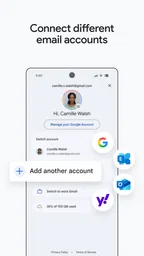
- Gmail works with multiple email accounts in one app.
What could be better
- Some advanced settings are easier to manage on the web.
- Promotional messages can make the inbox feel crowded.
- Smart features may use message data to provide suggestions.
- Large attachments usually require sharing files through Google Drive.
- Email organization can take time if you receive many messages.





