




Google Messages review
 Analysis by Appsdrops
I reach for Google Messages when I want texting to feel like a normal, dependable part of my day rather than another social network to manage. It handles everyday conversations in a familiar inbox, but it also sits at the point where ordinary SMS and newer messaging features can meet. That makes it useful, though the experience depends in part on whether the people I’m talking to use compatible phones and settings.
Google Messages is a free communication app from Google LLC, rated for Everyone. It has been available since November 12, 2014, and its broad adoption is reflected in more than 10 billion installs. Its average rating is 4.6 from around 52 million ratings, alongside roughly 722,000 written reviews. Those figures suggest a widely used app, not a guarantee that every conversation will work the same way on every device.
Trust starts with knowing what kind of conversation you’re having
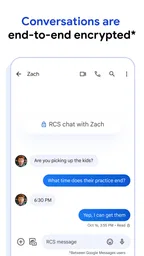
My first practical observation is that the app’s trust story is closely tied to the distinction between SMS and RCS messaging. They may appear in the same conversation, but they are not interchangeable technologies. The available features and protections can differ with the message type, the devices involved, and the settings in use. I think users are better served by checking what the composer or conversation indicates than by assuming every message gets the same treatment.
That distinction matters most when a conversation contains something sensitive. A routine “I’m outside” text is not the same as sending a private document or a personal detail. Before sharing anything I would regret sending to the wrong place, I take a moment to check the recipient and the conversation’s visible messaging status. This is a small habit, but it is more useful than treating the app’s name as a blanket promise about every exchange.
Google Messages is designed for communication rather than as a public posting feed. In day-to-day use, that keeps the focus on individual and group conversations. Still, an inbox can contain information that matters: appointment details, family plans, one-time codes, or a photo sent in a hurry. I recommend thinking about the phone itself as part of the trust picture, especially if other people can access it or see its notifications.
I also appreciate that the app’s familiar layout does not require me to treat every incoming message as trustworthy. The sender name, number, and conversation context are worth checking, particularly when an unexpected message asks for a quick reply or sensitive information. The app is a place to receive messages; it cannot make a suspicious request legitimate simply by displaying it in a clean interface.
What the visible controls can and cannot tell you
Messaging settings and indicators give users some agency, but I avoid reading more into them than they show. A visible option or status can help me understand how a conversation is being handled. It does not, by itself, answer every question about data handling, retention, or what happens outside the app. For those questions, I would consult Google’s current privacy information and the device settings rather than guessing from the chat screen.
That approach is especially useful when switching between people who use different devices or messaging setups. A conversation can feel seamless while the underlying message type changes. I make a habit of noticing the composer’s indication before sending something that requires a particular capability. If the recipient’s device or settings do not support that route, I keep the message simple or choose another way to share the material.
There is a practical trust advantage in using one familiar inbox for ordinary texting: I can review the recipient and recent context without jumping between several services. The trade-off is that the same convenience can make it easy to send quickly. When I am tired or distracted, I slow down for messages involving money, access codes, health information, or personal images. That is not a special feature; it is a sensible workflow around any messaging app.
Small habits for more sensitive moments
For a family group, I check who is actually in the thread before sharing a detail meant for one person. Group names can be helpful, but they are not a substitute for confirming the participants. If I am sending a photo or a specific location, I pause to make sure the conversation is the right one and that the content is appropriate for everyone in it.
For one-time codes, I treat the message as temporary information and avoid forwarding it casually. If an unexpected sender asks me to pass along a code, I verify the request through a separate, trusted route instead of replying immediately. This is a useful distinction: a messaging app can deliver the code, but delivery alone does not establish who is asking for it or why.
Notification previews are another moment worth considering. A message can be private in the sense that it is addressed to me, yet its contents may be visible on a lock screen or to someone nearby. I review the notification controls available on my phone and choose a level of preview that suits how I use the device. The right choice differs for someone who keeps a phone on a shared desk and someone who rarely leaves it unattended.
When a conversation becomes important enough that I need a record, I do not assume that an inbox is a complete archive or that a message will remain accessible forever. I save or note essential information in a place appropriate to it, and I avoid using a chat thread as the only record of a critical appointment or agreement. That is a modest but worthwhile adjustment for anyone who relies on texts to coordinate work or family responsibilities.
Where it fits beside other messaging options
Compared with a phone’s basic texting experience, Google Messages can offer a more modern path when the conversation supports RCS, while retaining the familiar role of SMS for ordinary texting. That combination is its central appeal to me: I do not have to persuade everyone I know to install a separate service just to exchange a basic message. But the experience is not uniform across all contacts, so I would not choose it on the assumption that every person gets the same richer features.
Compared with dedicated chat services, it is a better fit when the goal is to communicate through the messaging setup already used by the people around me. A separate service may be preferable if a group has already settled on it, relies on its particular tools, or wants a consistent experience across its members. I would also choose a more specialized channel for work that has formal recordkeeping or organization requirements. Google Messages is convenient for everyday conversation, not a replacement for every communication system.
There is also a social trade-off. If a contact’s device or settings do not support the same messaging capabilities, a conversation may fall back to a simpler form. I find it more helpful to accept that limitation than to spend time troubleshooting every contact. For a quick coordination message, plain texting is often enough. For a long group discussion where everyone expects richer interaction, it may be worth agreeing on a shared service instead.
A realistic day with the app
Imagine I am coordinating a pickup with a friend while also keeping a family thread open. I can use one inbox to confirm the time, see the recent exchange, and send a quick update if plans change. If the conversation is with a group, I check that the right people are present before sharing a detail that was meant for only one member. If the message contains something sensitive, I pay attention to the messaging type and recipient rather than relying on the app’s familiar appearance.
That workflow is where the app feels strongest: low-friction exchanges that benefit from being close at hand. It is less suited to a situation where I need every participant to have identical features, or where the conversation requires a dedicated project space, strict business controls, or a specialized record system. Knowing that boundary prevents the common mistake of expecting a general-purpose texting app to solve a more demanding communication problem.
For people who are new to it, I would start by checking the conversation composer and the settings that affect how messages appear on the device. Then I would send an ordinary, low-stakes message to a frequent contact and see how the conversation behaves. That simple test can clarify whether the contact’s setup supports the features I expect without risking an important message or assuming that a capability is available everywhere.
Who I would recommend it to
I would recommend Google Messages to Android users who want a straightforward place for everyday texting and value an experience connected to Google’s messaging tools. It is particularly practical for people who communicate with a mix of contacts and do not want to make every conversation depend on a separate app. Its free price also makes it easy to try, while the Everyone age rating reflects its general-audience positioning.
I would be more cautious about recommending it as the sole choice for someone whose main priority is a uniform, feature-rich experience across a group using different platforms. In that case, a service chosen and used consistently by the whole group may be more predictable. Likewise, anyone handling confidential work should follow their organization’s approved communication practices rather than treating a personal messaging inbox as an automatic substitute.
For a parent or caregiver, the useful question is not simply whether the app is easy to use, but whether the phone’s access and notification settings match the household’s needs. For someone who shares a device, leaves it in public view, or receives sensitive messages, reviewing those settings is part of making the app comfortable to use. The same care applies to anyone who keeps important codes or personal plans in their conversations.
My cautious verdict
After weighing its strengths and limits, I see Google Messages as a sensible everyday messaging choice, not a universal answer to privacy or communication needs. I like the convenience of one familiar place for routine conversations, and I value the way it can accommodate newer messaging capabilities when the other person’s setup allows them. Its huge audience—more than 10 billion installs—makes it a common option, but popularity should not replace checking how a particular conversation works.
The main caution is that a smooth interface can hide meaningful differences between message types and device setups. I would not send sensitive information on autopilot, assume every contact has the same capabilities, or rely on the app as the only home for important records. Those are manageable limits if I stay attentive to the recipient, the visible messaging status, and the phone’s own privacy settings.
My recommendation is straightforward: choose it if you want a familiar, no-cost app for everyday texting and are comfortable checking the details when a conversation matters. Skip it as your primary tool if you need consistent advanced features across every participant or formal controls suited to a specialized setting. Used with a little care, Google Messages is a practical inbox for ordinary life; its best quality is convenience, and its most important limitation is that convenience should never be mistaken for certainty.
What we like
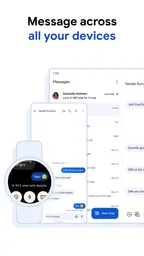
- Works across Android devices with a familiar interface
- Supports RCS chats when carriers and contacts are compatible
- Offers spam detection and conversation blocking
- Lets you search messages and shared media
- Includes useful tools for organizing conversations
What could be better
- RCS features depend on carrier and recipient support
- Some features vary by device and region
- Advanced messaging options may require Google services
- SMS and MMS charges may apply without a suitable plan
- The app is primarily designed for Android users





