






WhatsApp Business review
 Analysis by Appsdrops
I would choose WhatsApp Business when the people I serve already use WhatsApp and I want a separate, more deliberate place for customer conversations. It is a communication app from WhatsApp LLC, but its purpose is narrower than casual messaging: it is built for businesses talking with customers. That focus is useful, though it does not automatically make every business interaction easier or every privacy decision obvious.
Customer messaging works best when the boundaries are clear
My first question with any business messaging app is not how many tools it offers; it is whether it fits the way customers already reach me. WhatsApp Business has a strong case when customers expect to send a quick message rather than call, write an email, or create an account on another service. For a small shop, independent service provider, or home-based business, that can make basic questions and follow-ups feel approachable.
The app sits in the communication category, and its scale reflects how familiar this style of messaging is: it has over a billion installs, with an average rating of 4.6 from around 26 million ratings. Those figures are useful context, not a guarantee that it will suit every business. A busy support team with formal case tracking needs may still be better served by a dedicated help-desk system.
In ordinary use, the main advantage is the low barrier for a customer. Someone can ask whether an item is available or confirm a service time in the same kind of conversation they already use with friends and family. The trade-off is that personal and business communication can feel close together. I would decide in advance which number and device should handle customer messages, rather than treating that boundary as an afterthought.
A practical fit for one-to-one conversations
I find the app most convincing for businesses where a real person can respond and where a short exchange often resolves the question. Think of a hairdresser checking a booking request, a repair specialist asking for a useful description of a problem, or a small seller arranging collection. These interactions are conversational, and a customer can clarify details without writing a formal email.
It is less suitable when every conversation must be assigned, audited, and escalated through a team workflow. A messaging inbox can become hard to manage if several people need to coordinate replies or if cases must be tracked across departments. In that situation, I would compare it with customer-support software before making it the business’s main service channel.
The app is free to download, is rated for Everyone, and supports Android devices running version 6.0 or later. It was released on January 18, 2018, and the current version is 2.26.44.74. In-app purchases are listed from $0.29 to $4,789.99 per item, so I would check the app store’s purchase details before approving any transaction, particularly on a device used by more than one person.
Trust starts with the account you choose
For me, trust begins with being intentional about the account used for customer contact. If a business relies on a personal number, customers may reach that same account outside working hours, and the owner may find it harder to keep work conversations apart from private ones. A separate business number can help establish a clearer boundary, but it also means maintaining another contact point and making sure customers know where to reach you.
I would also consider who has access to the phone itself. If a colleague, family member, or temporary worker can open the device, customer conversations may be visible to them. A business owner should review the device’s own lock and notification settings, and think carefully about whether message previews on the lock screen are appropriate. Those are practical choices around the device, not a substitute for understanding the app’s current account and privacy settings.
WhatsApp LLC develops the app, and its familiar name may make it feel instantly trustworthy. I would not treat familiarity as a reason to skip a careful setup. Before inviting customers to message, I would check the app’s current privacy information and the controls shown in the account, then decide what kinds of information are appropriate to discuss there. For sensitive matters, a phone call, in-person conversation, or a channel designed for that specific information may be the better choice.
Use visible controls with a purpose
Rather than switching settings without a plan, I would review the controls the app presents for the account and decide what each should accomplish. The useful question is not simply whether a control exists, but whether its current setting matches the business’s needs. Who should be able to contact the account? What should customers be able to see? Which notifications are helpful during working hours, and which would expose business messages on a shared or unattended screen?
Settings and interface details can change between app versions, so I would verify the labels and options directly on the phone instead of relying on an old guide. The installed version is 2.26.44.74, but that number alone does not explain every choice available to an individual account. I would make a habit of revisiting the app’s settings after updates or when the person responsible for the inbox changes.
One useful workflow is to keep customer replies short and avoid putting unnecessary personal or confidential details into a message. If a customer asks about a repair, for example, I might use the conversation to arrange a call or appointment rather than request a full set of sensitive details in chat. That keeps the exchange focused and gives both sides a chance to use a more suitable method when the issue needs extra care.
Small habits prevent avoidable confusion
A second practical insight is to set expectations before the inbox gets busy. I would tell customers what kinds of questions the account handles and when someone usually replies, using whatever customer-facing wording the business can maintain consistently. This is not a magic fix for slow responses, but it helps prevent a messaging channel from silently becoming an always-on promise.
A third is to decide how the business will handle handoffs. If one person is away, another may need to respond, but sharing access casually can create confusion about who said what and who is responsible for the next step. I would establish a simple internal routine—such as noting which messages need follow-up—before relying on the app for time-sensitive requests. If the volume grows beyond what that routine can handle, moving to a structured support tool is a sensible upgrade rather than a failure of the messaging app.
For everyday use, picture a customer asking a local baker whether a particular cake can be ready for a weekend event. The baker can clarify the date and collection time in a familiar chat, then keep the conversation focused on the order. If the customer starts sending payment details or other information they would not want exposed on a phone screen, I would steer the exchange toward a safer, appropriate payment or contact method instead of treating chat as the answer to everything.
Where it differs from email, calls, and support tools
Compared with email, WhatsApp Business feels better suited to brief back-and-forth exchanges. Email can be easier when a long record, attachments, or formal wording matters; it also naturally separates work correspondence from a phone’s messaging flow. A phone call is often better for an urgent issue or a conversation that needs nuance, while chat gives both sides time to read and answer when convenient.
Against a general-purpose messaging app, the business-oriented identity is the point: it signals that the account is meant to handle customer contact. Still, customers may not distinguish a small business inbox from a personal chat unless the business explains how it uses the channel. I would keep the account’s purpose consistent and avoid inviting customers to use it for topics the business cannot handle responsibly.
Dedicated customer-service platforms generally make more sense when several agents need a shared queue, managers need a consistent process, or the business must organize many open cases. WhatsApp Business is not a replacement for those systems simply because customers like messaging. I would use it as a direct conversation channel when the workload is manageable, and choose a more structured option when accountability and coordination matter more than familiarity.
Who should choose it—and who should pause
I would recommend trying WhatsApp Business if you run a small operation, your customers already message you, and you can set clear limits around response times and the information handled in chat. It is especially appealing when a quick conversation can settle a practical question without forcing a customer through a formal support process.
I would pause if you need strict team workflows, if customer cases must be formally tracked, or if your work routinely involves highly sensitive information. I would also reconsider using it as the only contact option if some customers prefer phone or email, or if you cannot reliably monitor the inbox. Offering a familiar channel is helpful only when the business can actually support it.
With a 4.6 average from around 26 million ratings, it is clearly a widely used choice, but popularity does not settle the questions that matter to an individual business: who controls the account, what is appropriate to discuss, and how customer messages are handled when nobody is available. My advice is to review the visible account choices, protect access to the device, and keep sensitive conversations in a channel suited to them.
Overall, I see this as a practical, approachable way to manage direct customer chats—not a complete customer-service system and not a reason to ignore privacy habits. If you want a familiar route for simple questions and can keep the account boundaries clear, it is worth considering. If your business needs formal case management or handles information that should not be casually discussed in messaging, I would choose a more controlled alternative.
What we like
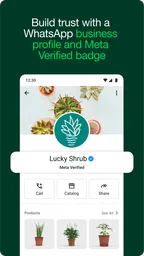
- Business profiles display key details such as opening hours and contact information.
- Labels help organize chats and keep track of customer requests.
- Quick replies save time when answering common questions.
- A product catalog lets customers browse items within the app.
- WhatsApp Web supports handling conversations from a computer.
What could be better
- Some features require a separate business phone number.
- Catalog setup can take time for businesses with many products.
- Automated replies offer limited customization.
- Business accounts still depend on an active internet connection.
- Customers may expect quick responses after seeing your business is online.





