
SmartRent review
 Analysis by Appsdrops
I would judge SmartRent less by the promise of a “smart” home and more by a practical question: does it make the routines around a home easier without asking me to surrender control? That is the right lens for this House & Home app. SmartRent is developed by SmartRent, is free to install, and is rated for Everyone. Its purpose is to connect residents with a smarter-home experience, but what you can actually do depends on the home and services available to you.
Trust starts with knowing what the app is for
For a resident, a home app can sit close to daily routines and personal decisions. I would treat it as a useful access point, not as a general-purpose smart-home hub that automatically works with every lock, thermostat, or building. Before relying on it, I would check whether my property or home is supported and what functions are enabled for my account. That practical step matters more than the app’s broad promise: a well-made app cannot control equipment or services that are not connected to it.
SmartRent has a 4.5 average from around 24,000 ratings, with roughly 2,900 written reviews and over 500,000 installs. Those figures suggest that many people have tried it, but they do not tell me whether a particular resident’s setup will be smooth. A renter using a participating property may have a very different experience from someone looking for a standalone home-control app. I would decide based on compatibility first, then judge convenience.
The current version is 4.10.4, and the app’s release history goes back to September 7, 2017. It supports Android 8.0 and later. That makes it potentially usable on a range of Android devices, though I would still keep the operating system and app updated where possible, especially when an app is involved in home access. For iPhone users, the relevant choice is the iOS app store; availability and device requirements should be checked there before depending on it.
Start with your home, not the download button
My first recommendation is to confirm that your property or connected home actually uses SmartRent. Ask the property manager or whoever set up the home which tasks are available through the app, and whether you need an invitation or account activation. This prevents a common mismatch: downloading a home-control app and expecting it to discover equipment on its own. SmartRent is most useful when it is part of the setup already, rather than when you are trying to impose it on an unrelated collection of devices.
That distinction also helps set expectations about alternatives. A conventional smart-home platform may be the better choice if you want to choose devices independently and build a personal system around them. A property-linked service can be more convenient when the building has already arranged the connected equipment and resident access. I see SmartRent as belonging to the latter kind of experience: its value depends on the relationship between the app, the home, and the services made available to the user.
What to check before trusting it with a routine
I would begin by exploring the app while I am at home and not in a hurry. Identify the controls that are actually visible to your account, learn the steps to reach them, and check what happens when you sign out or switch phones. Do not assume that a function is available just because it is common in smart-home apps. A control that is absent from your account may simply not be part of your property’s configuration.
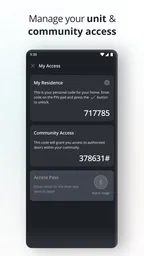
This approach is especially useful for anything that affects access. If the app is part of how you enter your home, test the process when you have a reliable alternative available, rather than discovering a snag at the door. I would also avoid making an unfamiliar app the only way to complete an essential routine until I knew how the account and property setup behave. That is not a criticism unique to SmartRent; it is sensible practice for any service tied to a home.
Controls, data-sensitive moments, and everyday use
One of the most important trust questions is what the app asks permission to do on a particular device. I would review the permission prompts as they appear and consider whether each request makes sense for the task I am trying to perform. If a prompt is unclear, I would pause rather than grant access automatically. Permissions can vary by operating system and by the functions enabled for an account, so I would not treat another resident’s experience as a definitive guide to mine.
I would also look for account settings and visible choices inside the app, especially around sign-in, notifications, and any connected home services. The useful standard is simple: can I understand what I am changing, and can I change it back? If a setting affects an important routine, I would test the result at a convenient time. I would not infer a particular privacy policy or data-handling practice from the app’s purpose alone; for those details, read the current privacy information and the prompts shown during setup.
Use it deliberately around guests and shared devices
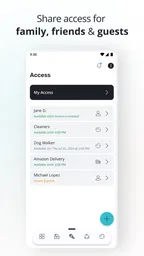
A home-control account can become more sensitive when a phone is shared, borrowed, or left signed in. I would keep the app on a device protected by a screen lock and avoid handing an unlocked phone to a guest if it gives access to home controls. If other household members need access, use the account options that are actually presented rather than sharing credentials by habit. That makes it easier to know who can use the app and to remove access when a household arrangement changes.
For a move, a change of roommates, or a new phone, I would treat account access as part of the handover checklist. Check what happens to the old device and account, and ask the property contact how access should be updated. This is a concrete place where resident apps can be helpful but also require attention: the home may stay the same while the people entitled to use it change. I would rather resolve that deliberately than assume that replacing a phone or moving out automatically updates every connected permission.
A realistic day where convenience matters
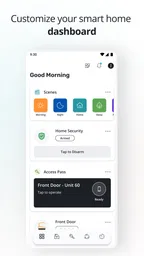
Imagine arriving home with bags after work. If your home has been set up to work with SmartRent, having the relevant resident controls in one app may save a few steps compared with finding separate device apps or contacting someone for routine assistance. The benefit is not that every household task becomes effortless; it is that the supported actions can be easier to reach when you already know where they are. I would still keep a backup plan for the moments when the phone battery is low, connectivity is unreliable, or an account needs attention.
Another useful scenario is checking the app before leaving for a trip. Rather than tapping through settings in a rush, I would learn in advance which controls are available and decide which ones I actually use. This is where a connected-home app can reduce friction: it can put supported options within reach without requiring a separate search for each piece of equipment. But I would not rely on an untested control to protect the home or replace a routine I already trust.
For a household with several residents, the practical question is not only whether the app works on one phone, but whether each person can use it appropriately. I would have each regular user verify their own access and understand the difference between controls they need and settings they should leave alone. A shared routine is easier to manage when everyone knows how to reach the relevant function, but unclear account ownership can make changes harder to track. Keep the setup as simple as your household needs.
Where the experience may feel limited
The largest trade-off is dependency on the supported home setup. If you want broad device choice, a unified dashboard for equipment from many unrelated brands, or a system you can configure independently, a general smart-home platform may suit you better. SmartRent makes more sense when it is already part of the property or home experience and its available controls match your needs. I would not install it expecting every smart device in the house to appear automatically.
There is also a learning curve in figuring out what belongs to the app, what belongs to the property, and what belongs to the physical device. When something does not behave as expected, the cause may be the account, the home configuration, or the connected equipment rather than the phone itself. I would note the exact step that fails and contact the appropriate property or support contact with that detail. Repeatedly changing permissions or reinstalling the app without understanding the issue can create more confusion than it solves.
SmartRent is free, which makes trying it low-risk from a purchase standpoint, but a free download does not make it the right tool for every home. If you are choosing a new system from scratch, compare the available device support and the control you want before committing to a property’s setup. If you are already a resident whose home uses it, the more useful test is whether your enabled functions are dependable and easy for the household to understand.
Who I would recommend it to
I would recommend SmartRent to residents whose home or property already uses the service, particularly people who want a phone-based way to reach the home functions their account supports. It may also suit someone who values a property-integrated experience over assembling and maintaining a separate collection of smart-home apps. The key is to treat the app as a companion to a supported setup, not as a guarantee that every home will offer the same tools.
I would suggest skipping it, or at least waiting before relying on it, if your home is not connected to SmartRent, if you need extensive device compatibility, or if you prefer to keep home functions completely separate from a phone account. It may also be a poor fit if you are uncomfortable reviewing permissions and account access yourself. Those concerns do not make the app inherently unsafe; they simply mean that a different arrangement may better match your priorities.
My cautious verdict
Overall, SmartRent is worth considering when it is already connected to the place you live. Its strongest case is convenience tied to a supported home, while its main limitation is that the experience depends on what the property and account make available. I would explore the controls, review each permission prompt, protect the phone and account, and test important routines before depending on them.
The app is free, rated Everyone, and has a substantial user base, but those facts are supporting context rather than a substitute for checking your own setup. If the controls you need are present and clear, it can be a practical part of daily home life. If you want an independent smart-home system with broad device choice, I would compare other platforms first. My recommendation is therefore positive but conditional: use it when your home is supported, and keep your own expectations and access choices deliberate.
What we like
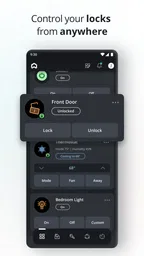
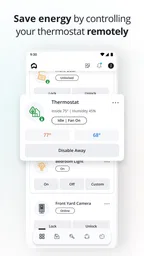
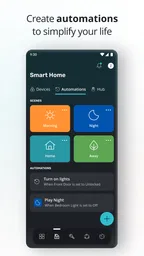
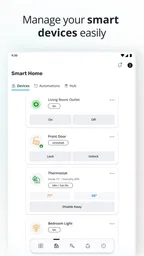
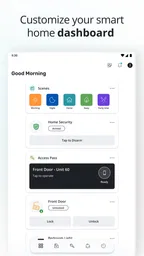
- Residents can manage smart-home devices from one app.
- Remote access helps control connected devices while away.
- The app can make rent payments more convenient.
- Maintenance requests can be submitted through the app.
- Community updates and amenity bookings are easy to find.
What could be better
- Available features depend on the property and its setup.
- Some controls require compatible smart-home hardware.
- A reliable internet connection is needed for remote access.
- App performance can vary by device and software version.
- Not every property offers the same payment or service options.





