
SmartHQ review
 Analysis by Appsdrops
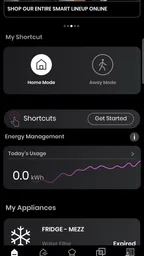
Choosing a connected-home app is less about collecting another icon on your phone and more about finding a practical way to keep track of the appliances you already own. SmartHQ is GE Appliances’ take on that idea: a lifestyle app presented as a command center for a connected home. I’d consider it when GE Appliances is already part of your household and you want one place to interact with that connected-home setup, rather than simply looking for a general-purpose smart-home app.
What to consider before choosing a connected-home app
Start with the equipment, not the app-store description. A useful companion app needs to make sense for the appliances in your home and the way you want to manage them. If you are comparing options, ask yourself whether you want a tool centered on one appliance maker, a broader home-control experience, or a straightforward way to stay connected with a particular brand. Those are different needs, and the best fit depends on your household rather than on a feature checklist alone.
That distinction gives SmartHQ a clear place in the conversation. Its identity is closely tied to GE Appliances, so the strongest reason to look at it is a connection to that ecosystem. I would not choose it just because the phrase “connected home” sounds appealing; I would first consider whether GE Appliances is relevant to the products I use. When it is, a brand-focused companion can feel like a more direct route than trying to make a general app serve a specific appliance relationship.
The app is free, which makes trying it a relatively low-commitment step for someone who is already interested in GE Appliances’ connected-home approach. Free does not automatically mean effortless, of course: an app is only useful if it works with the home setup you have and supports the routine you want. I’d treat the download as a way to explore the experience, while making the actual appliance fit the main decision point.
A quick look at its background
SmartHQ is a Lifestyle app developed by GE Appliances. It first appeared on August 28, 2015, and its current version is 1.0.0.119.1. It is rated for Everyone and requires Android 9 or later on Android devices. That makes the basic audience broad, while the operating-system requirement is worth checking if you are using an older phone or tablet.
Its scale suggests that it has found a substantial audience: it has more than one million installs, an average rating of 4.3, and around 41,000 ratings. There are also roughly 7,800 written reviews. Those figures are useful context, but I wouldn’t treat popularity as a guarantee that the app will suit every appliance, device, or household routine. The practical question remains whether it matches the GE Appliances products you want to connect and manage.
Where SmartHQ has the clearest appeal
The biggest advantage is focus. If GE Appliances is already central to your connected-home plans, an app associated with the brand is an obvious place to start. You are not being asked to think of SmartHQ as an all-purpose answer for every smart device; its own positioning is as a connected-home command center. That makes the app easier to evaluate: it is most compelling when the appliances and brand relationship are already a fit.
I also like that the decision can be approached without making the app itself the whole project. Rather than choosing a platform first and reshaping your household around it, you can begin with the appliances you own or are considering and then see whether SmartHQ belongs in that picture. That order helps avoid a common smart-home trap: installing several apps simply because they promise convenience, then discovering that the extra choices do not improve daily life.
For a GE Appliances household, a dedicated app may also feel more natural than an alternative built around a broader mix of brands. The appeal is not that a manufacturer-focused tool is automatically better in every situation; it is that its purpose is easier to understand. If your main interest is staying connected to GE Appliances, a companion app from GE Appliances is a sensible starting point. If your needs are more varied, that same focus may be less decisive.
SmartHQ is free to download, so exploring it does not require paying an app purchase price. That is helpful when you want to investigate the experience before deciding whether it deserves a regular place in your routine. I would still keep expectations grounded: the value comes from a useful match with your connected-home setup, not from the fact that the download itself costs nothing.
How I’d judge the day-to-day fit
When evaluating an appliance companion, I’d look at whether the app has a clear role in the household. Will you open it often, or only when you need to check on a particular part of your setup? Does its brand-centered approach align with what you own? Are you comfortable using a dedicated app alongside any other tools you already rely on? These questions are more revealing than a broad promise of a connected home, because they tie the choice to real habits.
I’d also think about who else at home might use it. A household app needs to make sense beyond the person who installs it. If everyone expects a single, brand-neutral place for home controls, a dedicated appliance app may not meet that expectation by itself. If the goal is instead to have a clear companion for GE Appliances, the narrower purpose can be a benefit. The right answer depends on whether you value a focused relationship or a consolidated one.
For searchers looking for a GE Appliances app, SmartHQ is easy to place: it is the brand’s connected-home option, available free, with a general-audience content rating. That combination makes it worth considering for current and prospective GE Appliances owners. I’d still check that the app aligns with the specific products and phone you plan to use before building a routine around it, since compatibility is ultimately what turns a download into a useful tool.
When another kind of app may suit you better
Alternatives can make more sense if your home is organized around several brands and you want a broader platform to bring them together. A general smart-home app may be a better starting point for someone whose priority is managing a mixed collection of connected products from one place. That does not make a general option automatically superior; it simply serves a different decision criterion than an appliance-maker companion.
There is also a case for using the apps associated with each manufacturer. That approach can appeal to people who prefer brand-specific tools and do not mind switching between them. In that comparison, SmartHQ’s focus is a feature of its identity rather than a flaw. It is a more natural candidate when GE Appliances is the reason you are looking for an app in the first place, and a less obvious choice when your main objective is to unify a diverse setup.
Some people may not need a dedicated connected-home app at all. If your appliances do not call for regular interaction through a phone, adding another tool could create more clutter than convenience. I’d rather have a smaller collection of apps that each serve a clear purpose than install one simply because it is available. SmartHQ is worth investigating when its role is concrete; otherwise, the simplest option may be to stick with the habits and tools you already use.
Think about the future as well as the present. If you are building a household around GE Appliances, a focused companion may fit naturally into your plans. If you expect to prioritize cross-brand coordination, compare that goal against the app’s brand-centered positioning before settling on a long-term routine. You do not need to settle every connected-home decision at once, but it helps to be honest about whether you want a brand companion or a broader hub.
The cost of switching and getting started
Because SmartHQ is free, the direct cost of trying it is low. The more meaningful cost is your time: installing an app, exploring its role, and deciding whether it adds enough convenience to keep using it. If you already use other smart-home apps, there may also be a small learning cost as you work out where SmartHQ fits alongside them. That is a sensible trade-off when it helps you manage a GE Appliances connection, but not much of a gain if it duplicates a routine you already find easy.
Switching from another app or platform can involve more than downloading something new. You may need to reconsider how your household organizes access and which tool people open for a given task. I would avoid replacing a setup that works just for the sake of simplifying things on paper. Instead, try to identify a specific inconvenience SmartHQ could address, then judge whether its focused role improves that part of your routine.
If you are new to connected-home apps, keep the first step modest. Check that your phone meets the Android requirement if you are using Android, then explore whether SmartHQ fits the appliances and household expectations you have. Its Everyone rating makes its intended audience broad, but the relevant question is still practical fit. A free app can be a sensible experiment; it becomes a keeper only when it earns a place in the way you manage your home.
My recommendation
I recommend considering SmartHQ if GE Appliances is already part of your home or is central to the products you are choosing. Its brand-focused identity gives it a clear purpose, and the free download makes it easy to explore without an app purchase cost. The app’s established audience and 4.3 average rating offer useful context, though neither should replace checking how well it suits your own setup.
If your priority is a single control point for a mix of different brands, compare broader smart-home alternatives before committing to a routine. If you mainly want a companion associated with GE Appliances, SmartHQ is the more directly relevant place to start. That is the decision I’d make: choose based on the equipment and household habits you actually have, not on the broad promise of connected living alone.
Overall, SmartHQ is a focused option rather than a universal recommendation. For the right GE Appliances household, that focus can be exactly what makes it appealing. For everyone else, a different category of app may fit better. I’d give it a try when its connection to your appliances solves a real need, and keep it only if that focused role makes your connected home feel simpler to manage.
What we like
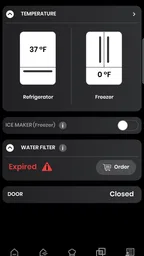
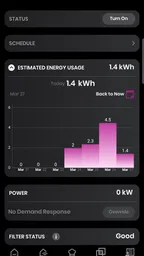
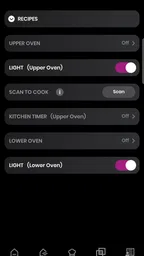
- Control compatible GE appliances from a single app.
- Check appliance status while away from home.
- Receive alerts when an appliance needs attention.
- Download select cooking cycles to compatible ovens.
- Some appliances support remote diagnostics through the app.
What could be better
- Only works with compatible GE appliances.
- Features vary by appliance model and category.
- A reliable internet connection is needed for remote access.
- Some remote controls require enabling them on the appliance.
- Setup may require account registration and appliance pairing.





