
SkyportHome review
 Analysis by Appsdrops
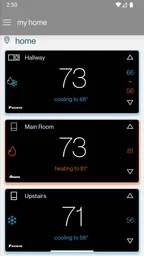
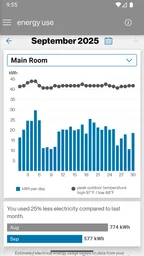
I’d consider SkyportHome when the heating and cooling system in my home is compatible with Daikin, Amana, or Goodman equipment and I want a phone-based way to manage it. This is a focused home climate control app, not a general smart-home dashboard. That narrow purpose is a strength if I mainly want to check or adjust the system, but it also means the experience depends on having the right equipment and on the controls available for that setup.
Made by Daikin Comfort Technologies North America, Inc., SkyportHome is a free app in the House & Home category. It has an average rating of 4.5 from around 6,600 ratings, and more than 100,000 installs. The app is rated for everyone. Those figures suggest it has found a practical audience, though they can’t tell me whether it will suit a particular home: compatibility is the first thing I’d establish before building a routine around it.
Start with a dependable everyday routine
For me, the useful baseline is simple: open the app, check the system’s current state, make a deliberate adjustment if needed, then leave it alone long enough to see how the home responds. With heating and cooling, changing the target repeatedly because the room does not feel different right away can make the controls harder to use sensibly. A calm, repeatable routine is more useful than treating the phone as a constant thermostat dial.
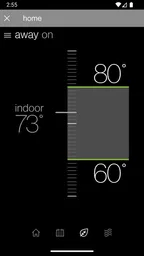
A realistic example is leaving home for the day and realizing the system is still set for the comfort level I wanted while I was there. If the connected equipment and app controls allow the adjustment, I can use my phone to change the setting rather than returning just to reach the thermostat. Later, I can check again and make a modest correction if the house needs it. The practical value is not dramatic automation; it is being able to manage a compatible system without being beside it.
I would also make the app part of a quick arrival routine. Before heading home, I could check the system and decide whether a change makes sense, rather than arriving and making several hurried adjustments at once. That is particularly helpful when my plans change. It is still worth remembering that a phone command is not the same as instantly changing the temperature of a room: the equipment has to do the work, and the home takes time to respond.
The first setup question is whether the home actually has supported Daikin, Amana, or Goodman heating and cooling equipment connected for app control. A brand name alone should not be treated as a guarantee that every installation or control arrangement will work the same way. I would check the equipment and its control setup before relying on remote access. If a household uses a different brand, this app is unlikely to be the right place to manage its climate system.
Make the first checks before relying on remote control
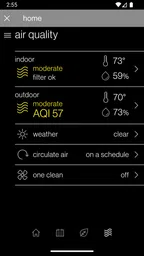
Once the system is available in the app, I’d verify that the displayed state makes sense alongside the equipment’s own controls. This is a useful habit after setup, after a change to the home network, or after someone else has adjusted the system. It helps distinguish a genuine comfort issue from a mismatch between what I think the system is doing and what it is actually set to do.
I’d also decide who in the household should make changes and how we’ll communicate them. If one person adjusts the temperature from the app while another uses the wall control, both may be acting with good intentions but working against each other. A shared rule—such as checking the current setting before changing it—avoids that small but familiar source of frustration. The app is most helpful when it supports a household habit, not when it becomes another competing control surface.
Settings that deserve a deliberate look
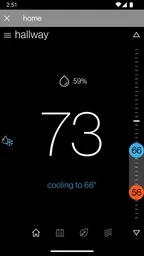
SkyportHome’s role is to control compatible heating and cooling systems, so I would focus on understanding the controls presented for my particular setup rather than assuming every home will show the same options. Before making frequent changes, I’d learn what each available setting does on the connected system and note the settings that matter in daily use. This is a better approach than tapping through controls experimentally when the household is already uncomfortable.
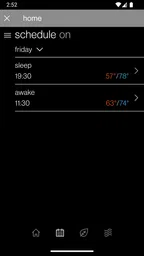
One useful practice is to settle on a normal routine for occupied hours and another for times when the home is empty, if the available controls support the distinction. I would make changes intentionally and observe their effect over a few ordinary days. That gives me a more reliable sense of whether the adjustment improves comfort than changing several things at once. The trade-off is that this approach takes patience; a phone interface makes changing a setting easy, but it cannot tell me by itself whether each change is worthwhile.
I’d keep an especially close eye on settings that affect more than one person. Someone working at home may feel cold while another person is comfortable, and a change that helps one room or one person may not improve the whole house. Rather than chasing a perfect number throughout the day, I’d agree on a reasonable shared baseline and use occasional adjustments only when there is a clear reason. That makes remote access a convenience, not an invitation to micromanage.
Build faster habits without expecting hidden shortcuts
Experienced use does not have to mean finding secret features. I’d make the routine faster by deciding in advance what I normally check: the current system state, whether a change is needed, and whether another household member has already made one. Keeping that mental checklist consistent saves more effort than opening the app repeatedly without a specific question in mind.
A second useful pattern is to connect a check to an event that already happens. For example, I could review the system when I leave for work, or when plans shift and I know the house will be empty longer than expected. I would avoid making a temperature change every time I open the app. Fewer, purposeful adjustments make it easier to judge which choices actually help and reduce the chance that two quick changes cancel each other out.
For a household with more than one person using the controls, a short handoff habit can help: mention a meaningful change instead of assuming everyone will notice it. This is not a feature claim about the app; it is a practical way to use any remote control without creating confusion. If a family member is away and adjusts the system, a quick message can prevent someone at home from immediately changing it back.
These habits also clarify when the app is worth opening. Remote control is valuable when I’m away, when my schedule changes, or when I want to check the system without walking to the thermostat. If I’m already standing beside the wall control and only need one simple adjustment, using that control may be quicker. The app earns its place through access at a distance, not by making every local interaction better.
Know where the app’s boundaries are
The clearest limitation is compatibility. SkyportHome is not a universal control app for every heating and cooling system, and it is not a substitute for equipment that has not been set up for the supported ecosystem. I would skip it if I’m looking for one app to bring unrelated brands of thermostats, lights, cameras, and appliances together. A broad smart-home platform is a better fit for that job.
There is also a difference between remote control and remote diagnosis. Being able to check or change a setting can help with everyday comfort, but I would not treat an app as a repair tool or assume that it can explain every equipment problem. If the system is not responding as expected, I’d check the physical controls and the equipment itself, then seek appropriate support rather than repeatedly sending commands from the phone.
Another trade-off is that the phone can make climate control feel more immediate than it is. A change in a setting does not make a room instantly warmer or cooler, and frequent corrections can make it harder to learn what works. For a new user, I’d recommend making one sensible adjustment and giving the system time to respond. The app’s convenience is best paired with realistic expectations about the heating or cooling equipment.
SkyportHome also has a narrower purpose than the usual alternatives. A thermostat manufacturer’s app may be the better choice if the home uses another brand, while a general smart-home app may make more sense for someone who wants to manage many kinds of devices in one place. If the household already has compatible Daikin, Amana, or Goodman equipment and the priority is managing that system from a phone, this focused approach is easier to justify than adding a wider platform for features the household may not need.
A practical choice for compatible homes
Version 3.8.1 is the current version, and the app has been available since April 12, 2019. I would treat that history as context rather than a promise about how any individual installation will behave. For a phone running Android 9 or later, it is an option to consider, but the more important question remains whether the home’s equipment and setup are compatible. Compatibility and a sensible household routine matter more than the app’s age or the ease of downloading it.
My overall view is that SkyportHome makes the most sense as a straightforward companion for people who already use supported heating and cooling equipment. I’d recommend it to someone who wants to check or adjust that system while away and is willing to use the controls thoughtfully. I would not recommend choosing equipment or reorganizing a smart home around the app alone without first confirming that the intended setup is supported.
If you install it, start by confirming the connection and learning the controls your system actually presents. Then use a small number of repeatable checks—when leaving, when plans change, and before making a second adjustment. That gives you a fair test of whether remote access improves your day. For compatible homes, SkyportHome is a practical convenience; for everyone else, a control app matched to their equipment is the better choice.
What we like
- Offers a convenient way to manage compatible SkyportHome devices.
- Remote access can help you check your home while away.
- A single app can simplify control of supported devices.
- Useful for adjusting connected home settings from your phone.
- May reduce the need for separate device control apps.
What could be better
- Features depend on owning compatible SkyportHome hardware.
- Remote controls require a reliable internet connection.
- Setup may take time if devices need individual pairing.
- Some functions may vary by device or app version.
- The app offers limited value without supported equipment.





