
Sketchbook review
 Analysis by Appsdrops
When I choose a drawing app, I care less about a giant feature list than about whether I can get from a blank canvas to a usable sketch without fighting the interface. Sketchbook is built for that kind of direct, hands-on work: it is an art and design app from developer Sketchbook, and its uncluttered feel makes it appealing for quick ideas as well as more deliberate illustrations. I’d recommend it most readily to someone who wants to draw on a phone or tablet and prefers a focused canvas over a busy creative suite.
Choose it for the way you like to draw
The first decision is whether you want a drawing space or an all-purpose studio. Sketchbook is the former. It puts drawing and painting at the center, so it suits people who think visually: doodlers, students planning a composition, illustrators roughing out a scene, and anyone who likes to keep a sketchbook close at hand. It is less compelling if your main goal is to edit photos, assemble a polished page layout, or move between many kinds of media in one project.
I also think the device matters. A larger screen and a stylus make detailed work feel much more natural, while a phone is better for thumbnail sketches, notes, and small studies. You can still make useful marks on a phone, but your hand and the interface share limited space. If you expect to produce finely controlled line art on a small screen with a finger, that constraint is part of the experience, not a problem an app can entirely remove.
Sketchbook is free to download, with in-app purchases listed at $2.99 per item. That makes it easy to try before deciding whether a paid item is worth it for your own process. It is rated for Everyone, which is useful for families and younger artists, though adults should still decide what fits their household. The app has a 4.1 average from around 707,000 ratings, and it has passed 100 million installs. Those figures suggest broad reach, but they don’t tell you whether its drawing approach will suit your hands or habits.
A focused canvas rather than a crowded workspace
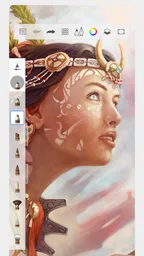
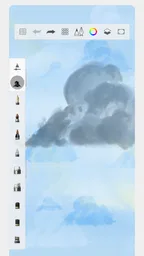
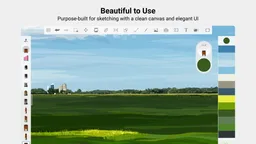
What I value most about Sketchbook is the sense that the artwork remains the main event. In many creative apps, tool panels and project controls compete for attention. Here, the experience is oriented toward making marks, choosing a tool, and continuing the drawing. That matters when you’re sketching from observation or trying to catch an idea before it disappears: fewer detours can make it easier to stay in the flow.
The trade-off is that a focused drawing app is not automatically the best place to finish every kind of creative job. If you need typography, page grids, precise photo compositing, or a presentation-ready design workflow, a dedicated layout or image-editing app may save time. I would use Sketchbook to explore the visual idea, then move to a more specialized tool if the final deliverable depends on features outside drawing and painting.
Small workflows that make a difference
One practical habit is to treat a new canvas as a workspace for exploration rather than a commitment to a finished piece. I’d rough in several composition ideas, compare their silhouettes, and only then spend time on cleaner lines. That approach plays to the app’s strength as a place to draw freely, while avoiding the common trap of polishing the first idea simply because it is already on the screen.
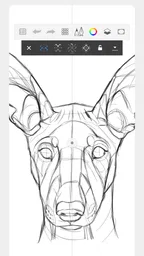
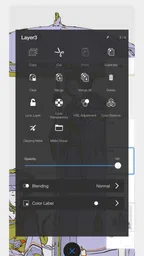
For a character or object study, I’d keep the early shapes loose and use separate working stages where the available layer tools make that convenient. The useful insight is not merely that layers exist in digital art; it’s that separating a rough construction from cleaner marks gives you room to revise proportions without erasing the thinking that got you there. Keep the layer setup simple, though. Too many parallel versions can make a small sketch harder to manage than a paper page.
A third good use is visual note-taking. If you’re planning a room rearrangement, mapping a garden bed, or explaining an idea to a friend, a quick drawing can communicate relationships better than a paragraph. I’d use broad marks for the main shapes, then add only the labels or details needed to make the sketch readable. Sketchbook is most satisfying in these situations when the goal is clarity and momentum, not immaculate finish.
Where the usual alternatives may fit better
Compared with paper, Sketchbook gives you a forgiving place to try a line, revise a shape, and explore color without carrying a separate pad and art supplies. Paper still wins when you want the feel of a particular physical surface, a dependable offline routine, or the freedom to work without looking at a screen. I wouldn’t treat digital drawing as a replacement for that tactile experience; I’d see it as a convenient companion for ideas that benefit from easy revision.
Against broad creative suites, Sketchbook’s appeal is its narrower focus. A multi-purpose app may be a better fit if your work regularly combines illustration with photo editing, graphic design, lettering, or other production tasks. Conversely, if you mostly want to sketch and paint, all those extra areas can feel like overhead. The right comparison is not which app has the longest feature list, but which one lets you complete your typical drawing with the fewest interruptions.
There is also a difference between sketching and professional production. A dedicated desktop workflow may be preferable when you need a particular export pipeline, complex project management, or precise control for a client handoff. I would not assume a mobile drawing app can replace every tool in a studio. Sketchbook makes more sense as a portable drawing environment, a practice space, and a way to develop an idea before deciding how it should be finished.
What to expect when you change tools
If you are moving from paper, the biggest adjustment is learning to draw while watching the display rather than the point of a pencil. Give yourself a few short sessions to get comfortable with the touch or stylus response before judging your line quality. I’d start with simple shapes and quick studies, not a complex piece you already care about. That lowers the pressure and helps you discover whether the screen feels natural.
If you are switching from another drawing app, the cost is mostly habit: where you expect tools to be, how you organize a canvas, and which gestures feel automatic. Recreate a small familiar exercise first, such as a face study or a simple still life. You’ll quickly see whether Sketchbook’s approach helps you work more fluidly or whether your current app’s specialized controls are important enough to keep. For a mixed workflow, there is no need to make the change all at once; you can use one app for exploration and another for finishing.
Before spending on any in-app item, I’d first use the free experience on the kind of work you actually make. A few casual doodles may not reveal much; try a rough composition, a colored study, and a drawing that needs several revisions. That gives you a fairer sense of whether the tools and navigation fit your routine. Purchases make sense only if they address a real limitation you have encountered, rather than a feature you merely imagine needing someday.
Who should give it a try—and who should pass
I’d point beginners toward Sketchbook if they want a welcoming place to practice without committing to a paid app upfront. Its art-and-design focus is also a good match for students who need to make visual notes or explore an assignment, and for hobbyists who want to sketch during spare moments. More experienced artists may appreciate it as a portable companion for roughing out forms and testing ideas, especially when a larger screen or stylus is available.
I’d suggest looking elsewhere if your top priority is a specialized production workflow, detailed page design, or a physical drawing feel that a screen cannot provide. It may also frustrate someone who wants every part of a finished project—image editing, layout, and illustration—in one place. Those are not reasons to dismiss Sketchbook; they are signs that its concentrated purpose may not match the job you need done.
Sketchbook was released on October 8, 2014, and its long presence is reflected in the scale of its audience: it has around 31,000 written reviews alongside its ratings. I don’t take popularity as proof that every artist will enjoy it, but it does make it a familiar option to consider in a crowded category. I’d judge it by a short, realistic trial rather than by reputation alone: draw something you would normally draw, revise it, and see whether the app helps you stay focused.
My recommendation
My recommendation is to try Sketchbook if you want a straightforward place to sketch and paint, especially for ideas that need to be captured quickly and revised freely. It offers a useful middle ground between paper’s simplicity and the breadth of a full creative suite. Its greatest strength is that drawing remains the point of the experience; its clearest limitation is that a focused drawing app cannot cover every design or production need.
I would keep it in my toolkit for quick studies, visual notes, and developing a composition before moving to a more specialized tool when the project calls for one. If you want a single app to handle an entire professional workflow, compare it with tools built around that broader job. But if what you want is a practical canvas you can open and start drawing on, Sketchbook is an easy option to test. It is free to begin, and whether it earns a lasting place depends on the simple question that matters most: does it make you want to keep drawing?
What we like
- The interface stays uncluttered while keeping key tools within easy reach.
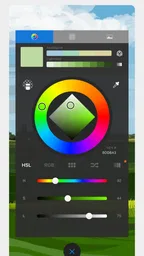
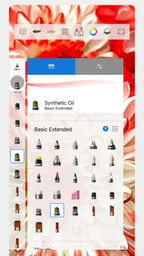
- Customizable brushes support a wide range of drawing styles.
- Layers make it easier to organize complex illustrations.
- It works well with a stylus for precise strokes.
- The app supports exporting artwork in common image formats.
What could be better
- Some advanced features may take time to learn.
- Large canvases can use substantial device memory.
- The free version may not include every premium tool.
- A stylus is helpful for detailed work but may be sold separately.
- Cloud backup options may be limited compared with some rivals.





