
ibis Paint X review
 Analysis by Appsdrops
Choosing a drawing app is partly about brushes and layers, but it is also about how comfortable you feel making a personal project inside it. I see ibis Paint X as a capable mobile studio whose appeal is easy to understand: it offers a substantial place to draw without an upfront purchase, while leaving the user to decide how much of its broader offering they want to explore. My recommendation is positive, with one important caveat: if privacy controls are your deciding factor, check the app’s current permission prompts and settings on your own device rather than assuming that a large, established app automatically fits your preferences.
Creative freedom, with sensible attention to trust
This is an art and design app from ibis inc., aimed at people who want to sketch, paint, ink, and develop illustrations on a phone or tablet. Its 4.5 average from around three million ratings and more than 100 million installs suggest that it has become a familiar choice for mobile artists. That scale can make the app feel less like an experiment, but popularity alone is not proof of any particular privacy practice. I would judge trust through the choices the app and operating system actually present, not through its download count.
In use, the strongest case for ibis Paint X is the combination of an accessible starting point and room to build a more deliberate workflow. I can imagine opening it for a quick character sketch, then returning later to refine line work, color, and details rather than treating the first screen as a one-off doodle pad. That flexibility makes it useful for hobbyists and learners who do not yet know how advanced their needs will become.
The app is free to download, and its content rating is Everyone. That makes it approachable for a wide range of users, though parents should still look at the app’s current in-app options and device-level controls before handing it to a child. In-app purchases range from $2.99 to $79.99 per item, so “free” describes the starting point, not a promise that every optional item or experience costs nothing.
What the workflow rewards
Drawing on a touchscreen asks for a different kind of patience than working with a mouse or a dedicated graphics tablet. Small screens make precision harder, and a finger can cover the mark being made. A stylus and a larger display can make the experience more comfortable, but I would still start with a modest canvas and a simple sketch before committing to a detailed piece. That helps reveal whether the controls feel natural in your hand and whether the device suits longer sessions.
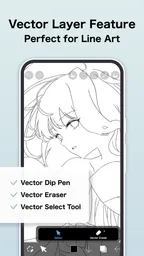
One useful habit is to separate rough construction from clean line work rather than trying to perfect every stroke as it appears. In a layered drawing app, keeping those stages distinct makes revisions less destructive: you can adjust the sketch’s visibility or work over it without rebuilding the whole image. This is especially valuable when drawing faces, clothing, or hands, where a change to the underlying shape often affects several polished lines.
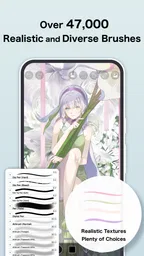
A second practical tip is to test brush size and opacity on a spare area before committing them to a finished section. On a phone, a brush that looks subtle in the controls can cover more of the canvas than expected. A quick test also helps you settle on a consistent line weight, which can make an illustration feel intentional even when it has been made in short bursts between other tasks.
Where it fits among drawing apps
Compared with a basic sketching app, ibis Paint X is better suited to a project that needs stages and revisions rather than just a quick note or loose doodle. Compared with desktop illustration software, its advantage is convenience: you can work directly on a mobile device without setting up a computer. The trade-off is equally clear. A small screen and touch input can make fine edits slower, and someone who needs a specific desktop workflow, a large working area, or highly tailored professional tools may be happier with a dedicated computer program.
I would also distinguish it from a paper notebook. Paper is immediate, distraction-free, and never asks you to navigate menus; a digital canvas is more forgiving when you want to revise a line or try a different color treatment. If your main goal is to capture an idea quickly, paper may be less friction. If you expect to revisit and develop that idea, an app like this has a stronger case.
The current version is 14.1.6, and the listed minimum operating system is 7.0. Those details are useful when checking whether an older device can run it, but compatibility is only one part of the decision. Performance with a complex illustration depends on the device and the way you work, so I would not assume every phone will feel equally responsive under a heavy workload. Start with a small test project on your own device before making it the home for a long-term piece.
Trust begins with visible choices
My cautious approach is simple: pay attention to the permission requests that appear, and consider whether each one makes sense for what you are trying to do. If the app asks for access to something on your device, pause and read the operating system’s explanation before allowing it. Granting only what you need is a practical way to retain control, and you can review app permissions later through your device settings.
I would avoid treating a permission prompt as a minor obstacle to tap through automatically. For example, if you are opening the app just to experiment with a blank canvas, ask whether a requested access is relevant to that immediate task. If you later choose an activity that depends on it, you can reconsider then. This staged approach is more useful than either granting everything reflexively or rejecting every request without understanding its purpose.
Data-sensitive moments can arise around any creative app when a drawing is shared, backed up, or otherwise moved beyond the device. Before sending a personal sketch or a work-in-progress elsewhere, think about what the image contains: a face, a private note, a client concept, or an unfinished design may deserve more care than a casual study. I recommend checking the destination and audience each time, rather than treating all artwork as equally harmless to share.
I also would not use an app’s popularity or its age as a shortcut for evaluating data practices. ibis Paint X was released on February 27, 2014, and has had time to become a well-known tool, but longevity does not tell me what choices are available in every current version or region. For trust-related questions, the useful evidence is what you can inspect now: the permission screen, the app’s settings, and the choices shown when you use a particular feature.
Keep control of the project itself
For user agency, I like to think beyond privacy and consider how much control you retain over the artwork. A sensible drawing routine is to save at meaningful milestones and keep a separate copy of important work wherever your device and preferred storage setup allow. That is not a special claim about this app; it is a good safeguard for any digital art workflow, especially if a piece represents hours of effort or a deadline.
When trying a new tool, I would make a small, disposable test illustration first. Use it to learn the interface, compare a few brush choices, and see how comfortable the controls feel before investing in a polished commission or a personal project. This also gives you a low-stakes way to inspect any prompts and settings you encounter. If the experience feels too crowded or demanding, you can change course without having tied your main work to it.
The purchase model deserves the same deliberate approach. The app costs nothing to install, while individual in-app purchases range from $2.99 to $79.99. I would explore the free experience first and buy only when a specific option addresses a real need. That is better than purchasing because a feature sounds impressive in the abstract, particularly if you are still deciding whether mobile drawing suits your habits.
For a student, a casual illustrator, or someone who wants to practice during a commute, the low barrier to starting is a genuine strength. A realistic use case is sketching a character on the way home, then returning to the same idea later to clean up the outline and test colors. The app makes sense when portability matters more than a perfect studio setup. It is less compelling for someone who dislikes drawing on glass, wants a minimal interface above all else, or expects a phone to replace a full desktop workstation.
Who I would recommend it to
I would recommend ibis Paint X to beginners who want to grow into a more involved drawing process, and to experienced hobbyists who value having a capable canvas close at hand. Its free entry point makes it easy to test without committing money first, while optional purchases give users a reason to assess their needs before spending. The broad adoption and 4.5 average rating are reassuring signs that many people find it useful, though neither guarantees that its interface or business model will suit you personally.
I would steer someone toward another option if they want a very simple tool for occasional marks, if they strongly prefer working on paper, or if their work depends on a large-screen desktop environment. I would also advise a privacy-conscious user to make their decision only after reviewing current permissions and settings on their own device. That is not a reason to dismiss the app; it is a sensible standard for any tool that becomes part of a personal creative routine.
Overall, ibis Paint X is a strong mobile drawing choice when you want more than a basic sketchpad and are willing to spend a little time learning its workflow. I like the balance between an accessible start and the possibility of developing more carefully structured illustrations. My qualified recommendation is to install it, try a small project, and make permissions and purchases choices one at a time. If the controls feel comfortable and the visible settings match your expectations, it can be a rewarding place to draw; if either point gives you pause, a simpler app or a desktop alternative may be the better fit.
What we like
- A large brush library supports many drawing styles.
- Layer controls make complex illustrations easier to organize.
- Stabilization helps produce smoother strokes.
- Time-lapse recording can capture the drawing process.
- The interface offers useful customization options.
What could be better
- Some advanced tools require a paid upgrade.
- Ads can interrupt use of the free version.
- The extensive toolset may overwhelm beginners.
- Large canvases can strain older devices.
- Cloud syncing may require an account.





