


Drawing Pad Lite - Artbook review
 Analysis by Appsdrops
When I want to turn a quick idea into a sketch, I look for a drawing app that feels approachable rather than packed with distractions. Drawing Pad Lite – Artbook presents itself as a place to start sketching, with drawing and painting at its center. That straightforward pitch makes it easy to understand who it is aimed at: anyone curious about making digital art, whether they are practicing or simply doodling for fun.
A simple starting point for digital sketching
Drawing Pad Lite – Artbook is a free art and design app from Cards. Its store description calls it a sketchbook for drawing and painting sketches, and that gives the experience a clear, beginner-friendly identity. Rather than promising a professional studio, it focuses on the basic appeal of opening a digital canvas and putting an idea down.
I like that kind of focus. A sketching app does not need to make every session feel like a serious project; sometimes the point is to test a shape, try a color, or spend a few minutes drawing. The “Drawing Pad Lite” description reinforces that casual, accessible impression. If you are searching for a drawing app for Android that sounds approachable, this is the sort of product name and purpose that may catch your eye.
The app sits in the art and design category and is rated for Everyone. That broad audience makes sense for a creative tool built around sketching: it can suit a young beginner exploring drawing as well as an adult looking for a low-pressure place to experiment. I would approach it as a simple entry point, not assume it is meant to replace a full-featured illustration suite.
What the app is trying to do
At its core, the appeal is uncomplicated: use a phone or tablet as a place to draw and paint sketches. That is a familiar idea, but it can still be useful when you want to practice without reaching for paper and supplies. A digital sketchbook can make spontaneous drawing feel convenient, and the app’s stated purpose keeps attention on that basic creative activity.
For newcomers, a clear purpose can matter more than a long list of advanced tools. It is easier to decide whether an app is worth trying when its central use is apparent. Here, that use is sketching. I would recommend going in with a flexible mindset: start with a small drawing, get a feel for the app, and decide whether its approach fits your routine.
It is also worth remembering that a simple description does not tell the whole story of how an app feels in daily use. Your impression will depend on the device and on what you expect from a drawing pad. Someone who wants an easy place to doodle may be satisfied by a focused sketching experience, while an experienced artist may be looking for a deeper toolset.
Its place among drawing apps
There are plenty of reasons to look for a sketching app: practicing line work, capturing an idea before it disappears, or simply making art for enjoyment. Drawing Pad Lite – Artbook is positioned around these everyday uses rather than a specialized professional workflow. That makes it easier to consider as a first app, especially if you are still deciding whether digital drawing is for you.
It can also be a practical option for someone who wants to keep sketching sessions casual. You do not have to begin with a major project or a particular artistic goal. A quick experiment with shapes or a small painted sketch is enough to explore the basic idea of drawing digitally. For me, that low-pressure angle is one of the most appealing parts of the app’s positioning.
How the product has developed
The app was released on November 30, 2021, and its current version is 2.6.1. Those details give a useful snapshot of its history: it has been available since 2021 and has reached a later numbered version. They show that the product has moved beyond its initial release, but a version number by itself does not reveal which tools or changes arrived along the way.
That distinction matters when considering an update. I would not treat the current version as evidence of a particular new brush, canvas option, or interface change unless the app itself explains it. What can be said confidently is that the app continues to be offered as a sketching and painting tool, with the same straightforward creative purpose at its center.
For an existing user, a later version can be reassuring simply because the app has not remained at its original release number. Still, the practical value of any update depends on what it changes for the individual. If you already use the app, the best way to judge its current state is to open it, try your usual drawing task, and see whether the experience suits your needs.
What the version history means to users
Version numbers are useful context, but they are not a substitute for release notes. A move to 2.6.1 indicates the current build identifier; it does not, on its own, prove that a specific feature was added or that performance improved. I prefer to separate those facts rather than make a tempting but unsupported promise about what an update contains.
For someone who has already installed the app, this is a sensible way to think about continued use: judge it by the drawing experience you actually have, not by assumptions based on a version label. If the app still fits your sketching habits, there may be no need to change your routine. If you are considering it for the first time, the current version is simply the version to evaluate.
New users can also use the release date as background rather than as a quality verdict. An app’s age does not automatically make it dated or dependable. What counts most is whether its current experience feels comfortable on your device and whether its approach to sketching matches what you want from a drawing app.
Popularity and expectations
Drawing Pad Lite – Artbook has passed 10 million installs and holds an average rating of 4.5 from 95,000 ratings. Those figures suggest that many people have encountered the app and that the overall response has been positive. They are useful signals when browsing, though they cannot guarantee that every person will enjoy the same experience.
The app has also received 2,600 reviews. I see that as a reason to read a range of user comments before deciding, especially if you have a specific need such as regular practice or a particular style of drawing. Ratings can help narrow a search, but personal priorities matter: a beginner looking for a casual sketchbook may value simplicity, while a more advanced artist may care about controls and workflow.
That balance is especially important with creative software. Popularity can indicate broad appeal, but it does not tell you whether the app’s tools match your habits. I would use the community response as context, then let your own first drawing session make the final call.
Cost and access
The app is free to download, with in-app purchases ranging from $0.99 to $99.99 per item. That means you can begin by trying the app without paying an upfront download price, while optional purchases may be available inside it. Before buying anything, I would check what an individual purchase offers and whether it is relevant to the way you plan to draw.
For casual users, free access can lower the barrier to experimenting with a digital sketchbook. At the same time, the presence of in-app purchases is worth keeping in mind if you prefer to avoid spending inside apps. Take a moment to review any purchase prompt before confirming it, and decide based on your own budget and needs.
The minimum operating system requirement is version 8.0. Checking your device’s software version before installing is a simple way to avoid surprises. The app’s broad Everyone age rating also makes it straightforward to consider for general audiences, though families should always make their own choices about device use and purchases.
Who may enjoy it, and what to keep in mind
Drawing Pad Lite – Artbook is easiest to recommend to people who want to explore sketching without turning the process into a technical project. If you are new to drawing on a screen, the app’s stated purpose offers a clear place to begin. If you already draw regularly, it may still appeal as a casual space for sketches, provided its current set of tools fits what you want to do.
It may be less suitable if your first priority is a detailed professional workflow. The app presents itself as a starting place for sketches, so I would not choose it on the assumption that it includes every advanced feature found in specialist art software. Matching expectations to its positioning is the best way to avoid disappointment.
There are a few practical questions to consider before settling in. Does the app feel comfortable on your device? Is its way of drawing intuitive for you? Do you want a lightweight place to practice, or a more elaborate environment for finished artwork? Those personal checks are more meaningful than choosing an app based on its name alone.
Remaining gaps in the picture
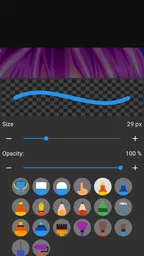
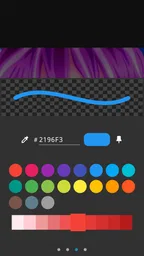
The product’s central promise is clear, but the short description is not a complete guide to every part of the experience. I would avoid assuming particular brush types, export options, layers, tutorials, or collaboration tools unless you see them in the app. If one of those details is essential to your workflow, check the app directly before building a project around it.
This is not a criticism so much as a practical point about choosing creative software. Every artist has different expectations, and a tool that feels perfectly adequate for a quick sketch may not meet the needs of someone preparing polished work. A brief hands-on test is the simplest way to tell whether the app’s current capabilities match your plans.
It is also useful to keep purchases in perspective. The free download gives you a way to explore, while optional items can carry a wide range of prices. I would not assume that a purchase is necessary for basic sketching; instead, look at the in-app options and decide whether any of them add value for you.
What to watch as you use it
If you install the app, pay attention to the basics first: how comfortably you can start a sketch, whether the controls feel natural, and whether you enjoy returning to it. These are the everyday details that determine whether a drawing app becomes part of your routine. A simple tool that you actually use can be more helpful than a complex one that stays unopened.
Existing users may want to check future version notes for clearly described changes before updating, especially if they rely on a particular workflow. New users can keep an eye on how the app’s current experience fits their device and creative goals. In either case, it is better to assess visible changes directly than to assume that a newer version automatically brings a specific improvement.
For anyone comparing sketching apps, I would also watch how the pricing options fit your expectations. The free entry point is appealing, but purchase decisions are personal. Knowing what is included before spending helps keep the experience comfortable and focused on drawing rather than surprises.
My final take
Drawing Pad Lite – Artbook has an easy-to-understand purpose: it is a digital place to draw and paint sketches. Its free download, broad audience rating, and strong install and rating figures make it a reasonable candidate for people exploring mobile art apps. I especially like that its pitch does not ask beginners to think of sketching as anything more complicated than making a start.
The main caveat is expectation. Treat it as a sketching app and explore its current tools for yourself, rather than assuming it is a full professional studio. The version history shows that the app has progressed since its 2021 release, but version numbers alone cannot tell you exactly what changed. That is a good reason to judge the current experience firsthand.
If you want a low-pressure way to try digital drawing, this app is worth considering. Start with a small sketch, explore at your own pace, and decide whether its approach feels right. For casual creativity and a first step into drawing on a device, Drawing Pad Lite – Artbook makes a clear, accessible proposition.
What we like
- A lightweight option for casual drawing sessions
- Useful for practicing basic sketching techniques
- The simple layout is approachable for beginners
- Works well for quick doodles and rough ideas
- A lite edition offers a low-commitment way to try it
What could be better
- Advanced artists may find the toolset too limited
- Small screens can make precise drawing difficult
- Artwork may need exporting for use in other apps
- The lite edition may restrict some features
- It may not suit users who need professional layer controls





