



Silly Smile Wallpaper & Sound review
 Analysis by Appsdrops
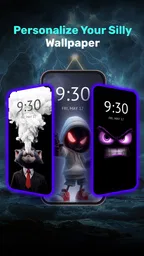
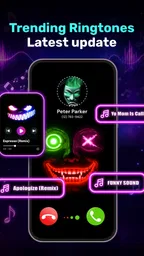
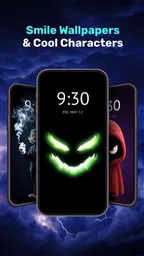
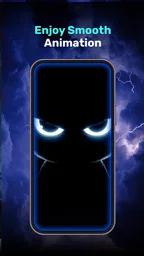
I like personalization apps best when they make a phone feel more like its owner without turning setup into a chore. Silly Smile Wallpaper & Sound takes a playful route: it pairs smile-themed live wallpapers with custom ringtones, so you can change both the look of your screen and the sound of incoming calls. That combination gives it a clearer identity than a wallpaper app that offers only static pictures.
In everyday use, the appeal is less about serious customization and more about adding a small, cheerful surprise to a familiar device. I’d consider it if you enjoy expressive graphics and want a phone that feels a little less standard. If you prefer restrained backgrounds, highly precise controls, or a quiet, uniform look, its lighthearted style may not suit you.
Starting with a simple setup
I’d begin by choosing one wallpaper and living with it for a day rather than changing everything at once. Live backgrounds are easy to enjoy at first, but the right choice needs to work behind app icons, widgets, and notifications—not just look amusing in a preview. Checking the home screen in ordinary lighting and with your usual layout is a better test than judging it in isolation.
Then I’d decide whether to use a custom ringtone as well. Changing the visual and audio sides together can make the phone feel more deliberately personalized, but it is not necessary to use both. Someone who likes the animated screen but wants familiar call sounds can keep that distinction; someone who mainly wants a distinctive ringtone can focus on sound instead.
A practical first-day routine is to set the wallpaper, return to the home screen several times, and see whether the animation remains pleasant rather than distracting. I’d also check that icons and any text I rely on remain easy to spot. This matters especially on a busy screen: a lively background that looks fun on an empty display can compete with widgets once the phone is back in normal use.
The app is a free personalization app from Daily Tool Labs, with a 4.6 average rating from around 21,000 ratings and more than 5 million installs. It is rated for Everyone, and its current version is 1.7.44. Those figures suggest that it has found a broad audience, but they don’t tell you whether its particular smile-centered style will fit your taste; that is best judged by trying a setup on your own screen.
Make the wallpaper work with your screen
My main tip is to treat the wallpaper as part of the layout, not as a decoration viewed by itself. If your home screen has several rows of icons, choose a visual arrangement that leaves enough contrast around them. If you use only a few shortcuts, you may have more room to let the animated design stand out. The useful question is not simply “Is this funny?” but “Can I still use my phone comfortably with it?”
It also helps to think about where you look most often. A background that is entertaining on the home screen may be less noticeable if you usually open straight into a messaging app. Conversely, a strong visual can make the brief moments between tasks feel more personal. I’d avoid judging the app by how long I can stare at an animation; its value is in those short, repeated glimpses throughout the day.
One realistic use case is setting up a family member’s phone with a cheerful wallpaper and a recognizable ringtone, then leaving the rest of the device familiar. That can make the phone feel more personal without requiring a complete redesign or a new way of navigating it. For a work phone, I’d be more selective: a playful screen can be welcome, but a distinctive ringtone may be better kept for a personal device if you want calls to remain unobtrusive in shared spaces.
Settings and habits worth checking
Before settling on a setup, I’d look through the available choices in the app rather than assuming that every option is equally suited to daily use. The store description establishes the two main ideas—live wallpapers and custom ringtones—but the right workflow is to explore what is actually available on your device, choose deliberately, and test the result in context. I would not build a routine around a setting unless I could see it in the app and confirm that it behaves as expected.
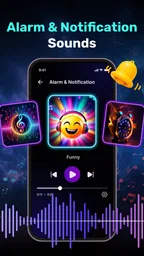
For sound, the important practical check is whether your chosen ringtone is easy for you to recognize without being disruptive. A distinctive tone can help you notice a call in a noisy setting, but it can be a poor match for quiet offices, libraries, or shared rooms. I’d try the sound at a comfortable volume and think about where the phone is usually kept before making it the default. If the app’s sound choices do not fit your routine, keeping the familiar ringtone is a perfectly sensible outcome.
For the wallpaper, check the lock screen and home screen separately if your device gives you that choice. A design that works in one place may feel too busy in the other, where notifications or shortcuts occupy different areas. This small review can prevent the common mistake of choosing only from the initial preview and then finding the finished setup harder to read.
It is also worth making changes one at a time. If you switch both the background and ringtone in a single session, you may like the overall effect but have trouble identifying which part you actually enjoy. Trying the visual first and the sound later gives you a clearer sense of what you want to keep. That habit is especially useful if you tend to personalize a phone quickly and then revert everything a day later.
Faster patterns for repeat changes
Once you know what suits you, a repeatable routine saves time: choose a wallpaper, check icon visibility, test it during normal use, and only then decide whether to change the ringtone. It sounds simple, but separating those decisions avoids making the phone feel noisy in both appearance and sound. Experienced users often get more from a customization app by being selective than by changing every available element at once.
If you like variety, I’d keep a mental note of what worked rather than repeatedly starting from scratch. For example, you might prefer a more animated look when the phone is mostly for personal use and a calmer arrangement when you need to focus. The useful habit is to make a deliberate adjustment when your context changes, not to keep switching just because customization is available.
There is also a sensible way to handle a shared environment: use a playful wallpaper while keeping call audio understated. That preserves the visual personality without making every incoming call draw attention. On the other hand, if the phone is usually on silent or used in private, the ringtone may be the more meaningful part of the app. The pairing is an option, not a rule.
Compared with the usual alternatives in personalization, this app’s distinguishing idea is its focus on smile-themed motion and matching custom sounds rather than a broad toolkit for rebuilding every part of the interface. A conventional wallpaper library may be a better fit if you want landscapes, abstract art, or a wide range of visual moods. A ringtone-focused app may be more suitable if sound is your only goal. Silly Smile is most appealing when you want a playful visual-and-audio identity in one place.
Where the limits become noticeable
The same focused style that makes the app easy to understand also narrows its audience. Smile-themed visuals are a specific aesthetic, not a neutral collection for every room, age, or occasion. If you want a professional-looking screen, subtle backgrounds, or a carefully coordinated theme across icons and widgets, you may find a broader personalization tool more useful. I would not choose this app expecting a full system makeover.
Live wallpapers also ask for a little more consideration than a static image. The movement is part of the appeal, but it can compete with screen content if the composition is busy or if you prefer a still, uncluttered display. I’d test the effect against your real home-screen arrangement and be willing to switch back if it makes routine tasks less comfortable. A background should not make the phone harder to read just to keep the screen lively.
There is a cost detail to keep in mind: the app is free to download, while in-app purchases range from $0.99 to $39.99 per item. That wide span makes it sensible to explore the free experience first and decide whether an optional purchase actually adds something you want. I would not pay simply to complete a setup; the point is to find a combination that improves your everyday experience, not to collect every available option.
Compatibility is another practical consideration before you commit. The minimum operating system is version 8.0, so a device running an older version is outside the stated requirement. The app was released on March 26, 2025, and the listed release history includes its current version, 1.7.44. Those details are useful when checking whether the app is a plausible fit for your phone, but your own device remains the best place to assess how the wallpaper looks and feels.
Who will enjoy it—and who should pass
I’d recommend giving it a try if you enjoy silly, expressive visuals, want to personalize a phone without redesigning its whole interface, or like the idea of coordinating a lively background with a custom ringtone. It may also suit someone choosing a friendly look for a personal device or making a straightforward phone feel more distinctive. The Everyone age rating reflects its broad intended audience, though personal taste still determines whether the style lands.
I’d skip it if you want a large, carefully curated range of visual themes, a minimalist screen, or advanced control over every part of the phone’s appearance. It is also not the best choice if your priority is a silent, low-distraction device and you have no interest in changing wallpapers. In those cases, a static wallpaper collection or a dedicated sound app is likely to serve you better.
With 134 written reviews alongside its larger ratings base, there is some user feedback to browse before deciding, but I’d treat individual opinions as clues rather than a substitute for testing the app on your own screen. A live wallpaper is unusually personal: icon placement, display preferences, and the amount of motion you tolerate can change the experience considerably. A quick trial with your normal layout tells you more than a rating alone.
A playful choice when you want personality
My overall view is that Silly Smile Wallpaper & Sound is best approached as a small, specific upgrade rather than a complete personalization system. Its strongest use is giving a phone a cheerful visual identity and, if you want, a more recognizable sound. The best results come from trying one change at a time, checking readability, and choosing a ringtone that fits the places where you actually use your device.
Daily Tool Labs has kept the concept easy to grasp, and the free starting point makes it straightforward to see whether the style suits you before considering any optional purchases. The trade-off is that the app’s playful focus will not satisfy someone looking for broad theme control or understated design. If smile-centered animation makes you grin and stays comfortable behind your everyday icons, I think it is worth trying; if you want your phone to fade into the background, a calmer alternative is the better call.
What we like
- Offers a playful theme for personalizing your device.
- Combines wallpaper options with sound features.
- Its lighthearted style can brighten up a home screen.
- Provides a simple way to add personality to your phone.
- Suits users who enjoy silly and cheerful visuals.
What could be better
- The novelty may wear off for users who prefer subtle designs.
- Sound effects may be distracting in quiet settings.
- Some images may not fit every screen size perfectly.
- The playful theme may not suit a professional look.
- Wallpaper variety may feel limited to some users.





