




Booksy for Customers review
 Analysis by Appsdrops
I think Booksy is most useful when a household needs to arrange personal-care appointments without turning the family chat into a long round of “When are you free?” It brings local beauty, wellness, and grooming services into one place, so each person can look for an appointment that fits their own schedule. The main benefit is practical: instead of calling several businesses or relying on scattered messages, you can search and book when it suits you.
One booking app, several different routines
Picture a busy week in which one person needs a haircut, another wants a manicure, and someone else is trying to fit in a massage. Their preferences and available times may have little in common. Booksy can make the search easier because it covers a broad mix of local services rather than treating grooming as a single kind of appointment. I’d use it to compare options and handle each booking separately, not as a shared family calendar.
That distinction matters in a shared-device household. The app is a booking tool for individual appointments, while the household still needs to agree on who is going where and when. I wouldn’t assume that installing it creates shared profiles, family scheduling, or special controls for managing several people. A simple, sensible approach is for each person to use their own account where appropriate and to share appointment details with the household through whatever communication method they already use.
The app is free to download and is published by Booksy International sp. z o.o. It sits in the beauty category, though its usefulness reaches into wellness and grooming as well. That range is handy when one household member wants a barber while another is looking for a beauty service; it also means searches can feel less focused than a specialist directory devoted to just one treatment.
Making setup fit the person who will use it
Before booking, I’d decide whose appointment is being arranged and make sure the contact and account details belong to that person or to the adult coordinating the visit. This is especially worth doing on a phone that several people share. Keeping account access clear helps avoid the awkward situation where one person’s booking is mixed up with another’s plans or notifications.
For a parent arranging an appointment for a teenager, I’d treat the app as a way to find and book a service, not as a substitute for checking the provider’s own expectations. The household should agree who is attending, who is responsible for the booking, and how any changes will be handled. Those decisions are more useful than assuming an app will provide family-specific permissions or supervision tools.
Booksy is rated for Everyone, and its minimum operating-system requirement is version 8.0. That makes it accessible across a broad range of devices, but an age rating is not the same as a recommendation that every child book independently. For younger users, I’d keep an adult involved in selecting a service and confirming practical details. For older teens, the right level of involvement depends on the family and the appointment.
Coordinating without creating a second calendar
The smoothest household workflow is to search first, compare the appointment options, and then immediately put the confirmed time somewhere everyone who needs it can see. That small extra step prevents Booksy from becoming a private record on one person’s phone while the rest of the household continues planning around outdated information. If someone else needs to provide transport or adjust a shared schedule, tell them as soon as the appointment is set.
A useful, less obvious habit is to compare the appointment itself rather than choosing only by the earliest available slot. A convenient time can still be a poor fit if the service, location, or provider does not match what the person wants. I’d narrow the search around the actual need first, then weigh timing. That is more reliable than booking quickly and discovering that the appointment solves the calendar problem but not the personal-care one.
For recurring grooming, I would also avoid treating a previous booking as an automatic template. Needs change: a different service, a different day, or a different household member may call for a fresh search. Rechecking the details before confirming is a simple safeguard, particularly when someone else is helping with the booking. It keeps convenience from turning into a mistaken appointment.
What the app is good at—and where it can feel limiting
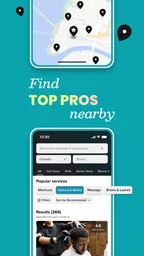
In my view, Booksy’s strongest point is the combination of local discovery and booking in one app. The alternative many people already use is to search online, browse separate business pages, and then call or message to ask about availability. That approach can work perfectly well when you already know the provider, but it spreads the process across several places. Booksy is more appealing when you are open to comparing local options or want to handle a booking outside the usual time you would make a phone call.
The trade-off is that a marketplace is only as useful as the choices it presents for the service and area you have in mind. If you already have a trusted professional and prefer to contact them directly, a call or message may be simpler than searching through alternatives. Likewise, people who want every household member’s plans managed in a dedicated shared calendar should keep using a calendar tool for that purpose. Booksy helps arrange services; I would not rely on it as the household’s complete coordination system.
Another practical point is to read the booking details carefully before treating a time as settled. When several people are arranging appointments on one device, it is easy to lose track of whose service is being booked or which time was selected. I’d pause at confirmation, check the person and appointment, and then pass the details to anyone affected. This is a small workflow improvement, but it prevents avoidable confusion.
Trust, age, and the person behind the appointment
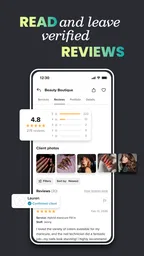
Booksy has an average rating of 4.9 from around 1.1 million ratings, alongside roughly 26,000 written reviews. Those figures suggest that many people find it useful, but I would still judge a particular appointment on its own merits. A strong overall rating cannot tell you whether a specific service suits your needs or whether a provider is the right match for a particular household member.
The app has been available since May 22, 2014, and its current version is 26.10.2200. It has passed 10 million installs. I see that reach as a sign that it is an established option for booking personal-care services, not a reason to skip basic care when choosing an appointment. For a first visit, I’d make sure the person receiving the service understands what has been booked and knows how the household will handle any change of plans.
For shared phones, privacy and account boundaries deserve a little thought. I would not leave one person’s account open for everyone to use casually, especially if the device also handles personal messages or other bookings. A household can share the task of searching without assuming that every person should share credentials or control. If an adult is booking for someone else, clear communication about who made the appointment and who will attend is more dependable than relying on an informal handoff.
Who should choose it, and who may prefer another route
I’d recommend Booksy to adults who want to find local beauty, wellness, or grooming services and prefer to arrange appointments through an app rather than making calls. It can also help a household coordinator handle several people’s needs, provided each booking is checked carefully and the confirmed times are shared outside the app when other family members need them.
I would not make it the default choice for someone who already has a direct relationship with a provider and values that personal contact more than browsing. Nor is it the right answer for a family looking for a complete system to manage everyone’s schedules, permissions, and responsibilities. In those situations, direct communication or a separate shared calendar is a better fit, with Booksy used only when a new service or booking is needed.
Overall, I find Booksy a practical way to reduce the effort of finding and arranging personal-care appointments. Its wide service focus suits households with different needs, while its limits are easiest to manage when everyone stays clear about whose account and appointment are involved. I’d use it as a convenient booking companion, confirm each choice carefully, and keep household coordination in the calendar or conversation the family already trusts.
What we like
- Book appointments from multiple salons in one place
- See available time slots before choosing a provider
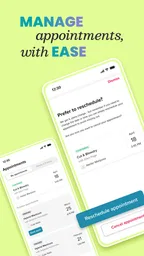
- Manage upcoming bookings within the app
- Browse providers by location and service
- Find customer ratings to help compare providers
What could be better
- Provider availability varies by location
- Not every salon or stylist may be listed
- Some services may require a deposit
- Appointment changes depend on provider policies
- Ratings may not reflect every customer's experience





