




Sekai: Create · Remix · Play review
 Analysis by Appsdrops
The first time I tried Sekai, the appeal was easy to understand: I could turn a small idea into something interactive without having to learn to code. It is an entertainment app from Sekai for making AI-powered games, quizzes, and mini apps. That makes it less like a conventional game with one fixed experience and more like a creative playground whose value depends on what I feel like making—and whether I still want to come back after the initial novelty.
From a quick idea to something playable
The first-week draw is the short distance between imagining an activity and trying to shape it into an interactive one. Instead of opening a separate game editor or starting with a blank programming project, I can begin with a concept in everyday language and see whether it can become a quiz, a game, or a small app. That low barrier is the product’s clearest strength, especially for people who enjoy experimenting but do not want a technical hobby.
A useful way to approach it is to start with a narrowly defined idea. “A quiz about foods my family likes” gives the creation process a more practical direction than an open-ended request to make something entertaining. I would also decide who is going to use the result and what a satisfying ending looks like before creating it. Those small choices help keep an AI-generated activity focused rather than merely novel.
The range of possible formats gives the app room to suit different moods. I might make a quick quiz for friends, try a compact game idea, or explore a mini app that turns a familiar task into something more playful. The important distinction is that Sekai is primarily a place to create and explore experiences, not a substitute for a polished, single-purpose game that arrives with a carefully balanced campaign.
That distinction matters when deciding whether to install it. If I want a ready-made game to play immediately, a conventional game is likely the better choice. If I like the process of shaping a prompt, seeing what the AI produces, and adjusting my idea, Sekai offers a more unusual kind of entertainment. Its appeal is partly the result and partly the act of making.
Make the first experiments easier to judge
For a first session, I would treat each creation as a prototype rather than expecting a finished product on the first attempt. Try a small concept, play through it, and note what feels unclear or less enjoyable. Then make one change at a time. This is a more useful workflow than repeatedly changing the whole idea, because it lets me judge whether the prompt or the resulting experience is responsible for a problem.
There is also a social use case beyond simply making something for myself. Before a casual get-together, I could try to build a short quiz around a shared interest, then use it as an icebreaker. The practical trade-off is that a group activity needs clear questions and a sensible pace; if the creation needs lots of explanation, it can interrupt the gathering instead of enlivening it. A brief test beforehand is worth doing.
For a parent or teacher considering it as a creative activity, I would keep the age context in mind: the app is rated Teen. That does not tell me how every individual creation will turn out, so I would review an activity before handing it to younger users or using it with a group. For adult users, too, a generated experience should be checked for clarity and suitability rather than assumed to be ready just because it is playable.
What keeps it useful after the novelty
After the first week, the question becomes whether I have a reason to return. Sekai has a better chance of earning that place for someone who regularly invents small activities: a quiz for a game night, a playful way to explore a topic, or a quick experiment with an idea that would otherwise remain a passing thought. In that pattern, the app is not competing only with games; it is competing with the effort of making something from scratch.
For occasional users, the recurring value may be less obvious. A person who enjoys trying AI tools once but rarely creates or shares anything may find that the initial surprise fades. The app’s open-endedness is both its advantage and its challenge: there is no single recurring activity that guarantees a reason to return. I would install it with a specific project in mind, then decide from experience whether making another one feels worthwhile.
Compared with standard quiz apps, Sekai gives the user a creative role rather than limiting the experience to prepared questions. Compared with game engines or coding tools, it lowers the technical barrier and is better suited to quick experiments than complex, controlled development. Neither comparison makes it a universal replacement. A conventional quiz app is simpler when I just want reliable questions, while a full development tool makes more sense when precise mechanics and detailed customization matter.
A less obvious benefit of this middle ground is that it can help test whether an idea is fun before investing more effort in it. I can explore the basic shape of a mini game or quiz without first committing to a technical project. The trade-off is that convenience should not be confused with full control: if an experience needs exact rules, consistent pacing, or carefully tuned difficulty, I should inspect it closely and be prepared for the result not to match my mental picture.
Keeping the creative habit lightweight
I would avoid turning every idle moment into another creation. A small backlog of ideas can make the app more useful: jot down a concept mentally or elsewhere, then open Sekai when I have a clear reason to experiment. That keeps the process intentional and reduces the risk of scrolling through possibilities without actually finishing or enjoying anything.
Another practical habit is to give each experiment a simple success test. For a quiz, that might mean asking whether another person can understand the questions without coaching. For a mini game, it could be whether the core idea is clear quickly enough to keep playing. This is not a feature of the app; it is a way to judge the output. It also helps me separate a promising concept from one that was fun only to imagine.
Sharing a creation with someone else can provide a stronger test than replaying it alone, particularly for a social quiz. But the app’s usefulness should not depend on every creation becoming a group hit. Some ideas are worthwhile as private experiments, and others simply do not work. Being willing to discard a weak result is part of using a generative creative tool sensibly.
Where friction and fatigue can appear
The main limitation I would watch for is the gap between a good prompt and a satisfying experience. AI can make the first step feel effortless, but it does not remove the need to judge whether the result is coherent, enjoyable, and appropriate for its audience. If I prefer predictable quality and polished presentation without iteration, the process may feel less convenient than opening a finished game.
Open-ended creation can also produce decision fatigue. A blank idea space is exciting at first, but it can be hard to choose what to make when there is no particular occasion or interest to guide me. My simplest remedy is to use a real-life prompt—something a friend enjoys, a subject I want to revisit, or a short activity for a specific moment—rather than expecting the app to supply a lasting routine on its own.
Another source of fatigue is repeating the same kind of experiment. If I keep making similar quizzes, the act of generating them may remain easy while the results feel less surprising. Switching between a quiz, a game concept, and a mini app can refresh the process, but variety alone is not a guarantee of quality. I would rather make one activity I actually use than many that only demonstrate what the tool can produce.
Because the product is built around AI-generated experiences, the app is not the right choice for someone who wants a fixed library of carefully selected entertainment and no creative decisions. It is also a weaker fit for projects where exact behavior, dependable difficulty, or a highly controlled final result is essential. In those cases, a dedicated game, quiz platform, or more capable development environment is the more sensible option.
What the app’s track record tells me
Sekai has a 4.7 average from around 85,000 ratings, with roughly 2,700 written reviews, and it has passed 10 million installs. Those figures suggest that a large audience has found a reason to try it, but they do not guarantee that its open-ended style will suit me. I would read broad popularity as reassurance that the concept has appeal, not as proof that every generated creation will be satisfying.
The app is free, which makes experimentation easier to justify, particularly if I am unsure whether I will enjoy creating. I would still think of my time as the main investment: if I spend more effort revising an idea than I get back in fun or usefulness, the low entry cost does not make it a good fit. Its current version is 2.3.9, and it was released on June 25, 2024. It requires operating system version 10 or later, so checking compatibility before installing is a sensible first step.
For ongoing use, maintenance is mostly a matter of managing expectations and choosing worthwhile projects, rather than treating the app as a daily obligation. I would return when I have a concrete reason to make something, review what it produces, and stop if the activity feels like work. That approach makes Sekai easier to keep around as an occasional creative tool, even if it never becomes part of my everyday routine.
My long-term verdict
Sekai is most compelling for curious people who enjoy turning their own ideas into small, playable experiences. Its Teen rating, entertainment focus, and no-code approach point toward an accessible creative pastime, while its large audience shows that the idea has reached well beyond a tiny niche. I would recommend trying it to a friend who likes making quizzes or exploring playful concepts, especially if they are happy to test and refine rather than expect perfection at the first attempt.
I would not recommend it as a replacement for a favorite finished game, a dependable quiz library, or a tool for building a tightly specified product. Those alternatives are better when the goal is predictable content or precise control. Sekai earns lasting space only when the user enjoys creating often enough to supply their own reasons to return. For me, that is a fair and useful distinction: the novelty may fade, but the app can remain worthwhile when there is still an idea worth playing with.
What we like
- Easy-to-use tools make creating short videos approachable.
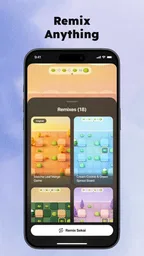
- Remixing lets users build on ideas from the community.
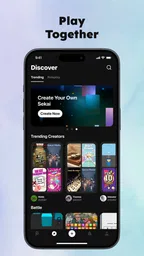
- A steady stream of new creations keeps browsing fresh.
- The playful format encourages experimentation with visual ideas.
- Quick projects can be made without advanced editing skills.
What could be better
- Some features may require an account to use.
- Results can depend on the quality of the source content.
- Popular templates may make creations feel less original.
- Community content may not suit every viewer.
- Creating polished videos can take more time than expected.





