
Schlage Home review
 Analysis by Appsdrops
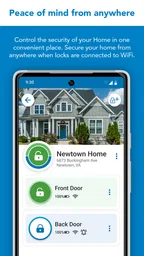
I judge a home-access app by more than whether it can operate a lock. It also needs to make everyday tasks understandable and predictable for people with different levels of sight, dexterity, hearing, and confidence with technology. Schlage Home is Schlage Lock Company, LLC’s House & Home app, intended for people using Schlage smart-home products. Its appeal is clearest when the app is part of a compatible lock setup; it is not a general-purpose way to control every door or household device.
Finding your way around the app
For a person deciding whether to use it, the most important distinction is between managing a Schlage lock and simply wanting a convenient digital key. If your household already relies on compatible Schlage hardware, an app can put lock-related tasks in one place. If you do not own that equipment, installing the app alone will not turn a standard lock into a connected one. I would check the exact lock model and its compatibility before making the app part of an accessibility plan.
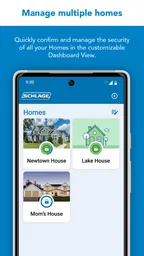
The app’s identity is straightforward: Schlage Home is made by the lock company, rather than by a broad smart-home platform trying to support products from many brands. That focus can make the experience easier to understand when your goal is specifically a Schlage door. It also narrows the audience. Someone who wants one interface for lights, cameras, thermostats, and locks may prefer a wider home-control system, while a household focused on Schlage access may find a dedicated app less cluttered by unrelated controls.
Ease of navigation matters most when a person is in a hurry or uncertain about whether a door is secure. I recommend that new users explore the app while standing at home, with the physical key or another agreed backup available, rather than learning its controls during a stressful arrival. Take time to identify the main lock actions and agree on a simple household routine. That preparation is useful regardless of age or ability, and it reduces the chance that someone has to improvise at the door.
Schlage Home is free, and its age rating is Everyone. Those details make it easier for a household to consider trying the software, but they do not answer whether it suits a particular person’s needs. A free app can still depend on buying and installing compatible hardware, and a general age rating is not a promise that every screen or interaction will work equally well for every user.
Make the setup understandable to everyone
One practical way to assess readability is to have each regular user perform the tasks they expect to use, rather than relying on one technically confident person to set everything up. Ask a family member to find the lock action, understand what the screen is asking, and recover from a mistaken tap. If they need repeated coaching, simplify the household’s routine before relying on the app for independent access.
For people with low vision, check the actual display on the phone they will use. Text size, contrast, screen glare, and the operating system’s accessibility settings can all affect legibility. I would not assume that a lock screen is readable just because the rest of the phone is. Try it in bright daylight and in a dim entryway, since those are common conditions when someone is arriving home. If the phone’s magnification or text-size settings make important controls difficult to reach, that is a meaningful limitation for that user.
It is also worth separating phone familiarity from lock familiarity. Someone who rarely uses apps may find a physical key more obvious even if the software is technically simple. Rather than asking them to switch completely, let them practice with a trusted person present and keep a familiar way to enter available. Digital access should reduce effort, not create a new test that a household member feels they must pass.
Motor and sensory needs at the door
A connected lock can be useful for someone who finds turning a key or manipulating a small keyway difficult, but the app does not remove every physical demand. The person still needs to use a phone, locate and activate the relevant control, and operate the door itself. A stiff handle, heavy door, awkward phone grip, or trouble unlocking the phone may remain the real obstacle. I would evaluate the whole route from sidewalk to indoor space, not just the lock interface.
For limited dexterity, a useful trial is to use the app with the phone held in the way the person naturally carries it: in one hand, on a mobility aid, or from a pocket. Notice whether reaching the control requires a precise tap or an uncomfortable grip. If a caregiver has to take the phone and operate it every time, the setup may be convenient for the caregiver but not genuinely independent for the resident. That distinction should be discussed openly before treating app access as an accessibility solution.
Sensory needs also vary. Some people find visual confirmation reassuring; others may not see a screen easily, may be sensitive to bright displays, or may prefer not to handle a phone at the entrance. I would test the ordinary arrival routine in the conditions the user actually encounters, rather than assume that a digital interaction is inherently easier than a key. Where a person relies on nonvisual cues, agree on a dependable way to know that the door is ready and secure instead of relying on a glance at the phone.
One non-obvious trade-off is that convenience can add a new dependency. A person who moves from a key to an app now has to keep a usable phone available and be comfortable with its normal operation. A low battery, misplaced device, or unfamiliar phone change can make the digital route less straightforward. Keep a backup entry plan that the person can actually use, and rehearse it; a backup that only another household member understands is not much help when that person is away.
Different routines and shared access
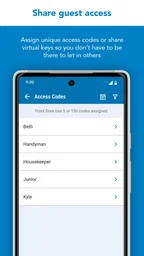
The strongest everyday case for a smart-lock app is often a routine that involves more than one person. Imagine a resident who has trouble carrying keys while handling groceries, a caregiver who visits at an agreed time, or a family member who regularly arrives with their hands occupied. A compatible connected lock managed through Schlage Home may make access easier to coordinate than passing a physical key around. The benefit is practical only if each person knows what to do and the arrangement fits the household’s safety needs.
Before relying on an app for visitors, decide who is responsible for giving access, how a visitor will know the plan, and what happens if the phone or connection is unavailable. Do not assume that a visitor can use the app simply because the household owner can. The person coordinating entry should test the intended arrangement in advance and explain it in plain language. For a one-time worker or a guest who is uncomfortable with smartphones, a conventional key or an in-person handoff may be the less confusing choice.
For someone with memory or attention difficulties, consistency is more valuable than a long list of options. Keep the routine short: use the same device, the same point in the arrival sequence, and the same backup plan. A trusted supporter can help the person practice, but the person who will use the lock should be included in decisions about the routine. Otherwise, a technically tidy setup can still feel unpredictable or take control away from its intended user.
There is a useful distinction between convenience and emergency access. An app may suit ordinary arrivals, but I would not make it the only way a person can enter their home if access is critical and they cannot independently troubleshoot a phone. People who provide care should also consider what happens when the usual user is ill, distressed, or separated from their device. Those are not reasons to reject connected access outright; they are reasons to pair it with a plan that works under less-than-ideal conditions.
Where the experience may still fall short
Schlage Home is not the right fit for everyone. If you do not have compatible Schlage hardware, a conventional key may be simpler and cheaper overall. If your household owns locks from several brands and wants one place to manage the whole home, a broader smart-home app may be more convenient, although that choice brings its own compatibility and setup questions. I would choose based on the door hardware already installed and the people who need to use it, rather than on the appeal of managing access from a phone alone.
The main accessibility concern is that an app-based path can assume confidence with a touchscreen and a charged, available device. That assumption may not suit someone with low vision, reduced dexterity, cognitive difficulties, or limited familiarity with smartphones. A digital option can help one resident while adding work for another. The only reliable way to judge the balance is to let each intended user try the real setup and identify where they need help.
There is also a household-management burden. Everyone needs to understand which method they are expected to use, and the person responsible for the setup should keep the physical and digital routines from becoming contradictory. A visitor who is told one thing at the door and another by a family member may be left uncertain. Write down the household’s simple access plan in a format that works for the people involved, and revisit it when regular users or their needs change.
The app has an average rating of 4.1 from around 13,000 ratings, with about 6,400 written reviews, and has reached over one million installs. Those figures suggest that it is an established option, but they cannot tell me whether it will work for a particular person’s eyesight, grip, memory, or phone habits. The current version is 8.3.1, and the app was released on August 15, 2017. I would treat those as context, not as a substitute for testing it with the specific lock and users in your home.
My inclusive verdict
I see Schlage Home as a focused companion for households using Schlage smart locks, not as a universal answer to accessible entry. Its value depends on whether the connected lock fits the door, whether each person can comfortably use the phone-based routine, and whether the household keeps a workable alternative for moments when the app is not convenient. That is a more realistic standard than asking whether an app is accessible in the abstract.
It is most worth considering when several trusted people need to coordinate access and a physical key is awkward to carry or manage. It is less persuasive when a resident cannot reliably use a touchscreen, when the household wants to control mixed-brand devices in one place, or when no one can maintain a backup plan. In those cases, a familiar key, another access arrangement, or a broader platform may be a better match.
My recommendation is to test the full routine before depending on it: confirm compatibility, let every regular user try the app in the lighting and circumstances they actually face, and make sure they can explain the backup method. Schlage Home has a clear role for Schlage-lock households, but an inclusive setup is one that preserves choice. The best result is not simply a smart lock; it is an entry routine that the people who live there can use with confidence.
What we like
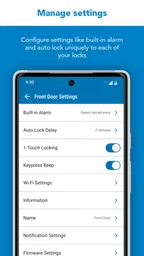
- Manage compatible Schlage locks from the app.
- Check lock status without being at home.
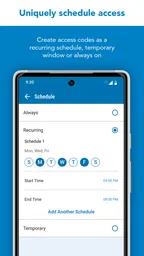
- Share access with temporary or scheduled codes.
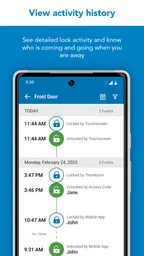
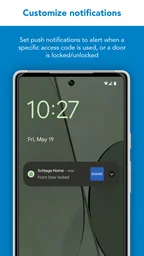
- Receive alerts when supported locks are used.
- Connect compatible locks to supported smart home platforms.
What could be better
- Remote features may require a compatible Wi-Fi adapter or hub.
- Some functions work only with specific Schlage lock models.
- Smart home integrations may need separate setup.
- App features can vary by lock model and region.
- A stable internet connection is needed for remote access.





