

RoomGPT AI - Interior Design review
 Analysis by Appsdrops
I can see the appeal of RoomGPT AI right away: when a room feels tired, it offers a quick way to explore a different look without first moving furniture or buying paint. I’d treat it as a visual brainstorming tool, not a substitute for measuring a space or planning a renovation. That distinction matters, because an inspiring concept is useful only if it helps you make a better real-world decision.
This House & Home app is developed by AZUR APPS FZ-LLC. It is free to install, rated for Everyone, and has a 4.5 average from around 19,000 ratings, with more than 500,000 installs. The current version is 100.1.23, and it supports Android 7.0 and newer. Optional in-app purchases range from $4.99 to $74.99 per item, so I’d check the purchase details in the app store before relying on paid access for regular use.
Why the first session feels useful
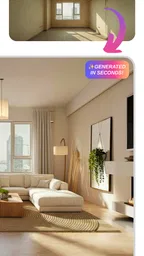
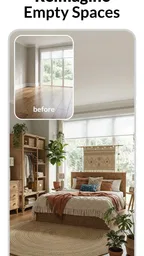
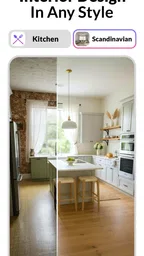
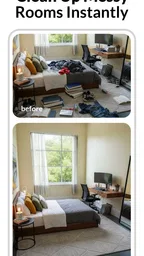
The core appeal is speed: I can use a room photo as a starting point and see a fresh interior direction without learning a full design program. For someone who has never used professional planning software, that low barrier is meaningful. It makes the first step—turning a vague “this room needs something” feeling into a visual idea—much less intimidating.
RoomGPT AI is most helpful when I have a concrete question rather than an open-ended demand for a perfect room. For example, I might want to compare a calmer bedroom mood with a more colorful one, or decide whether a living room should feel lighter and less cluttered. Seeing a proposed look can help me name what I like: warmer colors, simpler surfaces, or a stronger contrast between furniture and walls.
A realistic use is planning a small refresh before spending money. I could photograph a living room on a quiet afternoon, use the result to discuss possible directions with someone I live with, then make a short list of changes we can actually afford or carry out. The image is a conversation aid, not a shopping list. I would still verify dimensions, materials, lighting, and product availability separately.
There is a useful workflow hidden in that distinction: decide what you want to learn before generating a design. If the question is “Would a lighter, less busy look suit this room?”, compare ideas against that question instead of judging each image as a complete proposal. This keeps the process focused and reduces the temptation to chase a polished picture that does not fit the home.
Turn inspiration into a decision
I’d save or note the specific details that appeal to me, rather than treating an entire generated room as something to copy. A concept might suggest a color relationship or a way to make the room feel more open, even if its furniture arrangement is impractical. Separating the useful idea from the imagined setup makes the app more valuable than simply scrolling through attractive results.
It also helps to take the source photo thoughtfully. A clear view of the room gives the design process a better starting point than a tightly cropped shot that hides the walls or major furniture. I would photograph the room in ordinary lighting and keep the camera position consistent when comparing alternatives. That is a practical way to make visual comparisons fairer, without assuming the app can correct every limitation in a photo.
For renters, the same approach can support reversible changes: choose a palette, test a softer visual mood, or think about rearranging objects already owned. I would not treat a generated image as permission to make permanent changes or as proof that a particular finish will look identical in person. The strength here is helping me explore, not certifying the result.
What changes after the novelty
After the initial curiosity wears off, the question is whether I have a reason to return. RoomGPT AI is not automatically a daily-use app; most people do not redesign a room every day. Its recurring value depends on having several real decisions to make over time, such as refreshing another room, revisiting a color choice, or gathering ideas before discussing a project with a household member.
That makes it better suited to occasional bursts of use than a permanent habit. I would open it when I have a room to think about, not just to generate endless variations for their own sake. If I can turn a session into a clear next step—measure a wall, declutter a corner, compare paint samples, or agree on a style direction—the app has done something useful. If I leave with only a folder of attractive but unrelated images, the value is thinner.
Compared with a conventional interior-design app, the appeal is the quick visual starting point rather than detailed project management. A floor-planning tool is a better choice when exact dimensions, furniture footprints, or circulation paths determine whether a layout works. A mood-board app may be better when I already know what I want and need to collect real products, materials, and references. RoomGPT AI fits the earlier, less certain stage: “What direction could this room take?”
That comparison also explains who should skip it. If I need construction drawings, accurate measurements, a reliable purchasing plan, or a professional-grade specification, I would go to a specialist tool or a designer. A generated room image cannot replace those tasks. Likewise, someone who already has a settled plan and mainly needs to track expenses or coordinate contractors may get little lasting benefit here.
Keeping the process manageable
The maintenance burden is modest if I use the app for a specific project and stop when I have enough ideas. The bigger risk is not upkeep but overuse: repeatedly searching for a better-looking result can make a straightforward room feel like an unfinished design problem. I find it more sensible to set a small goal for each session, compare a limited set of directions, and then move to a real-world check.
Because in-app purchases are available, I would pay attention to where free use ends before building a routine around repeated design sessions. The free download makes it easy to try the basic experience, but a person who expects unlimited or ongoing use should inspect the purchase choices and terms shown in the app. The listed purchase range is broad, so it is especially worth deciding what you need before spending rather than buying on impulse after one appealing result.
One practical way to avoid wasted effort is to keep a simple note beside each image: what I like, what seems unrealistic, and what I would test in the actual room. For instance, “keep the lighter color idea; ignore the oversized seating; check whether the existing curtains clash.” This turns inspiration into a small, actionable review instead of a collection of images with no context.
I would also be careful about judging a room from a single viewpoint. A design that looks convincing from one angle may not account for a doorway, a window, or how people move through the space. Looking at the physical room from more than one position before acting is a sensible check. The app can help generate possibilities, while I remain responsible for noticing constraints that a picture may not make obvious.
Where fatigue can set in
The main source of fatigue is the gap between an attractive visual and a workable home. AI-generated concepts can encourage big expectations, while real rooms have fixed dimensions, existing furniture, uneven light, and practical needs. If I expect a generated image to be a faithful renovation preview, disappointment is likely. If I use it as a prompt for decisions, that limitation is easier to accept.
Another possible frustration is that more inspiration does not always mean more clarity. When several designs differ in many ways at once, it can be hard to tell which change actually improved the room. I would compare one broad direction at a time—such as a quieter palette versus a bolder one—and keep the rest of my judgment grounded in the home’s actual needs. This is a useful discipline for any visual design aid, but particularly important when the output is meant to spark ideas quickly.
There is also a personal taste issue. A room can be attractive in a generated image and still feel wrong for how I live. Someone with children, pets, accessibility needs, or a strong preference for familiar furniture should judge concepts by comfort and function, not just appearance. If a proposed look requires replacing items that work perfectly well, it may be a poor recommendation for that household even if the image is appealing.
RoomGPT AI has a 4.5 average from around 19,000 ratings and 268 written reviews, which suggests that many users find enough value to rate it positively. I would still judge it by my own use case: the relevant question is not whether other people enjoy generating room concepts, but whether those concepts help me make a decision I would otherwise struggle to picture.
Does it earn a lasting place?
My long-term verdict is that RoomGPT AI earns space as an occasional idea tool, not as an app I would expect to open every week. Its best contribution is lowering the effort involved in imagining a room differently. When I have a real project, that can save time and help me explain a preference to another person. When I do not have a decision to make, novelty alone is unlikely to keep it useful.
I would recommend trying it if you are stuck at the “I know this room needs a change, but I cannot picture what” stage. Start with one room and one question, then use the result to identify a practical next step. It is less suitable if you want precise floor plans, dependable renovation specifications, or a direct route from concept to verified products. In those situations, a dedicated planning tool or hands-on professional advice is the better fit.
For me, the app’s staying power comes from restraint. Use it to explore, keep the ideas that make sense in your actual home, and stop when you have enough clarity to act. That makes the quick visual experimentation genuinely helpful without asking it to do the work of a designer, a measuring tape, or your own judgment.
What we like
- Quickly generates room concepts from a photo.
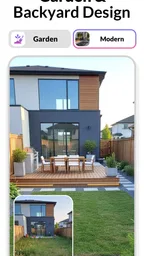
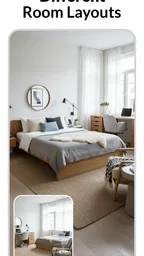
- Offers several design styles to explore.
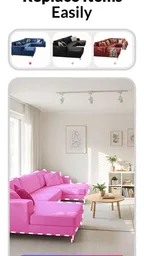
- Useful for visualizing decor before making changes.
- Requires no interior design experience.
- Can provide fresh ideas when planning a room update.
What could be better
- Generated designs may alter room details inaccurately.
- Results can vary in quality between photos.
- Some features or generations may require payment.
- A stable internet connection is needed for AI processing.
- Images are suggestions and may not reflect available products.





