
Roborock review
 Analysis by Appsdrops
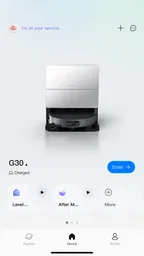
The first time I set up a Roborock cleaner, the appeal of the Roborock app was straightforward: it put the robot’s controls and cleaning information in one place instead of making me rely on buttons on the machine. That convenience feels most noticeable during the first week, when I’m learning how the robot behaves around my home and deciding when to start a clean. The app is free, and its main purpose is practical rather than entertaining: it helps you manage Roborock smart cleaning equipment from a phone.
What feels useful in the first week
Roborock is a lifestyle app from Roborock, built specifically around its own smart-cleaning products. It isn’t a general home-control dashboard, so I wouldn’t install it expecting to manage devices from other brands. Its value depends on having compatible Roborock equipment; without that, there is little reason to keep it. With a supported cleaner, the app gives you a more convenient way to interact with the device than walking over to it whenever you want to start or adjust a clean.
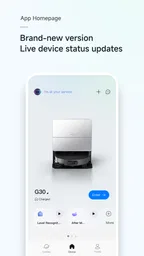
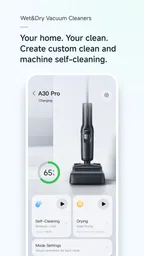
The first few sessions are also when the app earns its place as a companion rather than a simple remote. You can check how a cleaning run is going and use the available controls to fit the job to the moment. I find that distinction important: a robot vacuum is most useful when I can start it without interrupting whatever I’m doing, but it is more manageable when I can also see what it is doing and make decisions from the same screen.
A realistic example is getting ready to leave home while noticing crumbs in the kitchen. Instead of postponing the clean until I remember later, I can use the phone to launch the device before heading out. If I’m home and want to avoid noise during a call, the same kind of remote access makes it easier to choose another time. The app matters most in these small, repeated moments, not because opening a phone is inherently better than pressing a button, but because it removes friction from fitting cleaning into a routine.
The app’s appeal can be strong at the beginning because every new control invites experimentation. I would use that early period to learn which settings I actually need, rather than changing options on every run. A reliable routine is usually more useful than repeatedly fine-tuning a clean that already suits the household. That approach also makes it easier to tell whether a problem comes from the app, the robot, or a room that needs a different setup.
Why the routine matters more than the novelty
After the first week, the question changes from “What can I control?” to “Does this make cleaning easier often enough to matter?” For me, the app’s recurring value comes from reducing the effort of starting and checking a job. If a cleaner is already part of the household routine, phone control can make that habit easier to maintain. If the robot is rarely used, the app cannot create a lasting benefit by itself.
This is where Roborock differs from a generic cleaning timer or a basic appliance remote. A timer can start a task, but it doesn’t give the same device-specific context. A simple button is dependable for a quick start, but offers less flexibility when I want to manage the cleaner from another room. Roborock’s dedicated approach is a good fit for people who want their cleaning device and its controls to work together. It is less compelling if you prefer a single app that handles every smart-home brand, or if your cleaning needs are simple enough that physical controls do everything you want.
One useful habit is to treat the app as a way to make cleaning predictable, not as a reason to run the robot constantly. I’d choose a schedule or routine that fits the household’s actual mess and presence, then adjust only when there’s a clear reason. This avoids the common trap of spending more time managing a cleaning system than the cleaning saves. It also gives the app a clearer job: helping a useful household habit happen with less effort.
The same thinking helps when deciding whether remote control is worth using. If you’re often away when you want the cleaner to run, starting it from the app can be a genuine convenience. If you’re usually nearby and only need an occasional clean, the phone may be an optional extra rather than a daily necessity. I’d judge the app by how much it simplifies the routine you already have, not by how many controls I can explore during setup.
Keeping the cleaner—and the app—manageable
Smart control doesn’t remove the ordinary work of owning a cleaning device. The robot still needs attention, and an app can’t make a full dustbin, tangled brush, or neglected floor preparation disappear. I’d think of the app as a tool for operating the cleaner, not as a substitute for checking the machine. That distinction keeps expectations realistic and prevents a polished phone interface from being mistaken for maintenance-free cleaning.
A practical workflow is to check the cleaner after a job when something seems off, then deal with the physical cause before launching another run. If the robot repeatedly struggles in the same spot, changing the start time may not solve the real issue; clearing an obstruction or reconsidering the way the area is arranged could be more effective. The app is most helpful when it gives you a convenient way to operate the device, while your own observation tells you what the home and machine need.
I also recommend resisting the urge to adjust settings just because they are available. Make one change at a time, then see whether the next clean improves. This is a small but useful way to avoid confusing yourself: if several things change between runs, it becomes harder to know what helped. A consistent baseline makes occasional troubleshooting easier, especially in homes where furniture, rugs, or daily clutter affect how the cleaner moves.
For households with more than one person, it helps to agree on a simple routine for when the robot should run and who checks the machine. That isn’t a special app feature; it is a way to make connected cleaning work in real life. Remote controls are only valuable if everyone understands when to use them and someone remembers the physical upkeep. The app can make operation easier, but the household still supplies the judgment and follow-through.
Where fatigue can set in
The main source of fatigue is not necessarily the app itself; it is the extra attention that any connected appliance can invite. Checking progress too often, changing options without a clear need, or expecting the cleaner to handle every situation can turn a convenience into another thing to monitor. I get the best results when I use the phone to start or review a clean when needed, then let the device do its work rather than treating the app like a live dashboard that demands constant attention.
Another limitation is the product-specific focus. Because this is Roborock’s own control app, it makes most sense for people already invested in a compatible Roborock cleaner. If you’re comparing devices from several manufacturers and want one universal control experience, a brand-specific app may feel like another separate account and interface to manage. In that case, I’d first decide which appliance ecosystem you actually plan to use, rather than choosing an app in isolation.
There can also be a gap between what a user hopes a robot will do and what a home allows it to do. Clutter, cables, thresholds, and changing room layouts can all affect how useful automated cleaning feels. The app can help you operate the machine, but it cannot make a difficult floor plan simple. If your home needs frequent hands-on preparation before every run, the overall convenience may be lower than the interface initially suggests.
For those reasons, I wouldn’t recommend installing Roborock just because smart-home control sounds appealing. It is best for someone who owns, or is about to use, a compatible Roborock device and wants a dedicated way to manage it. Someone who prefers manual cleaning, rarely uses phone controls, or expects one app to handle a mixed-brand home may be happier with a simpler approach. That is not a flaw so much as a clear boundary around what the app is for.
A sensible long-term fit
Roborock has been available since May 23, 2019, and the current version is 4.76.08. It requires Android 7.0 or later, is rated for Everyone, and costs nothing to download. Its average rating is 4.6 from around 408,000 ratings, with about 3,600 written reviews and over 10 million installs. Those figures suggest that the app has reached a substantial audience, but I would still make the decision based on whether it matches the cleaner and routine you actually have.
For me, the lasting value is less about novelty and more about reducing small points of friction. The app is worth keeping when I use it to start the cleaner at a sensible time, check a run without walking over to the device, and make occasional adjustments that solve a real problem. It becomes less valuable if I spend more time watching progress or changing controls than the robot saves me in effort.
My overall recommendation is straightforward: if you use a compatible Roborock cleaner and want convenient phone-based control, this is a sensible companion to try. Give yourself a little time to settle on a routine, keep maintenance as part of ownership, and avoid treating every available setting as something that needs attention. Its strongest long-term benefit is making an existing cleaning habit easier to repeat, not replacing the judgment and upkeep that keep a home clean.
What we like
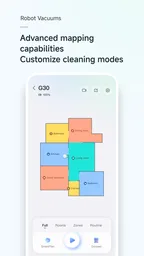
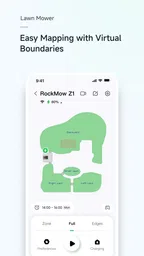
- The map makes it easy to set room-specific cleaning routines.
- You can adjust suction power and water flow for different jobs.
- Scheduled cleaning helps keep floors tidy with less effort.
- The app shows cleaning progress and remaining battery life.
- Voice assistant support allows convenient hands-free control.
What could be better
- Some features require a compatible Roborock vacuum.
- Map editing can take time to learn.
- App controls may feel overwhelming at first.
- Remote cleaning depends on a stable internet connection.
- Firmware updates can occasionally change how features work.





