
Rivian review
 Analysis by Appsdrops
I would judge the Rivian app by a simple question: do you own or regularly use a Rivian vehicle? If so, a manufacturer’s own app can be a practical companion for keeping vehicle-related tasks together. If you are looking for a general driving, navigation, or car-shopping tool, the name alone is not a reason to install it. My view is that this is a focused app for Rivian owners, not an all-purpose answer to everything a driver might need.
Start with the kind of app you actually need
Rivian, made by Rivian, LLC., sits in the auto and vehicles category. Its role is best understood as a brand-specific companion rather than a general motoring utility. That distinction matters: the useful question is not whether it can replace every app on your phone, but whether it gives you a worthwhile place to handle the parts of owning a Rivian that you want to manage digitally.
The app is free, has an Everyone age rating, and is on version 3.18.0. Those details make trying it a low-commitment decision, but they do not tell you whether it suits your routine. I would consider how often you interact with your vehicle, whether you prefer manufacturer-specific tools, and whether your everyday driving already depends on other apps. If your needs are broad and brand-neutral, a dedicated Rivian app may be only one small piece of your setup.
The audience is also fairly clear from its scale and feedback: it has over 100,000 installs, with a 3.0 average rating from 759 ratings and 360 written reviews. I read that as a reason to approach it with sensible expectations, not as a verdict that it is either indispensable or unusable. Ratings can reflect different devices, expectations, and experiences; what matters most is whether the app’s current capabilities match the way you use your vehicle.
Match the app to your ownership routine
Before relying on a vehicle companion, I like to separate occasional tasks from habits that need to work smoothly every day. If you only want a tool for infrequent ownership tasks, opening a dedicated app now and then may be perfectly reasonable. If you expect it to be central to your daily routine, reliability and ease of reaching the functions you care about become more important than a polished first impression.
A useful test is to list the moments when you would reach for it: before setting out, after parking, or when dealing with an ownership task at home. Then ask whether having those moments connected to a Rivian-specific app would simplify your day or merely add another place to check. That small bit of planning is especially helpful if you already use a navigation app, a charging-related service, or a general vehicle utility.
Where a manufacturer companion can be useful
The clearest strength of a brand-specific app is its focus. A general automotive app has to serve drivers with many makes and models; a manufacturer’s companion can concentrate on one ownership experience. In principle, that makes it a sensible first place to look when a task is tied specifically to your Rivian, rather than trying to bend a broad third-party tool around it.
That focus is most valuable when it reduces decision-making. Instead of wondering which unrelated app might handle a vehicle-specific need, an owner can begin with the app from the vehicle’s own company. I would treat it as a natural starting point, then keep other tools for jobs they already do well. A manufacturer app does not need to replace every service to earn a place on your phone.
Here is a realistic everyday example: you are getting ready to leave, and you want to make your usual vehicle-related checks in one familiar place rather than searching through several apps. A dedicated companion can be convenient in that moment because it is associated with the vehicle you own. The practical gain is less about the app being a universal dashboard and more about having a clear, brand-specific home base for the parts of ownership it supports.
The most useful way to approach Rivian is as an ownership companion, not as a substitute for every driving app. Keeping that boundary in mind helps avoid disappointment. I would not assume that a vehicle-maker app is automatically the best choice for route planning, comparing cars, or handling unrelated travel needs. For those jobs, a tool built specifically around the task may be more comfortable.
Where other kinds of apps may fit better
If your main priority is navigating unfamiliar roads, a dedicated navigation app is usually the more direct choice. If you want to compare vehicles from different manufacturers, a brand-neutral car research tool is a better starting point. And if you are looking for a general record of fuel, maintenance, or household vehicles, an independent vehicle-management app may fit a mixed-brand garage more naturally.
That does not make the Rivian app a poor choice; it means the alternatives solve different problems. A Rivian owner may reasonably use this app for the vehicle-specific side of ownership while keeping a separate navigation or planning app for trips. I would avoid forcing one app to become the center of every part of driving simply because it comes from the vehicle’s manufacturer.
It is also not the right pick for someone without a reason to use Rivian’s own services. If you do not own or expect to interact with a Rivian, the app’s focused identity is a limitation rather than a benefit. A general auto app will be more useful if you need information that spans makes, vehicles, or a broader set of everyday motoring tasks.
One trade-off worth considering is app switching. A brand-specific tool can make vehicle-related tasks feel more coherent, but it may still sit alongside other apps you use. If you dislike maintaining separate tools, decide whether the Rivian-specific convenience outweighs that extra stop. In my experience, a focused app earns its keep when it handles a recurring need; it is less compelling when you open it rarely and already have a satisfactory alternative.
How I would test it before building a habit
I would start by installing it and checking the tasks that matter to my own ownership routine, rather than judging it by the app’s name or its category. Try it during a normal day: use it when you are preparing to leave, then again when you have time to explore its vehicle-related options at home. This reveals whether the layout and workflow make sense to you without making the app responsible for a high-pressure moment right away.
A useful, slightly less obvious tip is to test the same task more than once, in different circumstances. An app can seem straightforward when you have plenty of time and feel less convenient when you are in a hurry. Pay attention to how many steps it takes to reach what you need, whether you can remember where things are, and whether using it actually reduces friction compared with your existing routine.
I would also keep a simple fallback for anything you consider essential. That is not a claim that the app will fail; it is a sensible habit with any digital tool tied to a vehicle or travel routine. If a task matters when you are away from home or short on time, know what you would do if you could not use the app in that moment. This kind of backup thinking is more useful than assuming any single app should handle every situation perfectly.
What its feedback suggests for a new user
The 3.0 average rating is a mixed signal, so I would not ignore it, but I would not let it decide the question by itself. The app has enough users to attract a meaningful body of feedback, yet ratings summarize many different expectations. An owner who wants a simple brand companion may judge it differently from someone who expects a single app to cover every part of vehicle use.
For that reason, I would treat a first install as a trial rather than a commitment. The app is free, so the main cost is the time spent learning it and deciding whether it deserves a regular place on your phone. If the tasks you care about are easy to reach and the app fits naturally into your day, keep it. If you repeatedly find yourself returning to other tools, it may be better as an occasional resource than a daily habit.
Rivian, LLC. is the developer, and the app’s identity is closely tied to the company and its vehicles. That is a useful point of distinction from general-purpose alternatives: the app’s value comes from being part of a particular ownership ecosystem, not from being the most comprehensive automotive tool for every driver. The store summary is “Adventurous Forever,” but I would make my decision based on practical fit, not on a slogan.
My recommendation for Rivian owners and everyone else
I would recommend giving the app a try if you own a Rivian and want a dedicated place to begin with vehicle-related digital tasks. Its focused approach is the main reason to choose it, and the free price makes it easy to see whether it suits your habits. I would keep expectations grounded: test the functions you actually need, and do not assume that a manufacturer companion will replace navigation, research, or other general driving tools.
If you are deciding between this and a broad automotive app, choose based on the job. For Rivian-specific ownership, start here. For a multi-brand garage, broad research, or a task that another specialist app handles better, choose that alternative and use Rivian only where its focus adds value. That division is often more practical than demanding one app do everything.
For a prospective user, the best next step is straightforward: install it, explore it when you are not rushed, and see whether it makes a real ownership task easier. If it does, let it become part of your routine; if it adds another stop without saving effort, there is no need to force the fit. My recommendation is positive for Rivian owners who want a brand-specific companion, and cautious for anyone seeking a complete, general-purpose driving toolkit.
What we like
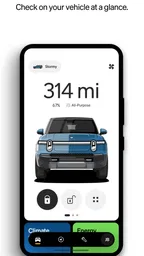
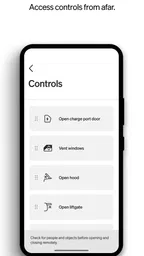
- Remote controls let you lock or unlock the vehicle from your phone.
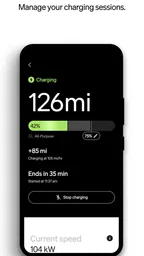
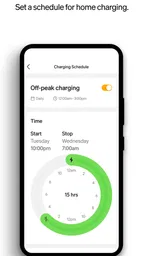
- The app can show vehicle location and charging status.
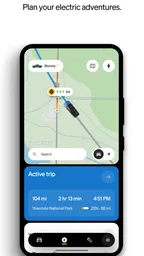
- Trip planning helps identify charging stops along a route.
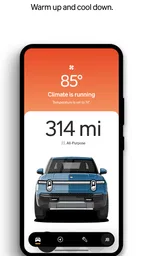
- Owners can schedule cabin temperature before a drive.
- Vehicle alerts can help you monitor charging and security.
What could be better
- Most features require a compatible Rivian vehicle.
- Remote commands may take time when network coverage is weak.
- Trip planning depends on charging station data being up to date.
- Some controls may be unavailable while the vehicle is updating.
- The app offers limited value to people who do not own a Rivian.





