
Resident Center review
 Analysis by Appsdrops
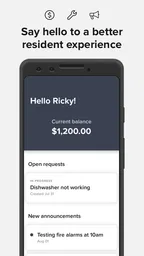
If you’re new to a rental community and want a clearer way to handle routine resident tasks, Resident Center is worth a look. It is a free House & Home app from Buildium, with a 4.6 average from around 25,000 ratings and over 500,000 installs. Its appeal is straightforward: it gives residents a mobile place to interact with the property-management setup their community uses, rather than relying on a scattered mix of calls, emails, and paper reminders.
The important caveat is that this is not a universal rental portal that works independently of your building or landlord. It is most useful when the property manager has adopted Buildium’s resident tools and invited you into the relevant community. If that is your situation, the app can make everyday follow-up more convenient. If not, installing it may not give you much to do.
What to expect from a resident portal
I think of this app less as a general home-organizing tool and more as a shared channel between residents and property management. That distinction matters. It is not meant to replace every conversation with a leasing office, nor should you assume that it handles every possible lease, payment, or maintenance process. What you can do depends on how your management team has configured and uses the service.
That property-specific nature is both the main strength and the main limitation. When your manager uses the platform consistently, keeping routine matters in one place can be simpler than searching old email threads for context. When the office still handles most things by phone or email, the app may feel like an extra stop rather than a shortcut. I would ask your property manager whether residents are expected to use it before treating it as your main contact method.
The overall presentation is designed to be simple, which suits an app people may open only when something needs attention. That is a better goal than burying a resident in complicated menus. Still, simplicity does not guarantee that every action is available to every user: the management company’s setup determines how relevant the app is to your home.
Who is likely to get the most from it?
It makes the most sense for residents whose property manager already relies on Buildium and wants residents to use a digital channel for day-to-day coordination. It can also be useful if you share household responsibilities: one person can check the resident-facing channel and relay practical updates, instead of everyone separately trying to track conversations with the office.
On the other hand, if you rent from an individual owner who prefers direct texts, or your building has its own established portal, this may not improve your routine. I would not switch away from an existing system until the manager confirms that Resident Center is the channel they actively monitor. A resident app is only helpful when both sides use it.
Getting started without guessing
Before installing, check any welcome email, lease information, or resident instructions from your management office for the name of the service they use. After installing, follow the sign-in or joining instructions provided by that office. The useful first step is not exploring every screen; it is confirming that you are connected to the right property and resident account.
If you cannot get in, pause before creating multiple accounts or trying unrelated email addresses. The account may be tied to the contact information your manager has on file, and a mismatch can make a simple setup feel like a technical problem. I would first compare the address you are using with the one given to the office, then ask the manager to check the resident invitation or account details. That is more likely to resolve access confusion than repeatedly reinstalling the app.
Resident Center is rated for Everyone, so its stated age classification is broad. The app is currently version 1.5.19, and it was released on August 7, 2019. Those details help identify the product, but for a first-time resident the practical question is whether your specific community supports it and has supplied a working way to sign in.
Your first useful task: make one real request
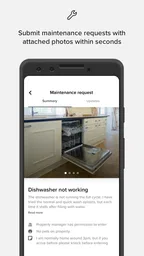
Once you can access the right resident account, start with a small, genuine task rather than trying to learn the whole app at once. If your management team directs residents to submit routine requests through the portal, use your first appropriate maintenance issue as a test: describe the problem plainly, include where it is, and keep the wording focused on what needs attention. Then check the app for any response or status information your community provides.
A concrete example: imagine you notice a leak under the kitchen sink before leaving for work. A useful report says where the leak is and what you observed, rather than just “something is broken.” If the portal gives you a place to add details, include whether the area is actively getting wet and whether you have taken a temporary step to protect belongings. These details help the management team understand the issue; they do not replace urgent action if there is immediate danger or serious water damage. In that case, use the emergency contact instructions from your property.
This workflow also gives you a quick way to judge whether the app fits your community. Can you reach the correct resident space? Is there a clear path for the task your manager says belongs there? Can you tell where to look for a reply? If those basics work, the portal may reduce the need to chase the same request through multiple channels. If they do not, contact the office and ask which route they want you to use.
Small habits that prevent avoidable friction
My first practical tip is to keep descriptions factual and specific. “The bedroom window will not close fully” is easier to act on than “the room is drafty,” because it points to a particular item and a visible problem. If the app supports a relevant detail field, use it for location and timing rather than burying the key point in a long explanation.
Second, treat the portal as a record of communication, not proof that an issue has been handled. After sending a request, look for a response through the channel your manager actually uses. If there is no acknowledgement and the matter is time-sensitive, follow the property’s stated contact process instead of assuming that submitting something in an app guarantees immediate attention.
Third, avoid sending the same request through several channels at once unless the issue is urgent or the office tells you to do so. Duplicate reports can make it harder to follow the discussion and may leave you uncertain about which thread contains the latest update. A sensible approach is to submit through the preferred channel, note when you did it, and use a direct call or other designated contact if the situation calls for faster attention.
Where first-time users can get confused
The most common point of uncertainty is likely to be account access, not how to use a complicated feature. A resident portal depends on the property’s setup, so an app download by itself does not necessarily establish your connection to a building. If the sign-in steps are unclear, ask the management office for the exact invitation or access instructions they expect residents to follow.
Another possible mismatch is expecting the app to behave like a general-purpose landlord marketplace. It is not a place to browse homes or find a new rental; it is intended for residents using a Buildium-powered management relationship. That makes it more focused than broad housing apps, but also less useful to someone who is still searching for a property or whose landlord does not participate.
There is also a difference between having an app available and having a management team actively respond through it. A polished mobile interface cannot fix slow office processes or unclear responsibilities. If your community provides instructions about which issues belong in the portal and which need a phone call, follow those instructions. For emergencies, use the property’s emergency procedure rather than waiting for an in-app reply.
How it compares with email, calls, and other portals
Compared with ordinary email, a resident portal can be easier to revisit when a conversation is tied to your property account instead of buried in an inbox. Compared with phone calls, it may be more convenient for non-urgent communication when you want to send a clear written description. But neither comparison means it is always superior: email remains useful when your manager explicitly requests it, and a call is better when you need immediate clarification.
Compared with another building’s resident app, the practical difference is often less about which interface looks nicer and more about which system your property manager actually supports. A portal that your office checks regularly is more valuable than a feature-rich alternative nobody monitors. For residents in Buildium-managed communities, Resident Center can make the approved route easier to reach; for everyone else, the property’s chosen system is the better option.
The app is free, so trying it does not require a purchase. But the time cost still matters: if your property has not adopted it, or if all useful communication continues elsewhere, it may add little. I would install it when the management team points you to it, then judge it by whether it helps complete one real task with less uncertainty.
What to do after the first success
After your first request or other routine interaction, make a simple personal habit of checking the portal when you expect a response, rather than refreshing it constantly. Keep any important instructions from your property manager accessible, especially contact details and the procedure for urgent maintenance. That way, the app becomes one part of a sensible communication routine instead of the only route you remember.
Buildium has built a practical resident-facing app for a specific situation: living in a community whose management team uses its platform. Its large audience and 4.6 average rating suggest many people find it useful, but those figures do not remove the need for property-level support. What matters to me is whether your manager is prepared to use it consistently and whether you can reach the right account without a detour.
I would recommend giving it a try if your property has invited you and you want a more organized mobile way to handle ordinary resident communication. I would skip it, or treat it only as a secondary option, if your landlord has a different process or expects urgent matters to be handled by phone. Used in the right setting, it can make the first step of contacting management feel less uncertain; used without that shared setup, it is simply another app on your phone.
What we like
- Residents can manage household details from a single account.
- The app can make it easier to contact property management.
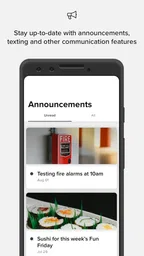
- Community announcements help residents stay informed.
- Maintenance requests can be submitted without calling the office.
- Useful for checking community services while away from home.
What could be better
- Available features depend on the property management company.
- Some requests may still require follow-up with the management office.
- Residents may need an invitation or account setup to get started.
- App usefulness varies based on how actively the community uses it.
- Not every building or community may support Resident Center.





