
RepairSolutions2 review
 Analysis by Appsdrops
When a warning light appears, the hard part is often deciding what to do next: keep driving, book a mechanic, or investigate first. RepairSolutions2 is aimed at that moment. It is a free car-diagnostics app from Innova Electronics Corporation, designed to help drivers make more sense of vehicle problems rather than guess from a dashboard symbol alone. I see its best role as a practical first stop between noticing a symptom and choosing a repair—not as a substitute for a mechanic or a guarantee that every fault can be diagnosed from a phone.
Start with the kind of help you actually need
Before choosing any car-diagnostics tool, I’d ask whether I want a quick explanation of a warning, a way to collect information before a garage visit, or equipment for ongoing hands-on vehicle work. Those are different needs. RepairSolutions2 is most appealing if you want accessible diagnostic guidance and are willing to follow a process; it is less compelling if you expect a phone app alone to inspect every system in every vehicle.
That distinction matters because a diagnostic result is a clue, not a repair order. A fault code can point toward a system or condition without identifying the failed part with certainty. I would use the app to prepare better questions and narrow down what to investigate, then weigh the result against symptoms, vehicle history, and professional advice when the issue affects safety or drivability.
The app sits in the auto and vehicle category, and its focus is narrower than a general maintenance log or a roadside-assistance service. Its store summary promises quick diagnostics, but the useful question for a driver is whether the information helps turn uncertainty into a sensible next step. In my view, that is the standard to apply: does it help you understand what may be happening and communicate the issue more clearly?
Know what you need before you begin
For a first-time user, I would begin by checking that the app is suitable for the phone’s operating system and that you have the equipment and vehicle access required for the diagnostic process. The current version is 2.7.5, and the stated minimum operating-system requirement is 10. It is worth checking compatibility before making a trip to the car or relying on the app when a warning light appears.
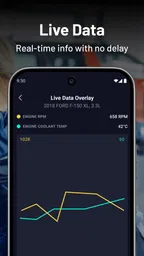
Also think about where you expect to use it. A driver who wants occasional help with a check-engine warning may value a guided explanation, while a hobbyist who wants to monitor several kinds of vehicle data or perform advanced testing may need a dedicated scan tool with capabilities matched to that work. The right comparison is not simply “app versus app”; it is whether a guided consumer tool or a more technical setup suits your comfort level.
Where RepairSolutions2 earns its place
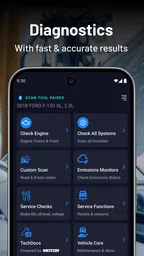
The strongest case for RepairSolutions2 is the gap it can fill between a confusing dashboard warning and a mechanic’s appointment. Instead of treating the light as either harmless or an immediate catastrophe, I can use a diagnostic workflow to gather more context. That can make a conversation with a repair shop more focused: describe the warning, explain when it appeared, and share what the diagnostic process surfaced, while staying open to a technician’s inspection.
A realistic example is a warning that comes on during an ordinary commute, with no obvious change in how the car drives. I would avoid clearing anything or deciding that the vehicle is safe solely because it still feels normal. I’d record when the light appeared, check for any urgent symptoms, use the app’s diagnostic guidance, and arrange professional help if the warning or behavior warrants it. That sequence is more useful than searching an isolated code and immediately buying a part.
Another practical use is preparing for a repair conversation when you have limited automotive experience. You do not need to arrive claiming to know the exact cause. You can explain what prompted you to investigate and ask the mechanic to verify the suspected area. This keeps the app in its proper role: a way to become a more informed customer, not a tool for overruling an inspection or diagnosing a complex fault by confidence alone.
With a 4.7 average from around 29,000 ratings, the app has attracted a substantial audience, and it has over 1 million installs. Those figures suggest broad interest, but they do not tell me whether it will suit a particular vehicle or solve a particular fault. I’d treat them as a reason to consider it, not as a promise of a successful diagnosis in every case.
In practical use, the most valuable habit is to keep the context around a result. Note whether the car was cold or warm, whether the warning appeared after refueling or in particular driving conditions, and whether the engine felt different. Those observations can help a professional interpret a diagnostic clue. The app may help you begin the investigation, but your account of what the car did remains important evidence.
I also like the idea of using it to avoid two opposite mistakes: ignoring a warning because the car seems fine, and paying for a repair based on a single code found online. A diagnostic aid is most useful when it prompts a careful next step. If its result points toward a system, use that as a discussion starter and seek confirmation before spending money on parts or attempting a repair beyond your skill.
How it compares with other ways to diagnose a car
The usual alternatives fall into a few broad groups. A basic code reader can be a straightforward choice for someone who wants to retrieve codes and already knows how to interpret them. A professional scan tool may be a better fit for a technician or enthusiast who needs deeper testing. A repair shop can inspect the vehicle directly, which is the sensible option when symptoms are serious, the cause is unclear, or safe diagnosis requires expertise.
RepairSolutions2 makes more sense for a driver who wants app-based guidance around diagnostics rather than a bare code and a blank search box. That convenience has a trade-off: guided information cannot replace the breadth of a shop’s physical inspection, and it may not satisfy users seeking advanced controls or detailed live analysis. I would choose based on the task, not assume that one tool is universally superior.
There is also a useful difference between looking up a code in a general web search and using a dedicated diagnostic app. Search results can be helpful, but they may mix vehicle-specific advice with guesses that do not fit your car. A purpose-built workflow can make the process feel more organized. Even so, I would not treat any single explanation as definitive; symptoms, vehicle details, and proper testing still matter.
If your car is running roughly, losing power, overheating, showing a brake-related warning, or behaving in a way that could make driving unsafe, I would not let an app decide whether to continue the trip. Stop when appropriate and get qualified help. Likewise, if you need a repair completed rather than an initial clue, a capable workshop is a better choice than spending time trying to make an app answer a question that requires hands-on diagnosis.
What it costs to try—and what to expect
The app is free to download, but it includes in-app purchases priced from $9.99 to $29.99 per item. I’d look at the purchase details in the app store before paying, and decide whether the specific paid option fits a real need. The free entry point makes it easier to assess whether the workflow suits you, but “free” does not mean every possible feature or service is included without charge.
For a first attempt, I’d keep the process simple: install the app, check compatibility, follow its instructions carefully, and avoid buying anything until you understand what the purchase offers. If you already own a diagnostic device or are considering one, compare the full setup you need rather than just the app’s price. A tool that is inexpensive to start with may still be the wrong choice if it does not support the kind of work you intend to do.
There is a small learning cost even when the interface is approachable. You need to distinguish a diagnostic suggestion from a confirmed fault, and you may have to provide accurate vehicle information or follow connection steps. If you are uncomfortable handling equipment around a vehicle, ask someone experienced to help rather than improvising. Taking a moment to understand the result is better than rushing into a repair based on a label.
RepairSolutions2 is rated for Everyone, which makes it broadly accessible as an app, but the subject itself still calls for care. Vehicle diagnosis can lead to decisions about driving and repairs. I would not let an age rating or a clear interface imply that every task is suitable for every user; safety-critical problems belong with a qualified professional.
Who should choose it—and who should look elsewhere
I’d recommend giving RepairSolutions2 a try if you want a practical way to investigate a warning, prefer guided help to starting with an unexplained code, and are comfortable treating results as preliminary. It may be especially useful to drivers who want to show up at a repair appointment with a clearer account of the issue and more informed questions.
I’d look elsewhere if you need a guaranteed diagnosis, advanced workshop-level testing, or a tool that can physically inspect a fault. A professional scan tool may suit a skilled enthusiast better, while a repair shop is the more responsible option for serious symptoms or uncertain safety. If your only goal is routine service reminders or maintenance records, a dedicated maintenance tracker may be a closer match than a diagnostics-focused app.
Innova Electronics Corporation develops the app, and its established presence in the car-diagnostics space is relevant when deciding whether to explore it. Still, the best reason to install it is not the developer name or popularity; it is whether the workflow helps with the specific uncertainty you face. Reviews number around 9,300, but no amount of public feedback can guarantee compatibility or a useful result for a particular vehicle.
My recommendation is to treat RepairSolutions2 as a first-step diagnostic companion, not a mechanic in your pocket. It offers a free starting point for drivers who want to investigate a warning and approach repairs with more context, with optional in-app purchases for those who find they need them. If you keep its limitations in mind, verify important findings, and hand serious issues to a professional, it can be a sensible addition to your vehicle toolkit.
What we like
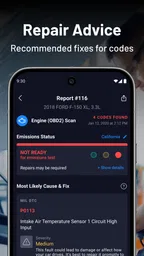
- Provides repair guidance tailored to a vehicle’s trouble codes.
- Can help users understand issues before visiting a repair shop.
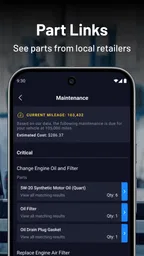
- Offers access to repair information for many vehicle makes and models.
- May connect with compatible FIXD or Innova diagnostic devices.
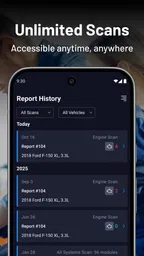
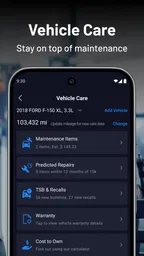
- Lets users review vehicle health information in one place.
What could be better
- Requires a compatible diagnostic device for many features.
- Vehicle coverage and available data can vary by make and model.
- Some features may require a paid subscription.
- Diagnostic results cannot confirm every mechanical problem.
- Bluetooth pairing can be unreliable with some phones or vehicles.





