
RentCafe Resident review
 Analysis by Appsdrops
I can see why a resident would try RentCafe Resident during the first week in a new home: rent, maintenance requests and other housing tasks can be handled from one place instead of being scattered across emails, phone calls and paper notes. The important question, though, is whether it remains useful after move-in excitement fades. My view is that it earns a lasting spot when your property actively uses RentCafe for resident services; it is much less compelling as a general-purpose rental organizer.
Useful from the first week, if your property is connected
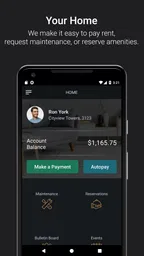
This is a free lifestyle app from Yardi Systems, built around the practical relationship between a renter and their property team. Its core appeal is not novelty but convenience: you can use it to pay rent and submit work orders, making it a single starting point for routine resident tasks. That focus gives it a clearer purpose than a broad apartment-search app, which is mainly useful before you sign a lease.
The catch is that the app’s value depends on your community’s setup and participation. Before making it your main route for housing matters, check whether your property has enabled the services you need and whether your resident account is ready to use. An app cannot make a payment workflow or maintenance process convenient if your building does not handle that task through it.
In a realistic first-week scenario, I would use it to learn where rent payments are handled and how to report a problem, rather than waiting for a leak or a deadline to find out. If something needs repair, submitting the request through the resident channel can keep the task connected to the property’s process. I would still keep a brief personal note of the issue and when I reported it, especially if the repair is urgent or affects access, heat or water.
That last point matters: a resident app is a useful channel, not a substitute for judgment. For an immediate safety concern or an urgent problem, use the contact method your property provides for emergencies instead of assuming an in-app work order will be seen at once. For a routine repair, the app is more likely to be a sensible first stop.
What makes the routine worthwhile
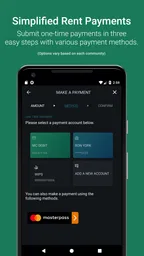
Rent is recurring, so having a dedicated place to deal with it can be more valuable than a long list of occasional features. The practical habit is to open the app around the time you normally review household bills, check the amount and payment details, and complete the task deliberately. I would avoid treating a successful app session as proof that every future payment is automatically arranged; confirm the options shown in your account and keep your usual financial records.
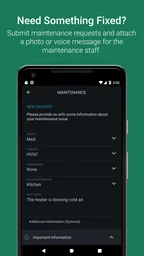
The same principle applies to maintenance. A useful workflow is to describe one problem clearly, include the location and the effect it is having, then keep any follow-up tied to that same issue where possible. For example, “the kitchen sink is draining slowly” is more actionable than a vague note about plumbing. This is a simple way to make a resident request easier for staff to understand without assuming the app offers a particular attachment, status tool or response-time promise.
RentCafe Resident has a 4.8 average from around 181,000 ratings, with roughly 24,000 written reviews. It has over a million installs, is rated for Everyone, and is free to download. Those figures suggest broad use, but they do not guarantee that the app will behave identically at every property: the resident experience still depends in part on how the community manages its services.
Month-to-month value comes from repetition
After the first week, the app’s staying power rests on whether it saves enough small bits of effort to justify keeping it. Rent payment is the obvious recurring reason. Maintenance requests are less frequent, but when one arises, having a familiar place to start can spare you from searching old messages for the right contact. That combination is more convincing than an app that is only useful at move-in.
I would make it part of a light monthly routine rather than checking it constantly. Review rent-related tasks when you review other bills, and open the maintenance area only when you have a real issue or need to revisit one. This keeps the app from becoming another source of notifications and screen clutter while preserving its value for the moments when it matters.
A useful trade-off is that centralization can reduce the mental effort of remembering where to go, but it also concentrates your resident tasks in one digital channel. If you move between properties, or your next landlord does not use RentCafe, the app may stop being relevant. It is not a universal rental record that will necessarily follow you from one lease to another, so keep important documents and confirmations somewhere you control.
Compared with paying through a bank’s bill-pay service, a resident portal can make the payment feel more directly connected to the property account. A bank may be preferable if you already rely on it for scheduled payments and want all bills in one familiar place. Compared with calling or emailing management, the app can offer a more organized entry point for routine requests, while a direct conversation remains better when a problem is complicated, time-sensitive or needs clarification.
Maintenance is mostly about clear communication
For work orders, the strongest practical benefit is having a resident-focused route for reporting a problem. The best results still depend on the details you provide and on the property’s response process. I would report issues promptly, state what is happening in plain language, and distinguish between a minor inconvenience and something that could cause damage. If a problem changes after submission, follow up through an available property contact rather than assuming the original description covers the new situation.
There is a small but important habit to develop: do not submit multiple versions of the same request just because you are unsure whether the first one went through. Duplicate reports can make a straightforward issue harder to track. Instead, look for confirmation in the app or your resident communications, and then use the appropriate contact route if you still need help. This is general good practice for a property workflow, not a promise about a particular confirmation screen.
For rent, I would also separate convenience from record-keeping. Save or note the confirmation that matters to you, and check your account rather than relying only on memory. If you have questions about a charge, payment timing or an account discrepancy, contact the property team through its accepted channels. The app can help you take action, but it cannot resolve every billing question on its own.
Where fatigue can set in
The main source of frustration is that a resident app can only be as useful as the services your property has put behind it. If you install it expecting every housing interaction to be available there, then discover that your community still handles some matters by phone or email, the experience may feel fragmented. I would treat it as a convenient hub for supported tasks, not as a guarantee that every conversation or document belongs in one place.
Another possible fatigue point is simply having a dedicated app for a few occasional jobs. Someone who pays rent through an established bank routine and rarely submits repair requests may find that a browser or a direct call is enough. The app makes more sense when you use its resident services repeatedly or appreciate having a property-specific place to begin.
There is also a difference between an app being well regarded overall and being a perfect fit for a particular resident. A strong average rating is encouraging, but your day-to-day experience will depend on account access, your property’s configuration and the way its staff handle requests. If something is unavailable or confusing, checking with the property team is often more productive than repeatedly trying the same action without knowing whether that service is enabled.
RentCafe Resident is currently at version 26.10.0 and requires Android 8.0 or later. If you use an older Android device, check compatibility in the app store before planning around it. For residents on a supported device, the free price removes the financial risk of trying it, though it does not remove the need to decide whether it fits your property’s actual workflow.
Who should keep it, and who can skip it
I would recommend keeping it if your property uses the platform for rent and maintenance, you prefer a clear digital starting point, or you often need to coordinate routine resident tasks. It is especially useful for people who want to act promptly when a repair appears instead of searching through old contact details. The app’s purpose is narrow, but that can be a strength when it aligns with the way your building operates.
I would be less enthusiastic if you expect a comprehensive personal finance tool, a universal apartment-management service, or a replacement for direct communication with staff. It is also an easy skip if your community does not support the tasks you care about or if you already have a dependable routine that is simpler for you. In those cases, a bank app, email, phone call or the property’s own preferred process may be the better choice.
My practical advice is to test the two tasks that matter most to you soon after setting up your resident account: check how rent is handled and learn how to report a non-urgent repair. If both work smoothly for your property, the app has a credible reason to remain installed. If neither makes your routine easier, there is little benefit in keeping it open out of habit.
A modest app with a durable job
RentCafe Resident does not need to be entertaining to earn space on a phone; it needs to make recurring housing chores easier at the moments you need them. Its strongest case is the combination of rent and work-order access in a resident-focused app, with the caveat that the property’s setup shapes the experience. That makes it a practical tool rather than an essential app for every renter.
For me, its long-term value comes from maintenance of the habit, not maintenance of the app: know where to go, use it for supported tasks, keep your own records, and switch to direct contact when urgency or complexity calls for it. If your community is well integrated with the service, that small routine can justify keeping it installed well after move-in. If the app adds an extra step instead of removing one, choose the channel that gets the job done more reliably.
What we like
- Residents can pay rent online without mailing a check.
- Maintenance requests can be submitted through the app.
- Payment history helps residents track past transactions.
- Push notifications can remind residents about important updates.
- The app offers access to community information on the go.
What could be better
- Available features vary depending on the property's setup.
- Some payments may include processing fees.
- App performance can depend on internet connectivity.
- Residents may need separate credentials for different properties.
- Support options may be limited within the app.





