Remote for Smart Samsung TV review
 Analysis by Appsdrops
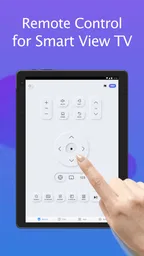
When my Samsung TV remote goes missing, the problem is rarely dramatic; it is just irritating enough to interrupt a film, a quiet evening, or the search for something to watch. Remote for Smart Samsung TV is aimed at that small, familiar inconvenience: it turns an Android phone into a remote for compatible Samsung Smart TVs. I’d consider it a practical backup, especially if I often have my phone nearby, but I would not treat it as a guaranteed replacement for every physical remote.
What matters before you install it
The first question is compatibility, not the number of buttons on the screen. The app is described as controlling Samsung SmartThings TVs, so it makes most sense if your television belongs to that group. If you are unsure whether yours does, check the TV’s model information or its settings before relying on the app for an important occasion. A phone remote is only useful when it can connect to the television you actually own.
The second question is whether a phone-based remote suits the way you watch TV. It can be handy when the original remote is buried under cushions, when you want to keep control close at hand, or when a household member needs a temporary alternative. It is less appealing if you regularly hand the remote to someone else, prefer physical buttons, or need a dependable control option when your phone is unavailable.
This is a free House & Home app from BoostVision, with in-app purchases listed from $1.99 to $36.99 per item. It has a 4.2 average from around 162,000 ratings, and more than 10 million installs. Those figures suggest that many people have tried it, but they do not guarantee that it will work smoothly with every TV setup. I would judge it by how well it connects in my own home and whether its controls feel comfortable during ordinary use.
Check the setup before you need it
My most useful advice is to install and test a phone remote while the original remote is still available. That gives you a way to adjust TV settings or troubleshoot if the phone app cannot find the television immediately. It also lets you check whether your TV and phone can communicate on your home network, rather than discovering a connection problem just as guests arrive or a programme is starting.
Keep both devices on the same home network when trying to pair them, and make sure the TV is switched on. If the app does not find the television, verify those basics before repeatedly tapping through the interface. This is a sensible first troubleshooting step for a network-based smart-TV remote, not a promise that every connection issue has the same cause. Once it is working, try the controls you use most, such as changing channels or adjusting volume, rather than assuming every on-screen button will match your habits.
Where a phone remote earns its place
The strongest case for Remote for Smart Samsung TV is convenience in a shared living space. Picture settling in to watch something and realizing the remote has slipped behind a sofa. If your phone is in your hand, opening a remote app can be easier than pausing everything to search. The same applies when the physical remote is in another room or one person has carried it away without noticing.
It can also serve as a useful household spare. If the original remote is temporarily misplaced, an app may bridge the gap while you look for it or decide whether to replace it. That is a more realistic role than expecting a phone to become the perfect everyday controller for every person in the home. I like the idea of having a backup ready before the small emergency happens; it is less useful if the first time I install it is after the remote has disappeared.
A phone can be easier to locate than a small remote, since people tend to keep it close. But this advantage has a clear limit: a phone needs battery power, and it may be in use for something else. If you often watch TV while charging your phone in another room, or if someone else needs to control the set while you are away, the original remote remains the simpler shared tool.
What it does not replace as comfortably
Physical remotes have a tactile advantage that is easy to underestimate. Their buttons can be found by touch, which matters when the room is dark or when I want to adjust the volume without looking away from the screen. A phone interface asks me to look down and interact with a screen instead. For frequent channel-hopping or quick adjustments, that small interruption may make the traditional remote feel more natural.
There is also a practical difference between a dedicated remote and an app. A remote is ready for the TV and can be left on a table for everyone. A phone app competes with messages, calls, and other tasks, and it may need to be opened or reconnected when I want to use it. If a household has several people who expect immediate, no-explanation control, keeping the original remote accessible is usually the better arrangement.
Compared with broad universal-remote apps, this one has a narrower purpose: Samsung Smart TV control rather than a general attempt to manage equipment from multiple brands. That focus may be an advantage if the TV is the device I need to control. On the other hand, someone hoping to operate a mix of televisions and other living-room equipment from one place should compare a more general solution or use the separate remotes already supplied with those devices. I would not assume this app controls hardware beyond the Samsung TV it is intended for.
Choosing between the app and other options
If the original remote is simply missing, a phone app is an appealing short-term alternative. If the remote is broken and I want a permanent replacement, I would compare the app with a compatible physical replacement before deciding. A physical remote may be preferable for guests, children, or anyone who dislikes touch controls; the app may be preferable for someone comfortable using a phone and who wants a backup without keeping another small device around.
There is a different choice if the TV itself already offers control through its built-in features or another compatible method. In that case, I would try the option that is easiest to access and maintain rather than installing several remote apps. The useful comparison is not which option has the longest feature list, but which one connects reliably in the home and is simple enough that everyone can use it without help.
For a household with one main viewer, a phone remote can be a convenient personal tool. For a family that passes control around constantly, a physical remote is likely to remain the better primary choice. For someone with multiple brands of equipment, a broader universal controller may be worth considering, though it brings its own setup decisions. Remote for Smart Samsung TV makes the clearest sense when the Samsung television is the specific device causing the occasional remote-control headache.
Think about switching and ongoing cost
Trying the app does not require abandoning the original remote. I would keep the physical one nearby until the phone connection has been tested more than once, including after leaving and reopening the app. That simple approach avoids turning a convenient experiment into a frustrating all-or-nothing switch. It also means the app can be judged as a backup first, which is where its value is easiest to assess.
The app is free to download, while in-app purchases range from $1.99 to $36.99 per item. Before buying anything, I would use the free experience enough to decide whether the app connects consistently and whether its controls suit my routine. A purchase only makes sense if it addresses a need I have actually encountered; I would not pay simply because I hope it will solve a connection issue without first checking the network and TV compatibility.
Its current version is 1.7.7, and the stated minimum Android requirement is 7.0. It is rated for Everyone, so the age classification does not make it a niche household tool. Still, a suitable Android version and the right TV are separate requirements: meeting the phone requirement alone does not ensure that a particular television will connect.
My recommendation for everyday use
I would recommend Remote for Smart Samsung TV to Android users who own a compatible Samsung Smart TV and want a convenient backup on the phone they already carry. It is especially appealing if the remote is often misplaced, if the main viewer watches alone, or if having a spare control method would reduce household friction. Set it up before you need it, test the basic controls, and keep the original remote available until you know the app behaves well in your home.
I would skip it as a primary solution if I strongly prefer tactile buttons, share control with people who do not want to use a phone, or need one controller for several kinds of equipment. In those situations, a physical replacement or a broader control option may fit better. My overall view is that this is a sensible convenience app rather than a reason to retire a working remote: useful when it solves a real, recurring annoyance, and easy to leave aside when a traditional controller already does the job.
What we like
- Offers convenient phone-based control for compatible Samsung TVs.
- Can make typing searches easier than using the TV remote.
- Keeps essential controls available without finding the physical remote.
- May provide a practical backup when the original remote is unavailable.
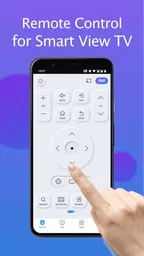
- A familiar touchscreen layout can be easy to navigate.
What could be better
- Compatibility may vary by TV model and year.
- The phone and TV may need to share a network.
- Some features may require a paid upgrade.
- Ads may interrupt use of the free version.
- A phone cannot replace every function of the original remote.





