
Remote Control for Onn Roku TV review
 Analysis by Appsdrops
I look at a phone remote differently from a streaming app: its main job is to make a small household task easier, and that means trust and reliability matter as much as convenience. Remote Control for Onn Roku TV is aimed specifically at people who want to control an Onn Roku television from a phone, with casting and mirroring also part of its appeal. I would consider it when the physical remote is missing or awkward to use, but I would first check how it behaves on my own home network rather than assume every feature will work in every setup.
What this remote is—and what to check first
This is a free House & Home app from MONIQ TAP., CO LTD. It has a 4.6 average from around 3,200 ratings, and more than 100,000 installs. Those figures suggest that many people have tried it, though they cannot tell me whether it will connect smoothly to a particular television or whether its controls will suit my routine.
The app is specifically presented for Onn Roku TVs, so that distinction matters. It is not a general remote for every television brand, nor should a Roku streaming player be assumed to behave exactly like an Onn Roku TV. Before relying on it, I would confirm that the television is the intended kind of device and that both it and the phone are connected to the same home network. A mismatch there can look like an app failure even when the issue is the setup.
The current release is version 1.5, and the listed minimum operating system is 8.0. The app is rated Everyone. It is free to install, with in-app purchases listed from $4.99 to $39.99 per item, so I would treat the free download as a chance to test basic suitability rather than assume every option is included without charge.
Trust starts with what you can actually observe
For a remote-control app, my first trust check is practical: does the app clearly find the television I mean to control, and can I tell when a command has worked? Those are visible behaviors I can assess at home. I would not infer anything about permissions, data collection, storage, or account handling from the app’s purpose alone. Before granting access or using casting and mirroring, I would read the permission prompts on my device and make a deliberate choice based on what the app asks to do.
That is especially useful when a phone is shared with family or guests. A remote app can be convenient without becoming something everyone needs to use. I would install it on the person’s phone who most often needs a backup, check the choices presented during setup, and avoid treating any permission request as automatic. If a prompt seems unrelated to the task I am trying to complete, I would pause and decide whether to continue.
Connection checks that save time
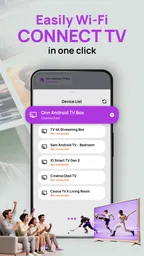
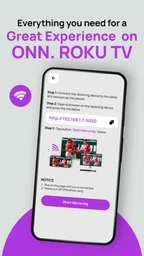
When a phone remote cannot locate a TV, I would troubleshoot in a fixed order instead of repeatedly tapping the scan button. First, I would confirm that the television is on and the phone is using the same Wi-Fi network, not mobile data or a guest network. Next, I would check whether the home router separates devices into different bands or network groups; some household setups keep devices from seeing one another even when both appear online. Only after checking those basics would I restart the app or television.
This workflow is a useful distinction between a network problem and a control problem. If the app can identify the TV but commands do not respond, I would focus on the connection staying active and whether the television is awake. If it cannot find the TV at all, I would look first at Wi-Fi and network isolation. I would not promise that these steps solve every case, but they prevent blaming the app before checking the most common home-network friction.
There is also a practical reason to test the connection before a show starts. A phone remote is most valuable when the original remote has slipped between sofa cushions, the batteries have died, or someone wants to adjust playback without searching the room. Testing it during a quiet moment lets me learn whether the TV appears reliably and where the important controls are, rather than trying to set it up while everyone is waiting.
Remote control, casting, and mirroring are different jobs
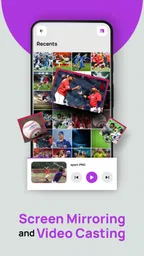
The app’s appeal includes more than changing channels or navigating menus: casting and mirroring are also part of its stated purpose. I would keep those uses separate in my expectations. A remote helps operate the television; casting is for sending selected content to it; mirroring is for showing the phone’s screen. Those tasks can involve different prompts and different sensitivities, especially if the phone contains messages, photos, or work material.
For a casual evening, I might use the remote controls to navigate the TV and reserve mirroring for a specific reason, such as showing a family photo. Before starting a mirror session, I would close private notifications or switch on the phone’s focus mode, because anything visible on the phone could become visible on the television. That small habit is more dependable than assuming a mirroring feature filters personal content for me.
For a guest presentation or a video that is already available through a television app, using the TV’s own app may be simpler than mirroring the entire phone. It avoids putting the phone’s whole screen on display and keeps the phone free for other tasks. In contrast, mirroring can be handy when the material is on the phone and there is no convenient TV app. The better choice depends on the content, not just on which button is available.
Everyday use: a missing remote at the worst moment
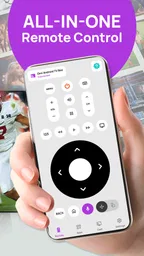
Picture a family settling in to watch something, only to discover that the physical remote is in another room or has stopped responding. If the phone and Onn Roku TV are already on the same network, a phone remote can be a useful backup: one person can navigate while another looks for replacement batteries. The advantage is not that a phone is always better; it is that it is often already in someone’s hand.
There is a trade-off, though. The television remote has dedicated physical buttons and does not depend on a phone battery, an app remaining available, or the network being cooperative. A phone may be easier to find, but it can also be locked, in use, or out of charge. I would keep the original remote as the everyday option when it works and use the app as a fallback or for situations where a phone-based control is more convenient.
A less obvious household tip is to test the app from the spot where it will usually be used. A connection that works beside the router may be less dependable from a bedroom or another floor. Trying it from the sofa gives a more realistic sense of whether this is a practical backup for that room, and it can reveal network dead zones before they become a problem during a film.
What the purchase details mean in practice
Because the app is free to install but has in-app purchases ranging from $4.99 to $39.99 per item, I would check the app’s own purchase screen before paying for anything. I would first establish whether the basic remote functions meet my needs and then consider whether a paid option offers something I specifically want. I would not buy simply to solve a connection issue until I had checked the television, Wi-Fi, and phone settings.
For families, that also means being thoughtful about who can make purchases on a shared device. I would use the device’s purchase authentication or family controls where appropriate, and make sure the person testing the app understands that some items may cost extra. That is a straightforward way to preserve choice without assuming that every household uses the same account setup.
The app is likely to suit someone who owns an Onn Roku TV, wants a phone-based backup, and is comfortable checking network settings if discovery is not immediate. It is less appealing if the television is a different brand, if the home network restricts device-to-device communication, or if the user prefers physical buttons and does not want to use a phone for TV control. If the TV’s built-in controls or original remote already cover the household’s needs, installing another app may add little.
A cautious recommendation
I see Remote Control for Onn Roku TV as a potentially handy companion rather than a replacement I would trust without testing. Its focused audience and inclusion of remote control alongside casting and mirroring make it relevant to Onn Roku TV owners who want phone-based options. The rating and install count provide context about its reach, but my decision would still depend on a successful connection at home and on whether the app’s visible prompts and purchase choices feel appropriate to me.
My advice is to try it before you need it, verify that your phone can reach the television over your normal Wi-Fi, and keep the physical remote nearby until the app proves dependable in your room. Use mirroring selectively, review permission requests as they appear, and check in-app costs before confirming a purchase. With those precautions, it may be a useful backup; if it cannot see your TV or you want a remote that works independently of a phone and network, the original remote is the better fit.
What we like
- Offers a convenient way to control an Onn Roku TV from a phone.
- Useful when the physical remote is misplaced or unavailable.
- Provides quick access to common playback controls.
- Phone typing can make searching for titles easier.
- A familiar touchscreen layout is simple to navigate.
What could be better
- Requires a compatible Onn Roku TV on the same network.
- Some features may depend on the TV model or Roku software.
- A phone battery is needed to use the app.
- Network interruptions can delay commands.
- Unofficial apps may include ads or optional paid features.





