

Redtiger Cam review
 Analysis by Appsdrops
Redtiger Cam is a companion app for people who use REDTIGER dashcams, and that narrow purpose matters when deciding whether it belongs on your phone. I would treat it as a way to interact with a compatible camera, not as a general driving app or a replacement for a standalone navigation tool. Its appeal is practical: when a trip produces footage worth checking, having a phone-based route into the camera’s material can be more convenient than handling every task at the device itself.
I’m cautious about judging any dashcam companion by its feature promises alone. Driving footage can be sensitive: it may show where you travel, when you leave home, or details of an incident. With this app, I’d focus on the choices I can see while using it and keep my expectations tied to the REDTIGER camera I actually own. The app is free, made by TANLINK TECH, INC., and sits in the auto and vehicle category. It has a 3.3 average from 456 ratings, so I would approach it as a useful accessory that may suit some setups better than others, rather than assuming every user will have a smooth experience.
What the app is—and where trust begins
Redtiger Cam is most relevant if you already have a REDTIGER dashcam or are considering one. Without that camera, there is little reason to install it: it is not a broad-purpose driving recorder that turns any phone into a dashcam. That distinction also sets the right standard for comparison. A camera’s built-in screen or controls may be enough for routine setup, while the app is valuable when using a phone makes reviewing or managing camera content more convenient.
The app has passed 100,000 installs, and its content rating is Everyone. Those details can help establish its audience and reach, but they do not tell me how well it fits a particular camera or what happens to information during use. I would not treat popularity or an age rating as a substitute for checking the choices presented on the phone. My practical advice is to install it only when you have a reason to connect it to a compatible camera, then pay attention to each prompt rather than approving everything automatically.
That approach is especially sensible because dashcam use is episodic. You may open the app only when setting up the camera, checking a clip, or dealing with an unusual event. Infrequent use can make it easy to forget what a permission prompt meant or whether a setting was changed. I prefer to make a deliberate note of the permissions I allow and revisit them if I stop using a feature. That is a general phone-level habit, not a claim that the app offers a particular privacy dashboard or account control.
What I would check before connecting
Before pairing, I would confirm that the camera is the REDTIGER model I intend to use and that the app is the correct companion. Then I would read the wording of each permission request in context. A prompt may be necessary for a task I want to perform, but I would not assume that every permission is essential for every use case. If a request seems unrelated to the action on screen, I would pause and decide whether to continue rather than grant access simply to get through setup.
My approach is to separate initial setup from everyday use. I would connect the camera when I have time to troubleshoot, check the app’s available controls, and decide what I actually need. I would avoid doing this while parked somewhere stressful or while preparing to drive. If a connection or transfer takes longer than expected, there is no benefit in trying to solve it at the roadside with traffic or passengers waiting.
The current version is 1.18.0, and the stated minimum operating system is Android 7.0. That gives Android users a useful compatibility checkpoint before installing. I would also keep both the phone’s operating system and the camera’s own instructions in mind; compatibility on paper does not guarantee that every phone and camera combination will behave identically. For someone buying a dashcam specifically for app-based use, checking the intended camera model before purchase is more useful than assuming all REDTIGER devices work in precisely the same way.
When footage becomes sensitive
The most consequential moment is not ordinary setup; it is deciding what to do with a clip after an incident. A recording may include a vehicle plate, a person, a home, or a location that reveals a routine. I would review footage somewhere private and think carefully before sharing it. If I needed to preserve evidence, I would first make sure I had a usable copy and understood where it was saved, rather than relying on a single viewing session or leaving the only copy in a place I might later overwrite.
A useful habit is to distinguish between checking a clip and distributing it. Viewing a recording for personal reference does not require posting it publicly or sending it to a large group. If I needed to share footage with an insurer, a repair professional, or another involved person, I would choose the smallest appropriate audience and inspect the clip for incidental personal details first. That is a sensible workflow for dashcam footage generally; it should not be mistaken for a claim that this app includes redaction tools, sharing controls, or a particular storage arrangement.
I would also avoid handling the phone while the vehicle is moving. The safer workflow is to set up the camera before departure and review recordings after parking. That sounds obvious, but a companion app can make footage feel instantly accessible, which can tempt a driver to check something at the wrong time. If a recording matters urgently, I would stop in a safe place before opening the phone and leave any detailed review until I am no longer driving.
How much control should you expect?
My experience-based recommendation is to judge user agency by the actual options visible in the app and in the phone’s settings, not by assumptions about how a connected camera must work. I would look for clear prompts, understandable choices, and a way to withdraw permissions through the operating system if I no longer want the app to use them. If I decide to stop using the companion app, I would remove permissions I do not need and uninstall it if it no longer serves a purpose. Those are user actions available at the phone level, not special account features I am attributing to Redtiger Cam.
One practical trade-off is convenience versus dependence. Phone access can make a camera easier to manage, but it also introduces another device, connection, and interface into the process. If I only need a basic recording device and rarely review footage, camera-side controls may be simpler. If I expect to check recordings often, especially after parking, the companion app is more likely to justify its place. I would not buy a dashcam solely on the assumption that a companion app will be effortless; the camera itself should still meet my needs when the phone is unavailable.
There is also a difference between wanting an app and wanting an account-based service. I would follow the screens presented during setup and avoid entering information that is not clearly needed for the task I am trying to complete. If the app offers optional choices, I would make them intentionally. I cannot infer account, cloud, or retention behavior from the app’s basic purpose, so I would not treat a convenient interface as proof of any particular data practice. For sensitive footage, my own restraint—reviewing locally where appropriate, limiting sharing, and keeping only what I need—is part of responsible use.
Who will find it useful
I can see this app fitting a driver who owns a REDTIGER dashcam and wants a phone-based companion for camera-related tasks. One everyday example is returning to a parked car after a minor bump and wanting to check whether the camera captured anything relevant. A sensible sequence would be to get to a safe place, open the app, locate the relevant recording if the camera and app support that workflow, and decide whether it needs to be preserved or shared. The key benefit is having a companion interface available without treating a phone as a substitute for safe driving or careful file handling.
It may also suit someone who wants to manage camera use without repeatedly learning device buttons, provided the app works well with their particular setup. I would still test the routine before relying on it for an important trip: connect the camera while parked, learn where the controls and recordings are presented, and confirm that the steps make sense. Doing this in advance avoids discovering during a stressful moment that the phone connection or navigation feels unfamiliar.
On the other hand, I would skip it if I do not own a compatible REDTIGER dashcam, if I prefer to keep vehicle footage entirely outside a phone workflow, or if I want a universal dashcam app that works across brands. Someone who needs navigation, traffic alerts, or general vehicle maintenance tools should look for an app built around those jobs instead. This one’s narrow scope is a strength for the right owner, but it is also a clear limit.
How it compares with other choices
Compared with using only the dashcam’s built-in controls, a companion app can be more convenient when the phone is already at hand and the vehicle is parked. The trade-off is that a phone adds potential connection friction and requires the user to think about permissions and handling footage. Compared with an all-purpose driving app, Redtiger Cam is more directly tied to one camera brand and is not a general-purpose tool. If cross-brand support is essential, I would choose an option designed around that requirement rather than expect this app to provide it.
The app is free, which makes trying it less of a financial commitment, but free does not automatically mean effortless or right for every privacy preference. Its rating suggests that experiences are mixed enough to warrant realistic expectations. I would install it because I have a compatible camera and a specific task in mind, then judge the connection and workflow on my own phone. If it proves unreliable for an important routine, the camera’s own controls or another supported method may be a better fallback.
A measured recommendation
Redtiger Cam makes the most sense as a focused companion for REDTIGER dashcam owners, not as an app everyone who drives should download. I would recommend trying it when phone access genuinely improves setup or footage review, while keeping sensitive recordings private and granting only permissions that make sense for the task at hand. The developer is TANLINK TECH, INC., and the app was released on December 6, 2024; its relatively specific role is more important to the buying decision than those details alone.
My verdict is cautiously positive for the intended user. It can be worthwhile when the camera and phone work smoothly together, but I would not rely on it without first practicing the workflow while parked. If you want broad driving features, support for many camera brands, or a reason to install an app without owning REDTIGER hardware, this is probably not the right choice. If you do own a compatible camera and value a phone-based way to interact with it, try it with deliberate permission choices and keep a camera-side fallback in mind.
What we like
- Simple controls make recording quick to start.
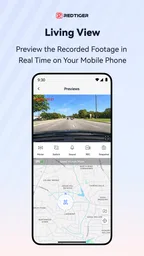
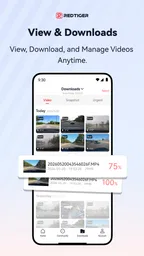
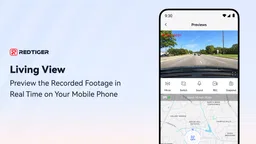
- The app lets you review footage on your phone.
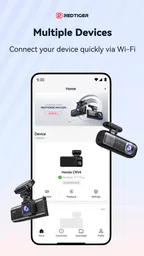
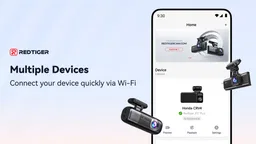
- Wireless camera pairing reduces the need to remove the memory card.
- GPS data can help show where a recording was captured.
- Useful for checking camera settings from the driver’s seat.
What could be better
- Wireless transfers can take longer than using a card reader.
- Live preview may lag behind the camera feed.
- Some features depend on a compatible REDTIGER camera.
- Background recording may drain your phone battery.
- Poor Wi-Fi conditions can interrupt camera connections.





