
Publix review
 Analysis by Appsdrops
I find the Publix app most useful when it is part of an ordinary household routine: checking what is worth buying before a grocery run, then keeping the shopping decision close to hand while I am in the store. It is a free lifestyle app from Publix Super Markets Inc., built around the retailer rather than general grocery planning. That focus is its strength, but it also defines its limits. If Publix is already where you shop, it can make the trip more deliberate; if you want one tool to organize shopping across several supermarkets, it is not a substitute for a broader grocery app.
Making a shared shopping trip easier
A useful shared-household routine starts before anyone leaves home. I would check the app for current store deals, decide which offers match things the household actually uses, and pass along a short list of priorities. That is more practical than treating every promotion as a reason to change the week’s meals. The app’s central value is helping you notice Publix savings in the context of a store visit, not planning an entire household menu for you.
Picture two people splitting errands: one is near the store and the other is at home trying to remember what is running low. The person checking the app can use it to inform the trip, while the other can send a concise list through whatever communication method the household already uses. I would keep that list separate from the app rather than assume that a shared account or built-in family coordination is available. This small habit avoids confusion about who added an item or whether a deal has already been considered.
The best household use is coordinated decision-making, not automatic coordination. The app can help one shopper see relevant store deals, but it should not be treated as a shared family dashboard. If several people shop independently, a separate notes or list tool may still be needed to prevent duplicate purchases and keep track of staples.
Set up around the person doing the shopping
Before relying on the app for an errand, I would make sure the person using it can access it on their own device and has the right store context for the trip. The short description identifies the product as Publix, and the store-focused purpose makes it sensible to check that the app is showing information relevant to the location where you intend to shop. For a household that visits different stores, this check matters more than it might for someone with one regular branch.
There is a practical account boundary here. A household should decide whether one person handles the app and shares useful findings, or whether each shopper uses it independently. I prefer the second approach when people have separate devices and shopping habits: each person can check what they need without depending on someone else’s login or phone. If one device is shared, I would avoid leaving personal account access open when handing it to another person. That is sensible device hygiene, not a claim that the app provides household profiles or special sharing controls.
Also consider the conditions of the trip. If you are planning purchases at home, there is time to compare offers with your list. If you are already moving through a busy shop, stopping repeatedly to inspect deals can slow things down. My approach would be to browse first, make a short decision list, and use the app as a reference rather than turning the aisle into a research session.
Use deals to guide choices, not the whole basket
The most helpful way to use a retailer’s deal app is to begin with needs. I would check for offers on products the household already buys, then decide whether those offers justify a visit or a change in timing. That order matters: a discount is only useful if the item fits the budget, the meal plan, and the amount of storage at home. The app can bring Publix deals into view, but the shopper still has to judge whether a promotion is worthwhile.
One non-obvious advantage is that deal checking can improve how a household divides the trip. The person who is already going to Publix can focus on items with a clear reason to buy, while another household member can confirm whether anything essential is missing. This can reduce aimless browsing, especially when the shopping list is short. It is not a guarantee of a lower total, though; adding unnecessary items because they appear in a deal section can cancel out the benefit.
Another useful habit is to check close to the time you plan to shop rather than relying on a saved mental note from an earlier visit. Store offers are most useful when they inform the current decision. I would still verify the product and offer details in the app before putting an item in the basket, and I would not build a meal plan around a deal unless the household is happy to use the item. This keeps the app in a supporting role instead of letting promotions dictate the week.
What it does well—and where another tool helps
Compared with a general shopping-list app, Publix has a narrower, retailer-specific purpose: it helps shoppers engage with deals at Publix. A general list tool is better for collecting items from multiple stores, dividing chores, or maintaining a household pantry checklist. I would use both if my household shops at several chains: the Publix app for store-specific deal checking, and a neutral list for the complete shopping plan.
Compared with simply browsing a store’s offers without an app, keeping the retailer’s app on your phone makes the information easier to consult as part of a regular routine. The trade-off is that it is another store-specific app to maintain. Someone who shops at Publix only occasionally may get little value from installing it, especially if they prefer not to add retailer apps for one-off trips.
The app’s audience is broad: it has an Everyone age rating, and it is free to install. Its average rating is 4.8 from around 171,000 ratings, with about 19,000 written reviews, and it has over 5 million installs. Those figures suggest that many shoppers find it useful, but they do not tell me whether it fits a particular household’s habits. The important question is still whether Publix is a regular stop and whether checking its deals will change a real shopping decision.
Age, trust, and shared devices
The Everyone rating makes the app suitable for a broad audience in the store-rating sense, but that does not automatically make every household setup equally appropriate. A parent may be comfortable letting an older child check a shopping list or look at store deals, while still keeping purchases and account access under adult supervision. I would treat the app as a shopping aid, not as a way to hand over financial or household decisions.
On a shared phone or tablet, it is worth agreeing on who is responsible for using the app and making changes. A family member who borrows the device to check a deal should not be assumed to have permission to make account decisions or alter another person’s settings. I would also avoid storing assumptions in a shared device—for example, that every offer is intended for everyone in the household—because different shoppers may have different budgets and preferences.
For trust, I prefer a simple rule: share the shopping information that is useful, but keep personal account access with the person responsible for it. Nothing about the app’s basic store-deal role requires a household to merge everyone’s digital activity. If your family needs formal parental controls, individual permissions, or a central shared grocery list, use tools designed for those needs instead of expecting a retailer app to provide them.
Version, compatibility, and everyday friction
The current version is 5.5.0, and the app requires operating system version 10 or later. That is worth checking before planning to use it on an older phone, particularly if a family member relies on a spare or hand-me-down device for errands. The app was released on November 20, 2012, so it has been around for years, but age alone does not tell me how it will behave on a specific device. I would install it and check that it works comfortably before making it part of a time-sensitive shopping routine.
The main friction is the app’s narrow scope. It is tailored to Publix, so it does not replace a cross-store price comparison tool or a complete household organizer. It also asks the shopper to make their own choices about which deals matter, how to share them, and whether a purchase belongs in the basket. For some people, that is exactly right: they want a quick retailer-specific check, not a complex planning system. For others, the extra app and manual coordination may feel like more effort than the savings are worth.
If you are deciding whether to try it, ask yourself three practical questions: Do you shop at Publix often enough to check its offers? Will you review deals before shopping rather than browse aimlessly in the store? And does your household already have a reliable way to share its shopping list? If the answers are yes, the app has a clear place in the routine. If not, a general list app or your usual store-browsing method may be simpler.
My household verdict
I would recommend Publix to someone who regularly shops there and wants an easy way to keep store deals in mind before heading out. It works best when one person checks offers with a real list, then shares only the relevant decisions with the rest of the household. That approach makes the app useful without expecting it to coordinate people, manage family accounts, or plan meals on their behalf.
I would skip it if Publix is not a regular stop, if you want a single app for several retailers, or if your main need is a shared household list with clear task ownership. For the right shopper, it is a straightforward, free companion to a Publix run; for everyone else, its retailer-specific focus may not justify another app. That is a fair trade-off, and the simplest way to get value from it is to let your shopping needs lead and the deals follow.
What we like
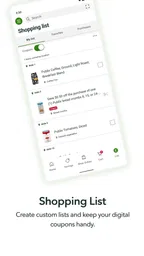
- Publix makes it easy to build and manage a grocery shopping list.
- Digital coupons can help shoppers save on eligible items.
- The app can show store hours and locations nearby.
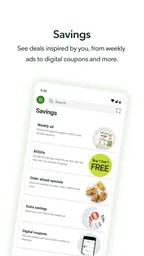
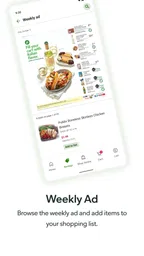
- Shoppers can browse weekly deals before visiting a store.
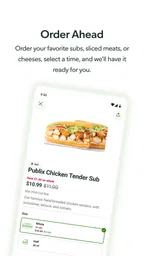
- Order pickup is available at participating locations.
What could be better
- Some app features vary by store location.
- Pickup availability may be limited during busy periods.
- Digital coupons may require account sign-in to access.
- Product availability shown in the app may change before a visit.
- The app is less useful for shoppers who do not live near Publix.





