


Projectivy Launcher review
 Analysis by Appsdrops
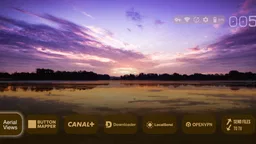
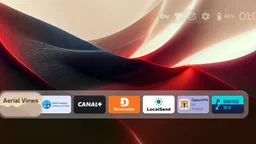
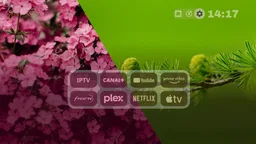
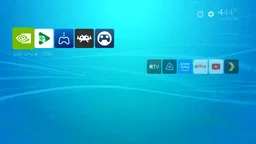
When I turn on an Android TV, I want to get to something worth watching without first working through rows of apps and recommendations. That is the problem I look to Projectivy Launcher to solve: it gives the home screen a more personal, deliberate feel instead of leaving it as a passive shelf of whatever the device puts first. It is a personalization app by Spocky, made for Android TV rather than a general phone launcher, and that focus is its main appeal.
From a crowded home screen to a clearer starting point
A launcher shapes the first few minutes of using a TV. The usual home screen can be fine if you like its layout and the way it presents services, but it may feel busy when you mainly want a short route to a handful of apps. Projectivy is worth considering if you want more say in how that starting point looks and works. Its purpose is not to replace your streaming services; it changes the layer you use to reach them.
I would approach it as a small home-screen redesign, not as a complete TV makeover. Start by thinking about what you reach for most often: perhaps a streaming app, live television, a media player, or a settings shortcut. Once you know that, you can judge whether a personalized launcher will make your routine simpler, rather than merely giving you another screen to configure.
The distinction matters. A launcher is most useful when it reduces the distance between switching on the TV and starting the activity you had in mind. If you enjoy browsing recommendations on the standard interface, or rarely use the TV’s home screen because you launch everything by voice, changing launchers may add little. I see Projectivy as a practical choice for people who want their own order and visual priorities, not as an automatic upgrade for every Android TV owner.
Setting it up around the way you actually watch
My advice is to make the first pass modest. Choose a small group of frequently used apps and arrange the home screen around those, then live with that arrangement for a few evenings before refining it. This is more useful than trying to perfect every detail immediately: what looks tidy during setup may not be the quickest layout from the sofa, especially when you are navigating with a remote rather than a touchscreen.
Think about the difference between an app you open every day and one you only use occasionally. Giving both equal prominence can recreate the clutter you were trying to avoid. A focused top row or first screen can serve as a launchpad, while less-used options can remain available without competing for attention. The best personalization is the kind that saves a navigation step, not just the kind that looks different.
That approach also helps answer a common question: is a custom launcher useful if a household has several viewers? It can be, but only if the layout makes shared habits easier. A common set of easy-to-find apps is more practical than a screen optimized around one person’s niche interests. If each person expects a completely different arrangement, you should be prepared for some compromise rather than assuming one layout will suit everyone equally well.
The everyday handoffs that make or break the experience
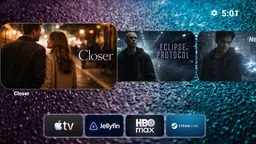
In real use, the launcher is only one part of the chain. I press the remote’s home control, choose a service, then hand over to that service’s own interface to browse and play something. When I finish, I return to the launcher and choose what comes next. Projectivy’s value lies in making those transitions feel more intentional; it does not take over the menus or playback experience inside each streaming app.
A realistic evening might start with a child’s show, continue with a news app, and end with a media player. If those choices are easy to spot on the home screen, the launcher can make the changes between them less fiddly. The benefit is especially noticeable when you do not want to remember which service has a particular kind of content or dig through a long row of icons. Still, the service itself determines what you can watch and how its own controls behave.
That boundary is important when deciding what to expect. A different launcher can improve access and presentation, but it cannot make an individual streaming app faster, simplify its account screens, or guarantee that every app returns to the same place after you exit. If your main complaint is a problem inside one service, changing the home screen is unlikely to fix it.
Remote navigation is another handoff worth testing early. A layout that is attractive on screen can be awkward if reaching a less-used option requires too many directional presses. I recommend trying the exact routine you use most: open the home screen, move to the app you want, launch it, return, and repeat with a second choice. That simple test reveals whether the arrangement is genuinely convenient or only looks orderly.
How much customization is the right amount?
Compared with leaving the manufacturer’s default launcher untouched, Projectivy appeals to people who want to shape the home screen around their own habits. Compared with an elaborate setup that demands constant tweaking, a restrained arrangement is usually easier to live with. I would prioritize useful placement over novelty: make the most common destinations obvious, keep the screen readable from your normal viewing distance, and avoid adding visual decisions that slow you down.
There is a trade-off in any personalized setup. More control can mean more time spent deciding how things should look, and a layout you enjoy today may need adjusting when your viewing habits change. That is why I would treat customization as a way to establish a good default, not as a hobby you have to maintain. If you find yourself rearranging the screen more often than using it, the setup has become its own friction.
One non-obvious way to judge the result is to watch someone else use the TV. If they can find the main apps without asking where you moved them, the layout is probably clear enough for shared use. If they hesitate or routinely return to the old navigation habits, simplify the first screen. A launcher should make the television easier to hand over, not turn the home screen into a personal map only its creator understands.
Another useful check is whether your choices are stable across a normal week. A layout built around one weekend’s viewing may not work for daily news or quick background listening. Try the same home-screen arrangement at different times of day, and notice whether it serves both a quick, specific task and a relaxed browsing session. That tells you more than judging it after a single setup session.
What the community signals, and what it cannot decide for you
The app has a 4.4 average from around 3,200 ratings, with roughly 254 written reviews, and it has passed one million installs. Those figures suggest that many Android TV users have found a reason to try it, but they do not tell me whether its particular approach fits your device, household, or tolerance for setup. I would use them as context, then make the decision based on how much you want to change your current home screen.
It is free to install and rated for Everyone. The current version is 4.73, and it requires Android 6.0 or later. Optional in-app purchases range from $0.99 to $7.49 per item, so anyone who prefers to avoid spending should pay attention to purchase prompts and decide whether any optional extras are relevant before buying. The core question is not whether every possible adjustment is worth paying for; it is whether the basic launcher experience already improves your routine.
That makes the app approachable for someone who wants to test a different home-screen style without committing to an upfront purchase. At the same time, “free” does not mean every optional purchase is part of the basic experience. I would install it with a clear goal—such as making a few regular apps easier to reach—and evaluate that goal before considering anything extra.
Where the workflow can break down
The clearest limitation is that a launcher cannot control every part of Android TV. The device, its manufacturer’s software, the remote, and each app all contribute to what happens after you press a button. If the TV does not behave as you expect when returning home, or a service presents its own navigation in a way you dislike, Projectivy may not remove that underlying friction. A launcher can organize the doorway; it cannot remodel every room behind it.
There is also a practical learning curve. Even a straightforward redesign asks you to make choices that the default interface made for you. Someone who values a familiar, ready-to-use screen more than personal control may prefer to keep the standard launcher. Similarly, if recommendations are the main way you find shows, a screen focused on your own app arrangement may not match the discovery-first experience you want.
Before settling on it, check that the device runs a compatible version of Android and then test the home-screen flow with the remote you actually use. Pay attention to the return trip from an app, not just the first launch. That is where small inconveniences tend to show up: a confusing path back, an extra navigation step, or an arrangement that works for one person but not the rest of the household. If those issues outweigh the clearer starting screen, the default option may be better for you.
Who I would recommend it to
I would recommend Projectivy to Android TV users who regularly open the same handful of apps and want a home screen that reflects that routine. It is a particularly sensible experiment if the standard interface feels crowded or if you find yourself repeatedly searching through the same rows. Start with a simple layout, test it in everyday use, and keep only the changes that make navigation easier.
I would skip it if you are happy with your current launcher, depend heavily on its recommendation-led browsing, or do not want to spend time arranging a new starting screen. I would also be cautious if you expect a launcher to repair sluggishness or awkward behavior inside other apps. In those situations, the usual launcher—or addressing the specific device or service issue—is the more relevant alternative.
Overall, I see Projectivy as a useful personalization app when the Android TV home screen is the part of the experience you want to improve. Spocky’s launcher is free to try, has reached a substantial audience, and gives viewers a reason to rethink how they reach their entertainment. My recommendation is to keep the goal practical: make your common route from the home screen to playback clearer. If it does that without making shared use harder, it earns its place; if it creates another layer to manage, there is no shame in going back to the default.
What we like
- Keeps the home screen free from distracting clutter.
- Supports custom rows for quick access to favorite apps.
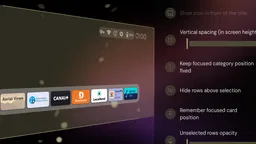
- Offers flexible controls for organizing the launcher.
- Can make Android TV navigation feel more personal.
- Provides useful options for adjusting the home screen layout.
What could be better
- Some settings may take time to learn.
- Compatibility can vary across Android TV devices.
- Certain features may require a paid upgrade.
- Setup may involve extra steps on some devices.
- It does not replace every device-specific TV interface feature.





