Pocket review
 Analysis by Appsdrops
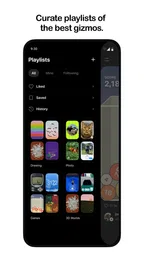
I’m cautious about judging Pocket from its premise alone: a creative app is only useful if it helps you get from a passing idea to something you can actually share. Pocket is an Art & Design app from Meta Platforms, Inc., built around making and sharing “gizmos”—a deliberately broad idea that suggests small, personal creations rather than a conventional drawing or photo-editing project. That focus makes it interesting, but it also means it won’t automatically replace a familiar canvas editor or a polished social publishing tool.
The clearest practical point is the cost: Pocket is free to use. That makes it easy to try without weighing a purchase against occasional use. It has a 4.8 average from around 4,000 ratings, with roughly 100,000 installs, so there is some evidence of interest beyond a handful of early users. Those figures are encouraging, though they cannot tell you whether its particular creative approach will suit your habits.
What Pocket’s creative approach is good for
Pocket is best understood as a place to make and share compact creative objects, not as a general-purpose art studio. If your goal is to produce a layered illustration, retouch a portrait, or prepare a carefully controlled graphic for professional use, a dedicated editor is likely the more dependable fit. Pocket’s appeal is different: it gives creativity a smaller, more immediate shape, which can make it easier to start when you have an idea but not a full project in mind.
That distinction matters in ordinary use. Imagine you have a few minutes between errands and want to make something playful to send to a friend. Opening a heavyweight design program can feel like setting up a whole work session; a pocket-sized creative platform sounds better suited to experimentation in that short window. The useful test is whether making a gizmo feels like a satisfying result in itself, rather than a detour before you move the work somewhere else.
I would approach the app with curiosity rather than a fixed expectation of what a “gizmo” should be. That keeps the first session from becoming a search for familiar drawing tools or standard templates. Try making a small piece with a clear purpose—something to share, a visual joke, or a quick expression of a mood—and see whether the format encourages you to finish. If you begin by demanding fine-grained control or a particular export workflow, you may judge it against tools designed for a different job.
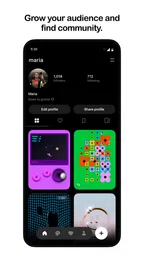
Its social side is part of the proposition, not an afterthought. Making and sharing sit together, so the audience for a creation can influence what feels worth making. That can be motivating if you enjoy showing rough, playful ideas. It can also be a poor match if you want a private workspace, a portfolio workflow, or complete control over how finished work is presented. Before putting time into a larger project, I’d make one small item and check whether the sharing experience matches the way you want to use it.
Free access and what that value really means
Because Pocket is free, the decision is less about whether a single purchase is justified and more about whether the app earns a place in your routine. There is no paid price to compare with a specific set of tools, so I wouldn’t describe it as a bargain in the same way I might assess a paid editor. Its value comes from whether it gives you an enjoyable, convenient way to create and share that you would otherwise not use.
That is a real advantage for casual creators. You can explore the basic idea without first deciding that you are committed to a new creative hobby. If it clicks, the lack of an upfront cost makes occasional use feel low-pressure; if it doesn’t, you have learned that this style of making is not for you without having spent money on it. Free access alone, however, does not guarantee that it will replace tools you already rely on, or that every part of your preferred workflow will be covered.
I’d also separate “free to try” from “right for every project.” When a task has exact output requirements, a deadline, or a need to move files between several tools, reliability and control matter more than the initial price. A conventional illustration or layout app may be a better choice even if it takes longer to learn. Pocket makes more sense when the creative act and the act of sharing are both part of the point.
Small workflows that make a better first test
A useful first-session strategy is to treat Pocket as a sketchbook for finished little ideas, not as a staging area for a large design. Choose one simple thought, make a compact result, and decide whether you would genuinely want to share it. This reveals more than scrolling around looking for every possible use: it tests the central loop the app is built around and keeps your expectations grounded.
A second practical approach is to use it for low-stakes communication. If you often send friends visual reactions or enjoy making playful responses rather than typing another message, try creating something specifically for that moment. The trade-off is that a purpose-built messaging sticker or image editor may be quicker when all you need is a standard reaction. Pocket is worth keeping in that routine only if the act of making adds enough personality to justify the extra step.
For anyone who likes collecting ideas, I’d use each creation as a prompt for the next one: take a theme from a conversation, a color or shape you noticed, or a small daily annoyance, then make a separate gizmo around it. This avoids turning a creative app into a blank page you open without a plan. It is a workflow suggestion, not a promise of a particular built-in collection or organization feature; the point is to bring a concrete idea with you and see how well the app supports it.
One more useful test is to compare the finished result with what you need to do next. If you are happy sharing it directly as part of the app’s creative environment, Pocket may fit neatly. If you need a specific file format, precise sizing, advanced editing, or handoff into another production tool, check that your workflow works before investing effort. A free app can still cost time when its output does not match the next step.
Where the trade-offs become important
The broadness of the gizmo concept is both the inviting part and the main uncertainty for a new user. A focused drawing app tells you what kind of work it is for; Pocket asks you to discover what you can make and whether that form is useful to you. People who enjoy open-ended play may find that liberating. People who want a clear toolset and a predictable route from blank page to finished asset may find the premise less reassuring.
Sharing also changes the kind of creativity the app encourages. A platform built around making and showing things can help overcome the hesitation that keeps ideas unfinished, but it may not be ideal when you want to work quietly or keep experiments to yourself. I’d start with content you are comfortable sharing and avoid assuming that a social creative space behaves like a private folder or a professional archive.
It is also not the obvious answer for people whose main aim is technical polish. If you need detailed brush control, dependable typography, exact dimensions, or a carefully managed export pipeline, use a dedicated design tool for the final work. Pocket may still be useful earlier in the process—as a way to play with an idea—but I would not make it the only tool in a workflow where precision is essential.
There is a learning trade-off, too. Because the concept is not as familiar as “draw,” “edit a photo,” or “make a poster,” a newcomer may need to experiment before deciding what counts as a good result. Give it a few deliberate attempts rather than judging it from an empty first screen. If you still cannot connect the creative format to something you would actually make or share, that is a reasonable sign to move on rather than forcing a use case.
Who is likely to get the most from it?
Pocket is a strong candidate for curious casual creators, people who enjoy expressive digital play, and anyone who would rather make a small original response than select a standard image. It may also suit someone who finds larger creative suites intimidating and wants an easier way to test whether making things on a phone is enjoyable. The app’s free access makes that experiment particularly easy to justify.
It is less compelling for working designers who need predictable production controls, artists who already have a preferred sketching setup, and users who want a private, structured archive more than a sharing-oriented creative experience. It is also a questionable choice if you rarely make or exchange visual content; an interesting idea will not create value simply by sitting on your phone.
The app is rated Teen, so it is not presented as a children’s product for every age group. That label is worth considering for households deciding whether it is appropriate, especially because sharing is part of the experience. I would make that decision deliberately rather than treating a free creative app as automatically suitable for younger users.
On the technical side, Pocket’s current version is 38.0.0.1.107 and requires iOS 12 or later. Check that your device meets that minimum before planning to use it. The release date is August 20, 2026, so this is a recently released app; I would keep expectations measured and judge it by the experience available to you rather than assuming a long-established ecosystem.
My verdict: try it for playful making, not precision work
I’d recommend Pocket to a friend who wants a free, low-pressure creative outlet and is interested in making small things to share. Its most appealing value is not a promised professional toolkit but the chance to turn a spare moment and a simple idea into something personal. The 4.8 average is a positive sign, but the better reason to install it is that its make-and-share focus matches what you already enjoy doing.
I would skip it, or at least keep it secondary, if your priority is refined illustration, dependable production work, private long-term storage, or a conventional editor with a familiar set of controls. For those needs, a dedicated art or design app is the safer choice. Pocket earns a place when experimentation is the goal and sharing is part of the fun—not when you need to force it into a job it was not designed to do.
My practical recommendation is to install it, make one small creation around a real everyday idea, and see whether you want to make another. If that first experiment feels rewarding, free access makes continuing an easy choice. If you find yourself wishing for precision tools or a different way to present the result, you have your answer: Pocket is an intriguing creative side option, but not the right main workspace for you.
What we like
- Saves articles from many websites in one place.
- Clean reading view removes distracting page elements.
- Offline access makes saved stories useful without internet.
- Highlights and notes help you keep track of key ideas.
- Tags make a large reading list easier to organize.
What could be better
- Many advanced features require a paid subscription.
- Some websites do not save correctly.
- Offline downloads can use substantial device storage.
- Long saved lists may take time to organize.
- Text and layout can differ from the original webpage.





