




Plex: Find Movies & TV Shows review
 Analysis by Appsdrops
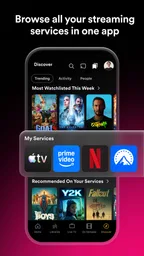
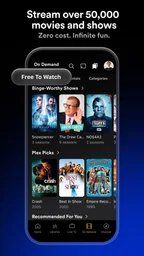
I think Plex makes the most sense when you want one place to browse for something to watch, rather than another service that expects you to arrive with a title already in mind. I found its entertainment focus useful for discovery: it can help turn an idle moment into a shortlist of possibilities, while its free viewing offer gives the browsing a practical purpose. It is not automatically the best choice for someone who wants a single subscription’s complete catalogue, though. Plex is most appealing when you are comfortable exploring and checking what is available instead of assuming every title will play on demand.
Discovery first, with a different kind of trust question
Developed by Plex, Inc., Plex: Find Movies & TV Shows is an entertainment app with a long history; it was released on February 16, 2011. The current version is 2026.22.0, and the app is listed for devices running Android 7.0 or later. It is free to install, rated Teen, and offers in-app purchases priced from $0.99 to $949.99 per item. Those purchase ranges are a reason to look carefully at what an item actually is before paying, rather than treating the word “free” as a promise that every possible feature or choice has no cost.
Its scale is notable: Plex has over 100 million installs, about 489,000 ratings, and a 3.5 average. I would read that rating as a reminder to keep expectations measured. A widely used app can still be uneven for a particular person, especially when the experience depends on discovery, content availability, and how much setup they are willing to tolerate. It is more helpful to judge whether its browsing style fits your habits than to treat popularity as proof that it will suit every viewer.
There is also a trust question that deserves a careful answer. A streaming and discovery app can involve searches, viewing choices, and account decisions, but I would not infer specific privacy practices or device permissions without checking the current app permissions and privacy information for the version and platform I use. Those details can change. Before signing in or sharing information, I would read the relevant notices in the app store and the app itself, and make a deliberate choice about any requested access rather than tapping through automatically.
What Plex is good at when you do not know what to watch
The strongest use case is the familiar “I have half an hour, but no idea what to put on” problem. Instead of opening a service where you already need a specific show in mind, I would use Plex to browse and see what catches my attention. Its discovery angle is useful when you want to compare possibilities across a broad entertainment landscape, and the app’s free viewing offer gives you a reason to explore beyond simply building a watchlist in your head.
That approach differs from the usual subscription-first streaming routine. A service tied to one catalogue can feel more straightforward if you already pay for it and know what it carries. Plex is a better fit when you want a discovery layer and are willing to investigate where a title can be watched. The trade-off is that browsing does not guarantee that the title you settle on will be available in the way you expect. I recommend treating search and discovery as the beginning of a decision, not as a promise of immediate playback.
A useful everyday workflow is to browse before the moment you plan to watch. If a friend mentions a film during lunch, I would search for it then, note the options I can find, and avoid spending the evening switching between apps. The practical benefit is not just finding a title; it is reducing last-minute uncertainty. If Plex points you toward something that requires another service or a different arrangement, you can decide whether that detour is worthwhile before everyone is waiting on the sofa.
How I would assess account and privacy choices
For a data-sensitive app, the most responsible advice is also the simplest: review the actual choices shown on your device. Check the permission prompts when they appear, consider whether each one makes sense for what you are trying to do, and revisit account and privacy controls inside the app if you create an account. I would not grant access simply because an entertainment app asks; I would first ask whether the requested permission is relevant to the task at hand.
Be especially attentive when moving from casual browsing to a more personalized experience. Signing in, saving preferences, or interacting with account settings can change what information you choose to provide. I would take a moment to read the wording on each screen, distinguish optional choices from required ones, and skip anything I do not need. If you are setting Plex up for a teenager, the Teen rating is a useful age cue, but it is not a substitute for a parent or guardian reviewing the content and account choices together.
One practical habit is to separate “I want to look around” from “I want to personalize this.” Start by exploring what is available without volunteering more information than necessary. If a feature later makes an account or a particular setting worthwhile, decide then. This keeps the setup intentional and helps you notice which choices are being presented, rather than accepting every prompt as part of the basic experience.
Where the experience can feel less direct
Discovery can become work if you already know exactly what you want and simply expect one tap to play it. In that situation, searching the app you already use may be quicker. Plex’s wider browsing role asks you to be flexible: a promising result may lead to a different viewing route, and you may need to compare options rather than assume the first result is the final answer. I see that as a meaningful limitation for impatient viewers, not a reason to dismiss the app altogether.
There is also a difference between a service that sells access to a defined library and an app that helps you find entertainment. If you want a predictable catalogue that you know is included in a subscription, a dedicated streaming service can offer a clearer mental model. Plex is more appropriate if you are comfortable with discovery as its own activity and understand that a recommendation or search result is not the same thing as guaranteed access. That distinction can prevent disappointment and makes the app easier to judge fairly.
The purchase range is another reason to pause before confirming anything. Since optional items span from $0.99 to $949.99, I would inspect the description and price on the purchase screen, confirm whether it is something I actually want, and use the device’s purchase safeguards if children share the device. The range does not tell me what any individual item does, so I would never buy based on a vague assumption. A free download is a low-commitment way to explore, but it is still sensible to treat in-app purchase prompts as real spending decisions.
Small habits that make browsing more useful
First, search with a specific intention when you have one. If you have a title, actor, or general kind of film in mind, use that as a starting point rather than endlessly scrolling. Then compare the available ways to watch before you commit to an evening plan. This is particularly helpful when you are coordinating with other people, because it turns “let’s see what’s on” into a quick check rather than a long group debate.
Second, use browsing when you are genuinely open to alternatives. If the exact film you wanted is not a convenient choice, explore nearby options by mood or genre instead of repeatedly checking the same result. This plays to Plex’s discovery value and avoids treating it as a universal catalogue. I would keep a short mental list of possibilities while browsing, then choose based on what is accessible and appealing at that moment.
Third, make privacy checks part of setup rather than an afterthought. Read prompts as they appear, avoid granting permissions that do not seem necessary for your intended use, and review account choices if you later decide to sign in. This is a practical way to stay in control without assuming either that the app is risky or that every default is automatically right for you. The same care is sensible for any entertainment app that may become part of a regular routine.
Who should try it, and who may prefer something else
I would recommend Plex to people who enjoy browsing for films and shows, want a free way to explore entertainment, and do not mind checking the route from discovery to viewing. It can also be useful for households that often disagree about what to watch, because a discovery-focused session can give everyone options to discuss before settling on one. The app’s large audience suggests many people are willing to use it, but its 3.5 average rating is a reminder that a popular choice is not a guaranteed personal match.
I would skip it, or at least keep it secondary, if your priority is a tightly defined catalogue, a familiar subscription interface, or immediate playback of a title you have already selected. It is also not the right fit if you are unwilling to review account choices, permissions, or purchase screens for yourself. Those checks need not take long, but they are part of using any app thoughtfully, especially on a shared device or one used by a younger viewer.
For someone deciding whether to install it, the sensible expectation is modest: try it as a discovery tool, see whether its browsing helps you find something worthwhile, and pay attention to the choices it presents along the way. Plex is free to download, but optional in-app purchases mean I would keep purchase confirmation enabled and review each item before committing. If the experience saves you time and helps you find viewing options you would otherwise miss, it has earned a place on your device. If you spend more time chasing access than choosing what to watch, a direct streaming app is probably the better match.
My cautious verdict is positive for the right viewer. Plex is most valuable as a place to explore and compare, not as a guarantee that every title you discover will be ready to play. I would give it a try if discovery is the part of streaming you enjoy, while keeping privacy choices, permissions, and purchases deliberate. That balance lets you benefit from its broad entertainment focus without expecting it to replace every service or decision in your viewing routine.
What we like
- Finds movies and shows across multiple streaming services.
- Personalized recommendations help surface relevant titles.
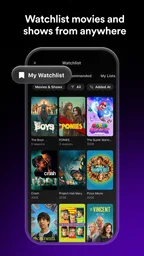
- Watchlists make it easy to save titles for later.
- Availability details help identify where a title can be streamed.
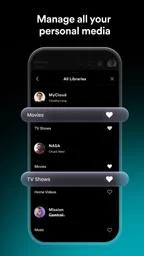
- The interface brings discovery tools together in one place.
What could be better
- Streaming availability can vary by country and change over time.
- Some listings may direct you to services that require subscriptions.
- Recommendations may take time to match your viewing preferences.
- The app requires an internet connection for current discovery results.
- Not every title includes complete details or viewing options.





