



Playful Rewards: Play & Earn review
 Analysis by Appsdrops
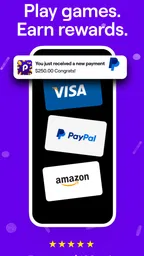
I see Playful Rewards as a casual way to add a little incentive to mobile gaming, not a dependable source of income. The basic idea is appealing: spend time with games and work toward rewards such as Amazon, PayPal, or Visa gift cards. In practice, the value depends on whether you enjoy the available games and are comfortable treating any reward as a bonus rather than a guaranteed payoff.
It is a free lifestyle app from Playful Rewards, with optional in-app purchases listed at $2.99 per item. The age rating is Everyone, and the app has a 4.5 average from around 103,000 ratings, with more than a million installs. Those figures suggest plenty of people have tried it, but they do not tell you how quickly any one person will reach a reward. I would judge it by whether the games fit your routine and whether the progress feels worthwhile to you.
Getting started without expecting instant rewards
My first piece of advice is to approach the initial setup as a short check, not a race to earn. Install the app, open it, and take time to understand what it asks you to do before choosing a game. In reward apps, the important distinction is usually between simply playing and playing in a way that qualifies toward a reward. Read the in-app instructions for the particular offer rather than assuming that any session will count.
That distinction can prevent a common frustration: spending time in a game and then wondering why the reward progress did not match your expectations. Before starting, check that you have a stable connection and that the game opens normally. If the app explains a specific starting point or task, follow that route rather than jumping ahead. A few seconds spent checking the instructions can save a longer session that you later discover did not meet the offer’s conditions.
Keep your first session small and deliberate. Pick one game, note what the app says to do, and see whether your activity is reflected as expected before committing a lot of free time. This is a practical way to learn the app’s workflow without assuming that all games or reward tasks behave identically. If progress appears, you can decide whether that particular game is enjoyable enough to continue.
The app’s current version is 3.2.3, and it supports Android 7.0 or later. If you are installing it on an older device, check the operating-system requirement first. That simple compatibility check matters more than troubleshooting a problem that is actually caused by an unsupported system. The app is free to download, but remember that optional purchases are separate from earning rewards; I would not buy anything unless I understood exactly what it adds and decided it made sense for my own use.
Where people can get stuck
The most likely point of confusion is the gap between playing for fun and completing a qualifying activity. The app’s premise can make rewards feel close at hand, but a gift card is not the same as an immediate payment for opening a game. Read each task carefully, especially before switching games or stopping partway through. If progress depends on a particular action, casually playing in another way may not satisfy it.
It also helps to separate three questions: Is the game enjoyable? Is the app showing progress? And does the eventual reward seem worth the time you are putting in? Those answers can differ. A game may be fun even if you decide the reward pace is not for you; conversely, a task may look attractive but feel like a chore once you try it. I would not keep playing solely because I had already invested time if the remaining effort no longer felt worthwhile.
Reward apps also invite people to compare their progress with someone else’s. I would avoid using another person’s timeline as a promise about your own. The games you choose, the tasks you complete, and the time you have available all affect whether the experience feels rewarding. A useful personal test is to decide in advance how long you are willing to play for a small bonus, then stop or reassess when that limit is reached.
Simple setup checks before you troubleshoot
If an activity does not seem to register, first confirm that you are using the game associated with the task you selected. Return to the app’s instructions and check that you have followed them from the intended starting point. Then make sure both the reward app and the game are running on a working internet connection. These basic checks are sensible because reward tracking involves more than the game screen alone.
Keep the app and game open long enough for the result to appear, and avoid repeatedly switching between apps while a task is in progress. I would also avoid reinstalling either app as an immediate first response: doing so can disrupt the session you are trying to understand. If the instructions describe a sequence, complete it in order and check for an update in the reward app afterward.
For a new user, the best test is a low-commitment one. Choose an activity you would be willing to try even without a reward, follow the stated steps, and see whether the app reflects your progress. That gives you a concrete basis for deciding whether the tracking and game selection work for you. It is more useful than starting several games at once and then trying to figure out which activity was meant to count.
Recovering a session when progress seems off
If the progress looks delayed or incomplete, pause before repeating the task. Check the instructions again, confirm that the relevant game is the one you launched, and give the app a chance to refresh while connected. Repeating an action without knowing whether it registered can waste time or make it harder to identify where things went wrong. A calm, one-step-at-a-time check is more effective than opening multiple games and hoping one of them updates.
If the app still does not show what you expect, make a note of the game, the task, and the point where you stopped. That gives you a clear account if you need to consult the app’s own help or support options. I would describe what happened plainly rather than guessing at a cause. Also check whether the task itself is still visible and whether its instructions have changed; the current wording is more useful than a memory of what you thought it said earlier.
When a session is not tracking as expected, the sensible choice may be to stop rather than pour more time into it. You can try another task later, but do not assume that switching will repair the earlier session. This is one reason I recommend testing a single activity first. It limits wasted effort and helps distinguish a one-off hiccup from a workflow that simply does not suit you.
When the app may not be the problem
Not every disappointment points to a technical fault. If the game is working but the task is not advancing, the issue may be that the activity does not match the requirement. If the reward still feels distant after several sessions, that may be a question of value rather than broken tracking. And if you find yourself playing only to chase progress, the app may not be a good fit for your habits even when it is functioning as intended.
Likewise, a weak or interrupted connection can complicate activity that needs to be recognized by an app. Check ordinary network conditions before changing settings or removing apps. If other apps are also struggling, it makes more sense to address the connection first. If only one game or task behaves unexpectedly, return to its instructions and use the available in-app help for the specific problem.
The app is also not the right choice if you want a predictable hourly return, instant cash, or a guaranteed reward for every minute played. Its appeal is the combination of casual games and the possibility of working toward gift cards; that is different from a standard cashback service or a paid gaming platform. If your priority is certainty, a direct purchase of a game or a conventional rewards program with terms you already understand may be a better match.
How it fits into an everyday routine
A realistic use case is a short break at home: I might open one game while waiting for dinner, follow its stated task, and stop when my break is over. In that situation, the reward angle adds a little purpose to time I already planned to spend gaming. I would not rearrange my day around it or keep playing late just to chase a threshold. The app works best as a light extra attached to leisure, not as a task that competes with work, rest, or a game I genuinely prefer.
Compared with ordinary mobile games, the distinctive trade-off is that you are choosing partly for the reward pathway rather than solely for the game itself. Compared with survey or cashback apps, the activity is more play-centered, which may suit someone who would rather spend a break gaming than answering questions or tracking purchases. But if you dislike trying unfamiliar games, or you care more about a known reward rate than entertainment, those alternatives may be easier to evaluate.
To make the experience more intentional, I would pick a small time window and one game at a time. After a few sessions, ask whether the game is still enjoyable and whether the visible progress justifies continuing. This prevents the reward goal from quietly turning an entertaining break into a repetitive obligation. It also makes it easier to compare the app with simply playing a game you already like, which has no reward promise but may be more satisfying.
Who should try it—and who should pass
I would recommend trying it if you already enjoy casual mobile games, are curious about earning gift cards through play, and can treat the outcome as a modest extra. Its Everyone age rating makes the app broadly accessible, though any user should still understand the individual games and the choices involved in optional purchases. The developer is Playful Rewards, and the app’s lifestyle framing makes sense for someone who wants a low-pressure leisure activity rather than a serious earning tool.
I would skip it if you expect a steady income, dislike following task instructions, or become frustrated when progress is not immediate. It may also be a poor fit if you prefer to spend gaming time on a particular title and do not want to switch to other games for a reward goal. The optional $2.99 purchases deserve a careful look: free access is a useful starting point, and I would not spend money in hopes of making rewards arrive faster unless the app clearly explains the purchase and its value.
Playful Rewards has a 4.5 average and around 7,900 written reviews, which can help a new user see that the app has drawn substantial feedback. I still would not treat ratings as a substitute for testing the workflow yourself. Start with one clearly explained task, use a reliable connection, and judge the experience by the actual progress you see and the time you are happy to spend.
My practical verdict
Playful Rewards is worth a cautious try if the games sound enjoyable even before you count the gift cards. Its best use is as an optional layer over casual play: choose one activity, follow its instructions, verify that progress appears, and decide whether to continue. Its main drawback is the uncertainty that comes with tying rewards to particular game tasks; that can make the experience feel less straightforward than playing a regular game or using a rewards service with a more familiar process.
I would install it for a relaxed experiment, not as a plan to make money. The app is free, supports Android 7.0 and newer, and is currently at version 3.2.3, so checking compatibility is straightforward. If you enjoy the games and the reward progress feels fair for your time, it can make a spare moment more engaging. If you find yourself troubleshooting repeatedly, spending beyond what you intended, or playing only out of obligation, stop and choose a simpler way to spend that time.
What we like
- Offers a straightforward way to earn rewards while playing games.
- A broad game selection can suit different tastes.
- Short play sessions make it easy to fit into spare time.
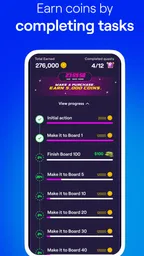
- Progress tracking helps you see how close you are to rewards.
- Getting started is simple for new users.
What could be better
- Rewards may take time to accumulate.
- Game availability can vary by device or region.
- Some offers may require reaching specific in-game milestones.
- Reward redemption options may be limited.
- Frequent ads can interrupt gameplay.





