
Picrew PFP & OC Maker review
 Analysis by Appsdrops
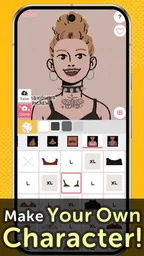
Making a character portrait should feel playful, not like a struggle to find the right button or see what you are changing. Picrew PFP & OC Maker is aimed at people who want to create a custom character image or profile picture, and its appeal is easy to understand: it puts personal expression at the center. I find that focus promising for a broad range of users, though an inclusive experience depends on details such as readable controls, comfortable interaction, and how well the app fits different situations.
Creating a character, at your own pace
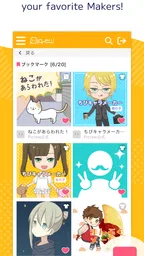
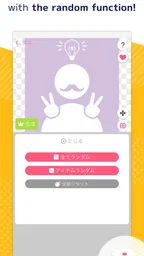
Picrew PFP & OC Maker is an art and design app from TETRACHROMA INC. Its short store description is simply “Picrew,” while the broader promise is a custom character creator and profile-picture maker. That combination gives it two clear uses: shaping an original character for fun and making an image that represents you online. It is free to install, with optional in-app purchases, so trying the basic experience does not require an upfront purchase.
The app has an average rating of 4.4 from around 43,000 ratings, and it has been installed over a million times. Those figures suggest that character creation has found an audience, but they do not tell me whether the interface will suit every person or every device. For an app built around visual choices, the quality of the experience rests on more than the number of people who have downloaded it. It also depends on whether users can comfortably browse, understand, and select the options available to them.
I like the straightforward idea behind a profile-picture maker: instead of starting with a blank canvas, users can focus on building a character that feels personal. That can be appealing whether you want an avatar for a social profile, a visual starting point for an original character, or simply a low-pressure creative activity. The app is rated Teen, and it is available as version 2.0.7 for devices running Android 7.0 or later. Those details help set practical expectations before installing.
Readable choices and easy-to-follow navigation
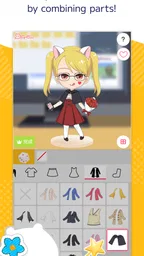
Character creators often involve a sequence of visual decisions. Even when the activity is enjoyable, it can become tiring if the available choices are hard to distinguish or the screen feels crowded. In my view, the most useful design approach for an app like this is one that makes the current task obvious and keeps the user oriented as they move between choices. Clear labels, understandable icons, and a visible sense of what has changed can make a creative process feel welcoming rather than confusing.
That matters especially for people who use larger text, have low vision, or find dense visual layouts difficult to scan. A character image may be the main event, but the surrounding controls still need to be understandable. If options rely heavily on tiny symbols or subtle visual differences, some users may have a harder time identifying them. Likewise, strong contrast and uncluttered screens can make it easier to focus, while clear naming can help users who do not want to rely on color alone.
I would approach the app as a visual tool whose ease of use may vary with individual needs and device settings. Android offers system-level display adjustments, and those can be useful when an app’s text or interface feels small. Still, system settings cannot solve every design issue: if an important control is difficult to identify or a choice is communicated only through appearance, changing text size may not be enough. The most inclusive experience is one where the app itself makes its choices clear.
For first-time users, a gentle learning curve is valuable. A person opening a character maker may not know what to tap first, and a clear progression can make that first session less intimidating. I appreciate apps that let users explore without making every action feel permanent. That kind of low-pressure interaction is particularly helpful for younger users, people unfamiliar with creative apps, and anyone who prefers to learn by trying things rather than reading instructions.
Motor comfort and sensory demands
Creating an image can involve repeated taps, scrolling, and close attention to small visual differences. That makes motor comfort worth considering. People with limited dexterity, tremors, or fatigue may benefit from controls that are easy to target and interactions that do not demand rapid or highly precise movements. For a character creator, the ideal pace is one the user can control, with enough time to compare options and make adjustments without feeling rushed.
I would also keep the sensory side of the experience in mind. A visual design app naturally asks users to look at the screen, but prolonged comparison can be tiring, especially for people sensitive to bright colors, busy compositions, or frequent visual changes. Taking breaks and adjusting the device’s brightness can make a session more comfortable. If you are sensitive to motion or strong visual effects, it is sensible to pay attention to how the interface behaves during use and step away if the experience becomes uncomfortable.
These considerations are not just for people who identify as having a disability. Anyone might use a character creator while tired, recovering from a headache, or working in a setting where they cannot concentrate for long. A calm interface and a flexible pace help make creative play more approachable in those ordinary circumstances, too. The key point is that visual creativity should leave room for different levels of energy and attention.
It is also worth remembering that visual character design can carry personal meaning. Users may want to represent aspects of their identity, mood, or imagination through an avatar. A welcoming creative tool should make that self-expression feel open-ended, rather than suggesting there is only one “right” way to look. I value the concept of a personal character maker because it gives people a chance to make an image that feels like theirs, even when the result is playful or stylized.
Using the app in everyday situations
Not everyone creates an avatar in the same setting. One person might spend a quiet evening experimenting, while another might make a quick profile image during a short break. Someone else may need to pause repeatedly because they are sharing a device, caring for someone, or dealing with interruptions. A creative app is easier to fit into real life when users can work at a pace that suits them and return to the activity when they have time.
The app’s focus on profile pictures makes it especially relevant to people who want a personal image for online spaces. That can include users who prefer a character portrait to a photograph, or people who simply want something more expressive than a default icon. I see that as a useful form of self-presentation: a small image can communicate personality without requiring a polished art background or a lengthy project.
There are practical context questions, too. A screen that is comfortable indoors may be harder to view in bright surroundings, while a longer creative session may be less convenient on a small display. Users can make ordinary adjustments, such as choosing a more comfortable environment or changing device brightness, but those steps are personal workarounds rather than guarantees of accessibility. The experience may differ depending on the device, settings, and the user’s needs.
For families, the Teen content rating is a helpful starting point when deciding whether the app is suitable for a particular young person. I would still encourage parents and guardians to consider the child’s maturity and how they plan to use any character image. The rating offers a broad age guide, not a substitute for a family’s own judgment. Since optional purchases are available, it is also sensible for anyone managing a child’s device to review the relevant app-store purchase settings.
Where inclusivity can still fall short
A character creator can be inviting in concept while remaining challenging for particular users in practice. People who depend on screen readers may need clear spoken descriptions of controls and visual choices; people who use switch access or other alternative input methods may need reliable keyboard or switch navigation. Those needs are difficult to judge from the app’s creative purpose alone, so I would not assume that every interaction works equally well with every assistive setup.
Color is another possible barrier. If two choices differ mainly by color, users with color-vision differences may have trouble telling them apart. Text size and contrast can affect people with low vision, while complex screens can be demanding for people with cognitive or attention-related needs. These are general considerations for visual design apps, not claims about a particular control in this one. They are worth keeping in mind when deciding whether the app feels comfortable during your own use.
Motor access can also be shaped by small details: how far apart controls are, how much precision a tap requires, and whether a user can change an option without repeating a long series of actions. Users with pain or limited hand movement may find frequent interaction tiring even when the creative task itself is enjoyable. If you use a particular accessibility tool, checking how it works with the app on your device is a practical way to understand whether the experience suits you.
There is no single interface that feels effortless for everyone. A person with low vision may prioritize scalable text and clear contrast, while another user may care most about fewer steps or easier one-handed use. That is why I would describe the app as a creative option to try rather than assume it will meet every access need. The right fit depends on your preferred way of navigating and the conditions in which you plan to create.
Value, audience, and overall impression
Since the app is free to download and includes optional purchases ranging from about sixty cents to forty dollars per item, users can approach it without paying at the outset while keeping in mind that paid items are part of the experience. I prefer that kind of clear distinction: installation and optional spending are separate decisions. If you are trying to keep costs controlled, check purchase settings before handing a device to a child or sharing it with someone who may tap through without noticing a payment prompt.
The app’s release date is July 11, 2024, and its current version is 2.0.7. For an app that depends on interface clarity and compatibility, keeping it updated is a sensible habit. Updates can improve an app over time, though the experience a person gets still depends on their device and personal access requirements. The developer is TETRACHROMA INC., and the app’s established audience gives it a recognizable place among character and avatar-making tools.
What I find most appealing is the approachable creative premise. You do not need to treat character design as a serious art project to enjoy making an image that feels personal. The same tool can support a quick profile-picture idea or a more thoughtful original character concept, depending on how much time you want to spend. That flexibility gives the app a broad everyday appeal.
My inclusive verdict: Picrew PFP & OC Maker is worth considering if you want a playful way to make a character image, but comfort and accessibility should be judged on your own device. Its focus on custom portraits gives people a simple creative goal, and its free download makes it easy to explore. At the same time, visual and touch-based apps can create barriers for users who need screen-reader support, larger controls, or reduced sensory demands. I would recommend giving it a try if the concept appeals to you, taking breaks when needed, and checking whether its navigation works with the way you prefer to use your phone.
Picrew PFP & OC Maker has a clear identity as a character creator and profile-picture tool, and that straightforward purpose is its strongest draw. I see it as a casual creative option for people who enjoy shaping an avatar and expressing themselves through an image. The best experience will come when the interface feels readable, the interactions feel manageable, and the app fits the user’s own pace. For a visual design app, that balance is what turns a fun idea into a genuinely welcoming one.
What we like
- The browser-based editor works on mobile without installing an app.
- Finished portraits are easy to save and share.
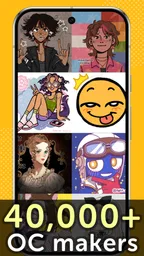
- Many creators offer distinct art styles and character options.
- The simple controls make portrait creation approachable for beginners.
- It can help users find inspiration for original characters.
What could be better
- Available options depend on each creator's design.
- Some creators restrict how their images may be used.
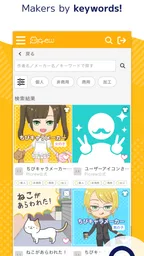
- The catalog can be difficult to browse for a specific style.
- Portraits may look similar when many users choose the same creator.
- A stable internet connection is needed to browse and create portraits.





