
PetDesk - Pet Health Reminders review
 Analysis by Appsdrops
Keeping up with a pet’s care is rarely difficult because of one big task. It is the small things—remembering to book a checkup, finding the right clinic details, and keeping household members on the same page—that can get scattered. PetDesk is a lifestyle app from PetDesk built around bringing pet-care organization onto your phone. I see its appeal less as a replacement for a veterinarian and more as a practical home base for the routine details that are easy to lose among calendars, messages, and paper notes.
What I would consider before choosing it
Before moving pet records into any app, I would ask a simple question: do I want a dedicated place for veterinary-related tasks, or do I only need occasional reminders? A regular calendar can handle a single appointment, while a notes app can hold a phone number. PetDesk makes more sense when those details recur and belong together, especially if you manage care for more than one pet or share responsibilities with someone else.
The app is free, and it is rated for Everyone, so there is no purchase decision to make before trying it. Its average rating is 4.7 from around 32,000 ratings, with about 14,000 written reviews, and it has been installed over a million times. Those figures suggest it has found a substantial audience, but they do not tell me whether its approach suits a particular household. The useful test is whether you will actually return to one pet-focused place instead of continuing to rely on whatever system you already use.
I would also decide how much of my pet-care routine I want to centralize. An organizer is most valuable when I enter information consistently and check it before an appointment, not merely when I download it. If my records are already easy to find and reminders are reliably handled by a shared calendar, a second system may add more upkeep than convenience. If those things are scattered, a dedicated app can give the routine a clearer shape.
A useful fit for recurring care
PetDesk is strongest as a companion to regular veterinary care. Think of routine appointments, follow-ups, and the everyday need to keep relevant pet-care information close at hand. It can be particularly helpful when a pet’s schedule involves more than one person: instead of relying on one person to remember every date and pass it along, the household can treat the phone as a shared point of reference.
That is a modest benefit, but it is a meaningful one. The hard part of pet care is often not knowing that a task matters; it is noticing the right task at the right time. A reminder-oriented workflow helps turn a vague intention—“I should arrange that soon”—into something visible enough to act on. I would still confirm important medical advice and appointment details with the veterinary practice, but an organizer can reduce the chance that an ordinary follow-up slips through the cracks.
One practical habit I recommend is to add or check a task immediately after a veterinary visit, while the instruction is fresh. That is more reliable than waiting until later and trying to reconstruct what needs to happen. A second useful habit is to review upcoming care before a busy week begins. Those small routines make a pet-focused app more valuable than a collection of reminders entered once and forgotten.
Another non-obvious advantage of keeping pet matters separate from general life admin is attention. A family calendar may be crowded with work, school, and errands; pet-care items can become hard to spot there. A dedicated place makes it easier to review the pet’s needs as a group rather than hunt through unrelated events. This is especially useful when more than one animal has appointments or when one person is coordinating care for another.
Everyday use, not just the appointment day
Consider a realistic week: you have a busy morning, a pet needs a scheduled checkup, and another household member may be the one who takes them. If the details live only in a paper folder or in one person’s memory, the handoff can become a last-minute exchange of messages. A central pet-care app gives you a place to check what is coming up and helps make that handoff less dependent on memory. I would still communicate any changes directly, but the app can support the coordination rather than replace it.
It can also help when a reminder needs action from someone other than the person who first noticed it. For example, one person may handle booking while another takes the pet in. The practical tip is to agree in advance who owns each task; a reminder does not itself resolve household ambiguity. Used that way, PetDesk can support a simple workflow: notice what is due, decide who will handle it, and keep the relevant information accessible for the next step.
For a first setup, I would avoid trying to enter every detail at once. Start with the next appointment and the information you know you will need soon. Then add recurring items as they come up. This lowers the effort of switching and gives you a fair test of whether the app fits your habits. If you begin with a large backlog, the setup can feel like another chore before it has had a chance to save you time.
Where a different approach may be better
PetDesk is not automatically the best choice for every pet owner. If you only need a reminder once in a while, your phone’s existing calendar may be quicker and already visible to everyone in your household. If you prefer writing down detailed observations in a flexible journal, a notes app or paper record may feel more natural. Those alternatives are not inferior; they suit people whose needs are simple or whose preferred system is already working.
There is also a difference between organizing care and providing care. An app can help you keep track of routine responsibilities, but it should not be treated as a substitute for professional veterinary guidance, urgent assessment, or a clinic’s own instructions. If your main need is to discuss symptoms, receive a diagnosis, or manage a complicated treatment plan, speak with the veterinary team and use whatever records or process they recommend. PetDesk is a useful organizer, not a medical decision-maker.
Households with several caregivers should be realistic about coordination. A shared reference point helps only if everyone knows where to look and keeps information current. If one person continues using a separate calendar and another relies on the app, the result can be two competing versions of the schedule. I would choose one primary place for upcoming tasks, then make sure the people involved know how changes will be communicated.
The effort of changing your routine
Switching to PetDesk is less about moving every scrap of information and more about deciding what deserves a dependable home. Before relying on it, I would gather the next appointments and any details needed for those visits, then check that the information is accurate. Keep existing notes or records while you establish the new routine; there is little benefit in discarding a familiar source before you know the app is working for you.
That approach also makes it easier to judge the trade-off. You may spend a little time setting up a pet-focused system, but in return you can reduce the mental effort of remembering which calendar or folder holds a particular item. The payoff is greatest when recurring care already creates friction. For a household with one occasional appointment and no handoffs, the setup may not earn its keep.
The app’s current version is 10.2.1, and it has been available since July 9, 2013. I would treat its long presence and broad adoption as context, not a promise that every individual clinic or household workflow will match my expectations. PetDesk is developed by PetDesk, and the best way to assess the fit is to try organizing a small, real part of your routine rather than building an elaborate system around assumptions.
My recommendation
I would recommend PetDesk to pet owners who want a dedicated place to keep routine care visible, especially people juggling several responsibilities or coordinating with another caregiver. Its value is practical: fewer loose reminders, easier review of what is coming up, and a clearer handoff between the people looking after a pet. The app’s lifestyle focus suits that everyday role, and being free makes trying it a low-commitment decision.
I would skip it if your current calendar and notes already keep everything clear, or if you expect an organizer to replace veterinary advice and direct communication with your clinic. I would also avoid maintaining parallel schedules for long; choose a main system and use it consistently. PetDesk is most worthwhile when it becomes the household’s reliable reference for routine pet care, rather than one more place to check.
What we like
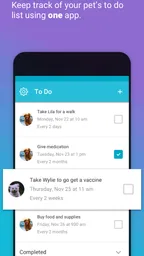
- Keeps vaccination and medication reminders in one convenient place.
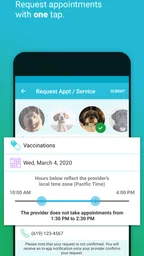
- Makes it easier to request appointments with participating veterinary clinics.
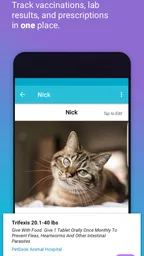
- Stores pet profiles with useful health details.
- Can help owners stay on top of routine care.
- Supports managing information for multiple pets.
What could be better
- Some features depend on your veterinary clinic using PetDesk.
- Clinic appointment availability may be limited in the app.
- Reminder alerts require notification permissions to work reliably.
- Health records may need to be entered or updated manually.
- The app cannot replace professional veterinary advice.





