




Pavo - AI Image & Video Maker review
 Analysis by Appsdrops
I can see the appeal of Pavo in a household where one person wants to turn an idea into a short, polished visual and someone else wants to experiment with images. It is an art and design app from SINGAPORE SAPIENS TECHNOLOGY PTE. LTD., built around AI-assisted image and video creation. My main takeaway is that it makes more sense as a shared creative tool for occasional projects than as a dependable family workspace: the output can be fun to explore, but users should agree on who is using the device, which account is active, and whether a generation is worth spending money on before they begin.
Making a small shared project together
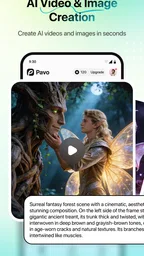
A realistic use is a family planning a birthday, school event, or neighborhood gathering. One person can bring the idea—a dreamy invitation, a playful scene, or a short visual for a group chat—and another can help refine the wording or choose a direction. Pavo’s appeal is the jump from a rough concept to an image or cinematic-style video, rather than the careful manual assembly typical of a conventional design editor.
That distinction matters when several people share a phone or tablet. A traditional editor is often easier for precise layout work: moving text by a few pixels, keeping a logo consistent, or making a set of matching cards. AI creation is better suited to early exploration, when the group wants to see a concept take shape without drawing every element. I would use Pavo to produce a visual starting point, then check the result carefully before treating it as a finished invitation or announcement.
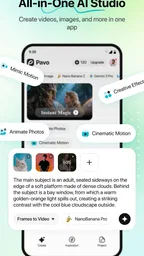
The app’s multimodal approach suggests that creative input is not limited to one rigid template style. In practice, the useful household habit is to decide the purpose before prompting: is this a private joke for relatives, a school project, or something that will be posted publicly? That small conversation helps keep the output appropriate and gives whoever is creating a clearer target. For shared use, agreeing on the idea first is more valuable than taking turns tapping through options without a plan.
What to decide before handing over the device
On a shared device, account boundaries are worth sorting out before anyone starts. I would have the person responsible for the device open the app and check which account, if any, is active, then make sure younger users understand that their creations may be associated with that session. I would not assume that separate household members automatically receive separate histories or spending boundaries; treat the currently active account as the working space unless you have checked otherwise.
That is especially important because Pavo is free to download but includes in-app purchases, with listed items ranging from about fifty cents to just over three hundred dollars. Those amounts are not a reason to avoid the app, but they do make a simple household rule sensible: children can explore only with an adult nearby, and nobody confirms a purchase without asking the account holder. The app is easiest to share when an adult handles account and payment decisions rather than relying on a child to interpret a purchase screen.
For a quick session, I would also establish a stopping point. AI experimentation can encourage repeated attempts: change the wording, try a new visual direction, and see what happens. On a shared device, that can make it unclear who initiated a generation or whether another person’s work has been replaced. Taking turns with a clear “this is my draft” moment—and saving or exporting a result before passing the device along, if the app offers an appropriate option—reduces confusion. I would check the available save and sharing choices in the app rather than assume they work a particular way.
Coordinating ideas without turning it into a group account
Pavo can support a simple creative handoff even if household members are not all using it at once. One person can agree on the concept and the intended audience; another can do the actual generation; then the group can review whether the image or clip communicates the idea. This is a practical division of labor for a school-poster concept or a family celebration graphic. It also avoids the common trap of asking several people to change the same draft without agreeing on what should stay fixed.
A useful tip is to separate the brief from the experiment. Keep a short note of the essential details—subject, mood, and what must remain recognizable—before trying different phrasings. Then change one element at a time. If a result goes in an unexpected direction, it is easier to tell whether the wording, style choice, or idea itself caused the shift. This is more reliable than rewriting everything after each attempt, and it gives a child a concrete lesson in how creative instructions affect an AI-generated result.
For coordination across a household, I would treat generated work as a draft until everyone who will use it has seen it. AI visuals can look convincing while still missing a requested detail or introducing an odd one. A cheerful party image might be attractive but unsuitable if it gets a name, object, or context wrong. Review the result at normal size, not only as a tiny preview, and check text separately if the design includes any. When exact wording is essential, a conventional editor may be the safer final step.
Age context and a sensible level of trust
Pavo is rated for Everyone, which makes it broadly accessible, but an age label should not replace adult judgment about how a child uses a generative tool. I would frame it as a creative aid, not an authority and not a promise that every output will be appropriate, accurate, or ready to share. Younger users may need help writing clear prompts and deciding whether an image is a harmless fantasy or something that could confuse or upset another person.
For a household with children, a good first session is a supervised, low-stakes one: make a whimsical picture or a fictional scene, then talk about what the app changed or invented. Avoid using private family details as creative input, and think twice before sharing recognizable images or personal information. These are prudent habits for any AI creation app, not a claim about a particular privacy control in Pavo. The useful boundary is behavioral: keep prompts appropriate, avoid sensitive material, and review before posting or sending results.
The app’s average rating is around 3.2 from about 1,700 ratings, so I would approach it with measured expectations rather than assuming every user finds the experience equally smooth. That does not tell me exactly what any individual household will encounter, but it is a reminder to try a small, disposable project first. If a child is using it, let them explore the creative idea while an adult stays responsible for account access, purchases, and decisions about what leaves the device.
Where Pavo fits among art and design apps
Compared with a standard template editor, Pavo’s distinguishing value is the possibility of moving from an idea toward generated imagery or video instead of building every visual element by hand. That can be liberating when the goal is a mood, a playful scene, or a cinematic flourish. It is less compelling when the job is exact layout, consistent branding, detailed typography, or a repeatable set of polished materials. For those tasks, a conventional design app with direct controls is usually the more predictable choice.
It is also not the same as a full video-editing workflow. A generated clip can help establish atmosphere or provide a creative centerpiece, but anyone who needs precise timing, narration, captions, or a carefully ordered sequence may prefer a dedicated editor. I would use Pavo to explore what a short visual could look like, then move to a more controllable tool if the project depends on exact edits. This keeps the app in its strongest role instead of expecting it to replace every stage of production.
My practical tip is to start with one clear deliverable rather than an open-ended session. For example, ask for a single image concept for a family event, compare the result with the original brief, and decide whether another attempt is genuinely improving it. That makes the experience easier to evaluate and helps manage any purchase decisions. Pavo is free to install, but optional purchases are listed from about fifty cents to just over three hundred dollars per item, so check what an action costs before confirming anything.
Compatibility, expectations, and everyday fit
The app’s current version is 2.2.6, and it requires Android 8.0 or later. It has passed 500,000 installs, which indicates that it has reached a substantial audience, though popularity by itself cannot tell me whether it suits a particular device or creative style. I would check that the household device meets the operating-system requirement before planning a shared activity, then begin with a simple project rather than promising a finished video for an important deadline.
Its release date is March 4, 2026, so it is a relatively recent entry in the app’s timeline. I would be particularly cautious about building a time-sensitive family workflow around any new creative tool before testing it: try the intended kind of output early, see whether the result is useful, and keep a fallback plan in a familiar editor. That is not a criticism of Pavo alone; it is sensible when AI generation is part of a project that needs to be finished by a specific day.
For casual household use, the best results are likely to come from treating the app as a place to experiment together, not as a shared archive or a substitute for communication. Decide the account boundary, agree on what information is appropriate to enter, and review the final image or video before sharing it. Those steps make the creative session more pleasant without assuming that the app provides family-management tools.
My household verdict
I would recommend Pavo to a household that enjoys trying visual ideas and wants an approachable route into AI-assisted image and video making. It can turn a shared concept into something everyone can react to, which is a satisfying role for a family activity or an informal creative project. I would be less likely to choose it for exact design work, a strict production deadline, or a child’s unsupervised use on an account tied to purchases.
The developer is SINGAPORE SAPIENS TECHNOLOGY PTE. LTD., and the app sits in the art and design space rather than functioning as a general-purpose family organizer. That distinction helps set expectations: its job is to help make visuals, while the household still needs to manage who is signed in, who is spending, and what gets shared. If those boundaries are clear, I think Pavo is worth trying for low-stakes creative sessions. If you need precise control and predictable layouts above all, a conventional editor will probably serve you better.
Overall, I see it as a playful shared-device option with a useful creative spark, not a complete answer for every design task. Start with a modest idea, keep an adult involved where purchases or children are concerned, and judge the output against the purpose rather than its novelty. That gives you a fair read on whether its AI-generated visuals are genuinely helpful for your household.
What we like
- Creates images and videos from text prompts.
- Offers a simple way to explore AI-generated visuals.
- Can help turn creative ideas into visual drafts.
- Supports making content without advanced editing skills.
- Useful for experimenting with different visual concepts.
What could be better
- Output quality may vary depending on the prompt.
- AI generations may take time to complete.
- Some features may require a paid plan.
- Results may not match detailed instructions exactly.
- Generated media may need extra editing before sharing.





