
Passio GO! review
 Analysis by Appsdrops
When I choose a transit app, I care less about how many buttons it has than whether it can answer a practical question quickly: where is my ride, and what should I do next? Passio GO! is aimed at that moment. It is an Auto & Vehicles app from Passio Technologies Inc, built around locating transit in real time. That makes it worth considering if your everyday travel depends on a transit service the app supports, rather than as a universal map for every trip.
Start with the question you need answered
Before installing any transit tracker, I would first check whether it covers the service I actually use. A real-time locator is only useful when the relevant buses or other transit vehicles appear in it; a polished map cannot compensate if my route is outside its coverage. Passio GO! makes the most sense when it is connected to the transit system you rely on and you want a focused way to follow that service.
That focus distinguishes it from general-purpose navigation apps. Those are often better when I need to combine walking, driving, and transit or compare routes across a broad area. A dedicated locator can be the more direct choice when the main question is about transit vehicles and their current positions. I would treat Passio GO! as a companion for a particular network, not as a replacement for every map or trip-planning tool on my phone.
It is free, has an Everyone age rating, and runs on Android 6.0 or later. That lowers the barrier to trying it on a compatible Android phone, though compatibility alone does not establish that a particular transit service is represented. The app has a 4.2 average from around 1,700 ratings, with more than 100,000 installs. Those figures suggest an established audience, but my decision would still hinge on whether the app serves my own route.
Why real-time location can change a routine
Picture leaving work on a rainy evening. Your usual bus is due soon, but waiting outside is unpleasant and walking to the stop takes several minutes. A transit locator can help you decide whether to head out now or stay indoors a little longer. The useful outcome is not simply seeing a vehicle on a map; it is making a better timing decision with less guesswork.
For that reason, I would open the app while I still have options, rather than only after reaching the stop. If the map shows the vehicle approaching, I can start walking. If it appears farther away, I can use the time to finish a task or choose another way to travel. This is a small workflow, but it is where a live tracker can earn a regular place on a home screen.
Where Passio GO! is most useful
The strongest case for Passio GO! is a repeat journey on a transit network it covers. When I already know which service I need, I do not necessarily want to enter a destination and review a fresh set of route suggestions. I want to check the live situation and make a quick choice. A locator is well suited to that narrow, recurring need.
It can also be useful when I am meeting someone who is travelling by transit. Rather than asking them to estimate their arrival from memory, I can use the vehicle’s position to get a more practical sense of whether I should wait nearby or continue with my plans. I would still allow for uncertainty: a map position is a guide to the journey, not a promise that every arrival will happen exactly as expected.
One less obvious advantage of a dedicated tracker is that it can keep the decision small. General navigation tools may encourage me to rethink the entire trip, even when I only need to know whether my regular ride is close. For a familiar commute, less searching can be a real benefit. The trade-off is that the app’s value depends heavily on the transit service behind it; for an unfamiliar journey with several transfers, a broader route planner may give me a more useful starting point.
Making the map useful rather than distracting
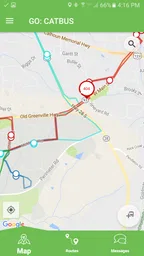
I would use the vehicle map as one part of a simple routine, not stare at it continuously. First, identify the service I intend to take; then check whether its live position makes my planned departure sensible. If I am already close to the stop, the map may reassure me. If I am still at home or work, it can help me decide when to leave. Checking repeatedly every few seconds is unlikely to improve the decision and can make minor movement or pauses feel more significant than they are.
There is also a useful distinction between “the vehicle is moving” and “my whole journey is on schedule.” A live location helps answer the first question more directly than a static timetable, but it does not by itself tell me everything about a transfer, a walking connection, or an unexpected change elsewhere in the trip. When a journey has several legs, I would pair the tracker with the transit operator’s service information or a route-planning app rather than assume one map view covers every risk.
Another practical habit is to check the app before committing to a detour. If I am deciding whether to walk to a different stop, the current vehicle position may help me judge whether there is enough time. But I would not make that choice from a glance alone when missing the ride would have a high cost. The map is most useful for low-stakes timing adjustments; for a crucial appointment, I would build in a buffer and keep an alternative plan.
Where another kind of app may fit better
Passio GO! is not automatically the right choice for someone who wants one app to plan every part of a trip. A general navigation app may be a better fit for comparing multiple transport modes, finding a route in an unfamiliar city, or combining transit with walking directions. A static timetable or transit operator’s schedule may be preferable when I need a clear planned departure time and do not need to watch vehicle movement.
Likewise, people who travel across different networks may prefer a broader planner as their main tool, then keep a network-specific tracker for the service they use most. That combination avoids expecting one app to be equally strong for local tracking and cross-network planning. If my transit service is not covered, or if I mainly drive, cycle, or walk, a live transit locator would add little to my day.
The main friction is therefore not complicated setup so much as fit. I would not recommend installing it just because I want a transit app in general. First, look for the service you actually ride and see whether the app gives you useful coverage. If it does, trying a free app is a low-commitment way to assess whether a live map improves your routine. If it does not, a different tool is the sensible answer rather than trying to force this one into a role it is not designed to fill.
What switching into a live-tracking routine involves
Moving from a timetable or general map to Passio GO! does not have to mean abandoning the tools that already work. I would keep my usual route-planning method for unfamiliar trips and use the tracker for the specific question of where the relevant transit vehicle is. That division of labour is easier to trust than expecting one app to replace every source of travel information.
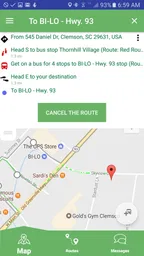
There is a small habit change, too: a live position is something to consult near the time of travel, while a schedule can be checked earlier and used to plan the day. I would avoid treating a tracker as a reason to leave at the last possible moment. If the map helps me reduce unnecessary waiting, that is useful; if it encourages me to cut my buffer too close, the convenience can turn into stress.
Passio GO! is at version 151 and was released on April 21, 2017. I see those details as context, not a guarantee about how it will behave on every phone or route. The practical test remains whether the experience on my device shows the transit service I need clearly enough to support a decision. If it does, it can complement my existing routine without requiring a wholesale switch.
My recommendation
I would recommend Passio GO! to someone who regularly uses a transit service it supports and wants a straightforward way to check vehicle locations before leaving or while waiting. Its strongest value is practical timing: deciding when to walk to a stop, whether to keep waiting, or whether a change of plan is worthwhile. For that kind of repeated, local use, a dedicated tracker can be more convenient than opening a broad navigation app every time.
I would skip it as a primary travel tool if I need extensive trip planning across many networks, rely on modes beyond transit, or cannot find my service in it. In those situations, a general route planner or the operator’s schedule is likely to fit better, with Passio GO! serving at most as a secondary check. My bottom line is simple: choose it for live transit awareness on a network you use, not as an all-purpose travel planner. That expectation gives the app a fair chance to be useful without asking it to solve problems outside its purpose.
What we like
- Live vehicle tracking helps riders check progress in real time.
- Route maps make it easier to locate stops and nearby transit.
- Arrival estimates can help with planning trips and connections.
- A clean map view makes transit information easy to scan.
- Useful for checking service details before leaving.
What could be better
- Arrival estimates may change when traffic or service conditions shift.
- Coverage depends on the transit agencies supported by the app.
- Location access may be needed for nearby stop information.
- Outdated agency data can make route details less reliable.
- The app is less useful in areas without participating transit services.





