




O'Reilly Pro review
 Analysis by Appsdrops
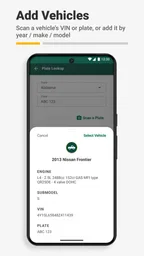
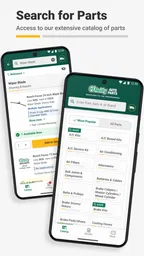
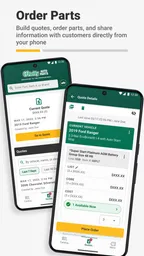
When a repair is waiting and the right replacement part is the next hurdle, a clear lookup and ordering process can make the job feel much more manageable. O'Reilly Pro is built for that practical moment: its purpose is to streamline parts lookup and ordering for people working with auto parts. I see the appeal in keeping those tasks together rather than treating the search and the purchase as unrelated errands.
From repair need to parts search
The workflow starts with a familiar problem: you know a vehicle needs attention, but you still need to identify the part that can move the repair forward. In that situation, an app focused on parts lookup has a straightforward role. It gives the process a dedicated starting point, with ordering as the next natural step. That focus makes O'Reilly Pro easier to understand than a general-purpose automotive app whose features might be spread across several unrelated tasks.
I would approach it as a practical tool rather than an automotive encyclopedia. The central promise is to help users look up parts and place orders more smoothly. That makes it relevant to professionals who regularly handle parts needs, as well as anyone whose work involves coordinating a repair. The app’s value depends on how well it supports the specific job at hand: moving from a parts question toward an order without unnecessary detours.
It is also worth setting expectations sensibly. A focused ordering app can help organize part of a repair workflow, but it does not replace the judgment involved in diagnosing a vehicle or choosing the correct component. I would still treat the lookup as one step in a larger process: establish what the repair requires, search for the relevant part, review the choice carefully, and then decide whether ordering is the right next move.
A focused first step
For me, the strongest idea behind O'Reilly Pro is its concentration on a common, time-consuming task. Parts research can interrupt the rhythm of a repair, especially when the person handling the job also has to manage the surrounding work. Giving lookup and ordering a shared destination is a sensible way to reduce the feeling of switching between separate processes.
That does not mean every search will automatically be simple. The usefulness of any parts tool depends on the user having enough information to begin and on taking care when assessing the result. I would bring the vehicle and repair details into the process, then use the app as a way to support the search rather than assuming the first option is necessarily the correct one. This careful approach matters whether I am preparing for a job or responding to a part that is needed along the way.
Moving from lookup to order
The intended flow is easy to picture. First, there is a parts need. Next comes the lookup, followed by the decision to order. Keeping those stages under one app’s broad purpose gives the process a clear direction. Instead of thinking only about finding a product, the user can treat the search as part of getting the repair supplied and ready to proceed.
That connection between discovery and action is the main point I would keep in mind when evaluating the app. A parts search is most useful when it helps answer a real question: what should be obtained to continue the work? Ordering is the follow-through. The app’s stated aim of streamlining both tasks speaks to that full path, rather than presenting lookup as an isolated activity with no connection to what happens next.
In everyday use, I would still pause between those steps. A search result needs to make sense for the repair, and an order should follow only after the choice has been considered. That pause is not a flaw in the app’s concept; it is part of responsible parts selection. The tool can support the workflow, while the user remains accountable for checking that the chosen part fits the task they are trying to complete.
Where coordination matters
Parts work often involves a handoff: the person identifying what is needed may not be the same person placing the order, receiving it, or carrying out the repair. A focused lookup-and-ordering app can make that transition feel more coherent by centering the process on the part itself. Even when several people are involved, having a clear sequence in mind helps keep the request from becoming an informal back-and-forth with no obvious next step.
I would use the app as one part of that coordination, not as a substitute for communicating clearly. If a repair is being handled by a team, the people involved still need to agree on what the job requires and what has been selected. The app’s purpose makes it relevant to that moment, but good coordination depends on the people using it sharing the necessary context. That distinction keeps expectations grounded and helps avoid treating software as though it can resolve every workshop or service-counter question on its own.
The same idea applies to a solo user. Even without a team handoff, the process has stages: identify the need, look up a part, make a decision, and place an order. Thinking in those terms can make the app easier to use purposefully. It is not just something to open because a vehicle has a problem; it is a tool for moving one concrete supply task toward completion.
What the experience is meant to deliver
The desired outcome is simple: spend less effort moving between parts research and ordering, and more effort getting the necessary item lined up for the repair. That is a practical promise, not a dramatic one, and I appreciate the directness. People looking for an auto parts lookup and ordering app are usually trying to solve a specific logistical problem. A focused tool can be appealing precisely because its purpose is easy to describe.
Whether it feels genuinely convenient will depend on the user’s needs and how often parts lookup is part of their routine. Someone who regularly handles these tasks may value having a dedicated app for them. A person who only needs a part occasionally may judge it by how clearly it supports that single visit. In either case, the central question is whether the app helps keep the path from search to order understandable and manageable.
The audience is not limited to one kind of repair situation. Anyone with a legitimate reason to find and order auto parts may recognize the workflow, though the app’s professional orientation is clear from its name and purpose. I would think of it as a task-specific companion for parts work, rather than a full service platform for every stage of vehicle ownership. That narrower role is useful to know before deciding whether it belongs in a regular toolkit.
Ratings and practical expectations
The response from users is mixed: the app has a 3.1 average from 895 ratings, alongside 368 written reviews. Those figures give prospective users a reason to approach it with realistic expectations rather than assuming the experience will suit everyone equally. Ratings can reflect different devices, workflows, and expectations, so I would treat them as context and pay attention to whether the app’s core purpose matches the task I need to handle.
Its reach is notable, with over 500,000 installs, and it is free to use. It was released on November 22, 2024, and the current version is 1.26.0. The age rating is Everyone, and it requires Android 9 or later. The developer is O'Reilly Auto Parts. Those details help frame the app as a current, accessible option for Android users who want a dedicated route into parts lookup and ordering.
For a potential user, compatibility is the useful detail to check before making the app part of a routine. Beyond that, the best expectation is a focused tool with a defined job: support the search for auto parts and the next step of ordering them. I would not judge it by whether it replaces every conversation or decision surrounding a repair. I would judge it by whether it gives that particular part of the process a clearer home.
Where the workflow can lose momentum
Even a well-focused workflow can stall when the information entering it is unclear. If the repair need has not been identified carefully, a parts search may not resolve the underlying uncertainty. The user may need to revisit the diagnosis or confirm what the job calls for before moving forward. That is a normal limitation of the task itself, not something a lookup-and-ordering app can eliminate by its purpose alone.
There can also be friction at the handoff between a promising search and a confident order. A user may need to double-check the selection, coordinate with someone else, or reconsider what the repair actually requires. I see that as the point where a deliberate process matters most. The app is intended to streamline lookup and ordering, but the final decision still benefits from attention and context rather than rushing from search straight to purchase.
Another possible source of mismatch is expectation. Someone looking for a broad collection of vehicle-management tools may find a parts-focused app narrower than hoped. That is not necessarily a drawback for its intended job, but it changes how I would assess it. The right question is not whether it handles every automotive need; it is whether it makes the parts portion of a repair easier to organize.
The mixed average rating reinforces that practical mindset. I would be comfortable considering the app for its stated purpose, while remaining attentive to the parts of my own workflow where confusion tends to arise. If the task begins with a clear need and ends with an order that has been checked, the app’s focus makes sense. If the repair itself remains uncertain, the lookup step may not be enough to create a smooth result.
Who may find it useful
I can see the most immediate fit for users who handle auto parts often and want a dedicated place for lookup and ordering. It may also suit someone preparing for a repair who would rather keep the supply step organized instead of treating it as an afterthought. In both cases, the app’s value comes from its role in a larger chain of work: identify the need, locate a suitable part, coordinate as necessary, and proceed with the order.
For occasional users, usefulness will depend on whether that focused path feels simpler than the method they already use. I would approach it with one real task in mind, rather than expecting a general automotive resource. That makes it easier to decide whether the app earns a place on the phone: does it help me move from a parts question to a considered order with less hassle?
O'Reilly Pro is a straightforward concept aimed at a real part of vehicle work. Its strongest appeal is the attempt to bring parts lookup and ordering into one focused workflow, with a clear outcome in mind. The process can still require careful selection, communication, and judgment, but those steps are part of getting a repair supplied properly. If that is the task you want to make more organized, this app is worth considering as a practical, purpose-built option.
What we like
- Offline access keeps saved learning materials available without a connection.
- Progress tracking helps learners monitor course completion.
- Search makes it easier to find specific topics across the catalog.
- Playback controls support learning at a comfortable pace.
- One subscription can provide access to a broad range of technical content.
What could be better
- The subscription may be costly for casual learners.
- Some courses may require a separate purchase or plan.
- Video streaming can use substantial mobile data.
- The large catalog can make choosing a course difficult.
- Content may focus more on technology than on other subjects.





