
Opendoor - Buy and Sell Homes review
 Analysis by Appsdrops
I judge a home-buying app by whether it makes a complicated decision easier to inspect, not by whether it makes the process look effortless. Opendoor is a House & Home app from Opendoor Labs, LLC, built around buying and selling homes through the company. In my view, its clearest appeal is to people who want to explore that route from a phone, while its main limitation is that an app cannot make a major property decision simple for everyone. Clear information and a comfortable pace matter as much as convenience, especially when users differ in vision, dexterity, attention, confidence, and access to a quiet place to browse.
Reading and finding your way around a high-stakes decision
The app’s central purpose is easy to understand: it relates to buying and selling homes, rather than being a general-purpose home inspiration or household-management tool. That focus can help a first-time visitor decide whether to explore further. I would still approach it as one part of a property search, not as a replacement for carefully reviewing the home, the terms, and the steps involved before making commitments.
Opendoor has a free download and is rated for Everyone, which lowers the practical barrier to trying it. Its average rating is 4.5 from around 3,600 ratings, and it has more than 500,000 installs. Those figures suggest that many people have tried it, but they cannot tell me whether the experience will suit a particular person’s reading needs or circumstances. I would treat them as context, not as a guarantee of ease or fit.
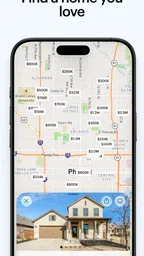
When browsing homes on a phone, readability is more than font size. A useful experience should make it possible to distinguish one property from another, revisit a detail, and compare options without relying on memory. My practical advice is to pause after each promising listing and note the questions it raises: what matters about the location, what would need checking in person, and what information you still need before deciding. That habit reduces the chance of letting a polished screen replace a considered comparison.
It is also worth separating exploration from commitment. Looking through a home-buying or selling service on a small screen can be convenient, but contracts, property details, and financial implications deserve deliberate attention. If a screen feels crowded or a term is unfamiliar, I would switch to a larger display or ask someone I trust to review the relevant material with me. That is not a failure of the app; it is a sensible way to handle an important transaction.
Making the interface workable for different ways of using a phone
People vary in how precisely they can tap, how long they can focus, and how comfortable they are reading on a handheld screen. For someone with reduced dexterity, I would avoid rushing through forms or decisions while walking, and use a stable surface where possible. If a step requires careful input, taking a moment to check each entry is more useful than trying to finish quickly on a crowded commute.
For readers who tire easily, a focused session may be more manageable than a long property-search marathon. I would shortlist only a few homes at a time, then return later with fresh attention. This also helps people who find it difficult to hold many details in working memory: write down the features that matter to you, and compare each home against the same short list rather than relying on impressions.
Sensory conditions matter too. Bright sunlight, glare, background noise, and interruptions can make it harder to read property information or think through a decision. When I am comparing something consequential, I prefer a quieter moment and a screen position that reduces reflections. If notifications or other distractions interrupt the process, I would leave the decision for later rather than trying to reconstruct what I had just reviewed.
I would not assume that a home-search app automatically works equally well with every assistive setup. Anyone who depends on a particular text-reading, display, voice, or switch-control method should test the specific tasks they need before relying on it for a time-sensitive step. The most useful test is practical: can you locate a home, understand the information presented, return to a previous point, and complete the action you actually need without outside help?
Using it around real-life schedules and constraints
A realistic use case is a person who has only a short break between work and an appointment. They can use that time to review a few possibilities, capture questions, and decide what deserves a closer look later. I would not use a rushed break to make a final choice. The app is more helpful as a way to organize the next step than as a reason to compress a home decision into a few spare minutes.
It can also fit a household where one person has more time to browse than another. One person might explore the available homes while the other reviews the shortlist later, discussing what needs a visit or further consideration. To make that handoff useful, record the reason each option made the list, not just its name. “Worth checking because the layout may work” is more actionable than a bare saved impression.
For someone selling while also searching for a new place, the prospect of handling both sides through one company is appealing. It may reduce the feeling of coordinating entirely separate searches, but it does not remove the need to compare the company’s route with other ways to sell or buy. I would consider the convenience alongside the particular home, the proposed process, and my own timing needs before choosing.
Access to a reliable phone and a suitable moment to use it is not universal. A person sharing a device, managing a limited data connection, or needing help to read small-screen content may find a property app less convenient than a conversation or a larger-screen review. In those situations, the app can still be a starting point, but it should not be the only way the household evaluates a home or understands a decision.
Where convenience gives way to friction
The biggest limitation is not unique to this app: property decisions involve details that are difficult to judge from a phone. A listing can help someone identify an option, but it cannot substitute for checking the home and its surroundings in person or for understanding the relevant terms. I would use the app to narrow attention, then verify the things that matter most through appropriate follow-up before treating a home as the right choice.
There is also a trade-off in using a service centered on one company. A single route may feel more straightforward than juggling several providers, but a buyer or seller who wants a broad comparison should look beyond one company’s process. If your priority is to compare many kinds of agent arrangements, selling methods, or local services, a wider search may be a better starting point. If your priority is to explore Opendoor’s approach specifically, this app is more directly relevant.
People who need an uninterrupted, highly structured explanation may find the phone format less comfortable than speaking with a person or reviewing documents on a larger screen. Likewise, someone who is uncertain about financial or contractual language should not treat a smooth browsing experience as a substitute for asking questions. My rule is simple: use the app to identify what you want to know, and pause whenever the next step feels unclear.
The app is free, but free access should not be confused with a promise that every part of buying or selling a home carries no cost. The home transaction itself is a separate matter from downloading the app. I would keep those two questions apart and examine the relevant terms for the specific situation rather than infer costs from the app’s price.
Who is likely to benefit, and who may prefer another route
I think Opendoor is most useful for people who are actively considering a home purchase or sale and want to explore this company’s approach on a phone. It can suit someone who likes to browse independently, wants to gather questions before speaking with others, or is coordinating an early shortlist with family. It is less suited to someone looking for a general real-estate directory, renovation ideas, or a complete substitute for professional advice and in-person evaluation.
The app is also not the right choice for a user who cannot comfortably complete the key tasks with their current device or assistive setup. In that case, I would not recommend pushing through a stressful interaction just because the service is mobile. A larger screen, direct conversation, or another route that better accommodates the person may be the more inclusive option. The best tool is the one that lets the user understand and act with confidence.
The current version is 300.0.23, and the app has been available since October 19, 2016. Those details give a little context for its history and current release, but they do not settle the question of personal usability. Before relying on it, I would check the tasks that matter to me on my own device and make sure I can review the information at a pace that feels comfortable.
A measured recommendation for inclusive use
My overall view is that Opendoor can be a useful starting point for exploring a home purchase or sale, especially when someone wants to consider the company’s route without beginning with a call. Its strongest inclusive quality is the possibility of browsing on one’s own schedule; its biggest caveat is that mobile convenience does not guarantee that every person can read, navigate, or complete every step comfortably.
I would recommend trying it if you are specifically interested in Opendoor and can comfortably review property information on your device. Use short sessions, keep a written comparison, and move important questions to a larger screen or a conversation when needed. If you require more support, broader comparisons, or a format that better fits your access needs, choose that alternative without hesitation. For a decision as personal as a home, accessibility means having enough time, clarity, and control to make the choice your own.
What we like
- Browse property listings and save homes for later.
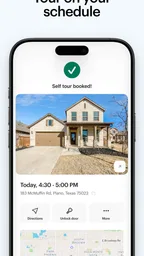
- Schedule home tours directly through the app.
- Get notifications about listing updates and price changes.
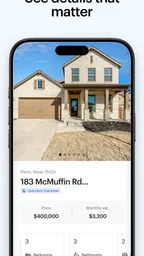
- View home details and photos in one convenient place.
- Contact Opendoor about buying or selling a home.
What could be better
- Available listings depend on your location.
- Some homes may have limited photos or details.
- Tour times depend on availability in your area.
- Selling through Opendoor may involve service fees.
- The app may require personal information to get started.





