
Online Portal by AppFolio review
 Analysis by Appsdrops
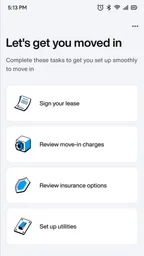
I would judge a resident portal less by how polished it looks than by whether it helps me handle ordinary housing tasks without adding uncertainty. Online Portal, from AppFolio, Inc., is a House & Home app aimed at people whose landlord or property manager uses AppFolio. Its purpose is practical: give residents a place to deal with payments and maintenance while away from a computer. That can be genuinely useful, but the relationship matters. This isn’t a general-purpose rent tracker or a tool that independently manages any home; its value depends on your property’s use of the AppFolio system.
Trust starts with knowing who the app serves
In my view, Online Portal is best understood as a shared channel between a resident and a property manager, rather than as a private household organizer. That distinction sets the right expectations. You use it to interact with a housing provider, so the experience is shaped by the account and services connected to your property. If your manager has not enabled the portal for your tenancy, installing it alone won’t turn it into a useful payment or repair tool.
The app’s broad reach suggests that this setup is familiar to many residents: it has more than a million installs, and its average rating is 4.6 from around ten thousand ratings. Those figures are reassuring as a sign that people do use it, but I wouldn’t treat them as proof that every landlord offers the same options or responds at the same pace. A portal can make it easier to submit a request; it cannot, by itself, determine how quickly someone fixes a leak or answers a question.
That is the key trust context: the app sits between you and the property-management process. I’d use it for routine, recordable tasks, while keeping a separate route in mind for urgent problems. If a situation needs immediate attention, waiting for an in-app response may be the wrong choice. The portal is most useful when it complements the manager’s established communication process rather than replacing common sense about urgency.
What the app is—and what it isn’t
Online Portal is free and rated for Everyone, which makes it easy to try without treating it as a paid subscription decision. It is currently at version 1.57.1 and requires Android 9 or later. AppFolio released it on July 19, 2018, and the app’s central role remains resident access to housing-related tasks. I would not confuse that focused role with a complete record of everything happening at a property.
Compared with paying rent through a property manager’s website, a paper check, or a bank’s bill-payment service, a resident portal can put payment and maintenance interactions in one place. The trade-off is dependence on the management company’s setup. A bank payment may suit someone who wants housing transactions handled with other bills, while a portal is more convenient when the manager expects residents to use it and can connect the payment to the tenancy.
Controls are only useful when you can see the choices
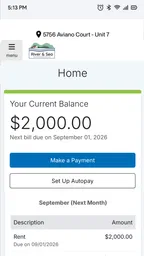
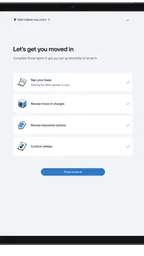
For a cautious user, the first useful step is not to rush into submitting a payment. I’d sign in, confirm that the account corresponds to the correct property and tenancy, and inspect the choices the manager has made available. The interface can only offer the controls associated with that account. Checking those details before acting is a simple way to avoid sending a request or payment through the wrong channel.
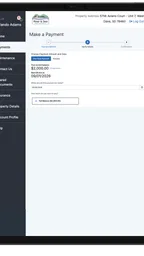
I also recommend treating each action as a deliberate decision. Before confirming a payment, review the amount and the account context shown in the app. Before sending a maintenance request, make sure the description says where the issue is and what is happening. Those are ordinary precautions, but they matter more in a portal because an entry may become part of a conversation with the property manager rather than a note you keep only for yourself.
I wouldn’t assume that every user has the same payment methods, account settings, or request options. Those are practical questions to settle with your property manager or by checking the choices visible after signing in. If you need to know whether a particular payment arrangement is available, the safest approach is to confirm it before relying on it for a due date. That avoids turning a convenient app into a last-minute source of stress.
Think carefully at payment and maintenance moments
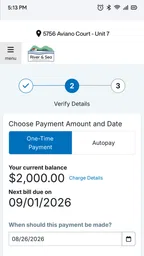
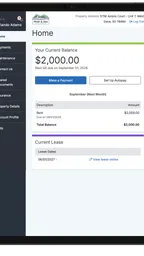
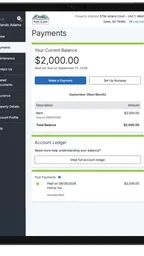
Payments and repair reports are the moments when small mistakes have consequences. For a payment, I’d compare the displayed amount with what I expect to owe and make sure I’m acting in the intended resident account. I’d also keep any confirmation the app presents, rather than assuming that tapping a button is the same as having a completed transaction. If a payment looks wrong or its status is unclear, contacting the manager is more sensible than repeating it blindly.
Maintenance requests benefit from a different kind of care. A vague report such as “something is broken” may lead to follow-up questions and delay. I’d describe the location, the observable problem, and whether it is getting worse. For example, a resident noticing a persistent drip under a kitchen sink can explain where it appears and when it happens, then use the portal to leave a clear report. That creates a more actionable starting point than a hurried message with no context.
There is a trade-off here: a written request is convenient and can help keep the issue tied to the resident’s account, but it may not be the right channel for a hazard that needs immediate attention. I would contact the property manager through the urgent route they provide if the problem cannot wait. The app is a useful place for routine coordination, not a reason to delay when safety or serious damage is at stake.
Because the app relates to housing, it’s also worth pausing before entering sensitive details. I’d include what the manager needs to understand the problem, but avoid adding unrelated personal information. For a repair report, the location and symptoms are usually more relevant than a long account of private circumstances. This is a good general habit for any resident portal: keep the message focused, factual, and useful to the person who has to act on it.
Keep your choices and expectations grounded
A portal gives residents a convenient route to communicate, but it does not guarantee control over how a property manager processes a request. I’d think of it as a way to make an action visible to the management system, not as a promise of a particular response time or outcome. If a request affects access to the home, a deadline, or an ongoing dispute, keeping your own notes about when you submitted it can help you follow up clearly.
The same principle applies to account access. Use the account associated with your tenancy, and be deliberate about who can use the device or sign-in you rely on. If you share a phone, consider whether leaving a housing account open is appropriate for your household. I’m not claiming the app offers any particular privacy setting; the practical point is to manage access through the choices actually available on your device and account.
It’s reasonable to ask your property manager how the portal fits into their process: whether residents should use it for routine repairs, which route to use after hours, and how to handle a payment question. That conversation is more useful than guessing from the app’s name or assuming every property uses it identically. For residents moving between properties, it is especially sensible to confirm that the account reflects the current home before relying on it.
Who will get the most from it
I’d recommend Online Portal to residents whose property manager already uses AppFolio and who want a convenient mobile route for ordinary payment and maintenance tasks. It is a natural fit for someone who is away from home during office hours, wants to report a non-urgent issue without waiting to sit at a computer, or prefers to handle a housing task while checking other things on a phone.
A realistic example is a resident who spots a loose cabinet hinge after dinner. Rather than postponing the report until the next time they remember to call, they can describe the problem and its location in the portal, then return to their evening. The benefit is not that the app fixes the hinge; it is that the resident can record the issue in a direct, structured channel when it is convenient. For a payment, the same convenience can help someone handle a routine task while travelling, provided they verify the details and know how their manager processes it.
I’d skip it as a primary solution if your landlord does not use AppFolio, if you need a tool that works across unrelated properties, or if you want a standalone budgeting app with broader household-finance features. It is also not a substitute for urgent contact, and it may feel unnecessary if you prefer your property manager’s existing website or another established process. In those cases, the option that matches the manager’s workflow is likely more reliable than maintaining a separate app you cannot use effectively.
A cautious, practical verdict
My overall view is favorable, with an important condition: Online Portal is useful when it matches the way your property is managed. AppFolio, Inc. has built a focused resident-facing app, and the strong average rating and substantial audience make it a credible option to consider. I’d install it when invited by a property manager, check the account and available choices, and use it for clear, routine tasks rather than expecting it to solve every housing issue.
The main limitation is not a flaw I can confidently assign to the app itself; it is the dependence on the property manager’s setup and response process. That makes the app less universal than a general bill-payment tool, while giving it a more direct role for residents whose homes are already connected to AppFolio. My practical recommendation is simple: use the portal for convenient, well-documented communication, verify payment details before confirming, and keep the manager’s urgent contact route handy. With those habits, it can reduce friction without asking you to put more trust in it than the situation warrants.
What we like
- Residents can submit maintenance requests through the portal.
- Rent payments can be made online without visiting an office.
- Payment history helps residents keep track of transactions.
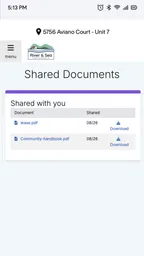
- The portal provides access to lease documents and community updates.
- A single login can simplify routine property management tasks.
What could be better
- Features may vary depending on the property manager’s setup.
- Some requests may take time to receive a response.
- Online payment options may include processing fees.
- Portal access depends on the property manager inviting residents.
- Account or payment issues may require contacting the property manager.





