




Offender Locator review
 Analysis by Appsdrops
I would treat Offender Locator as a focused lookup tool, not as a complete safety plan. Its purpose is to help you check registered sex offenders near a place you select, which can be useful when moving house, planning a regular route, or getting familiar with a new neighborhood. That narrow purpose is also its main limitation: the app can support awareness, but it cannot tell you how safe a place is or replace sound judgment.
As a lifestyle app from Offender Locator Inc., it is aimed at people who want this information close at hand rather than having to begin each search from scratch. The app is free to install, rated for Everyone, and has a 4.3 average from around 4,400 ratings. Those figures suggest a widely used tool, but I would still approach the results carefully: a listing is information to interpret, not a prediction about someone’s behavior or a guarantee about a location.
Finding your way through a focused lookup
The central task is straightforward: look at a chosen area or location and review registered offenders associated with it. That makes the app easier to understand than a broad neighborhood-safety service trying to combine crime reports, alerts, community posts, and other data. If your question is specifically about registered offenders, the app’s narrow focus can save time and reduce distraction.
In practice, I would start with a place that matters to my routine rather than browsing a map without a reason. For example, someone considering an apartment could check the surrounding area, then repeat the search for the route to a bus stop or grocery store. This turns a single lookup into a more useful planning exercise: it helps you consider the places you actually visit, while avoiding the mistaken impression that one neighborhood-wide result answers every personal safety question.
The app’s current version is 13.0.5, and it has been available since October 26, 2017. It has passed 100,000 installs. That history and reach make it a recognizable option in this specific niche, though neither popularity nor a polished interface should be treated as a substitute for understanding what a result means.
For readability, the key question is whether you can identify the location you are checking and make sense of the information presented there. I would use the app with a specific search in mind, pause to read each result rather than scanning only for map markers, and avoid making quick judgments from names or proximity alone. A map view can make distance feel obvious, but nearby does not automatically mean relevant to your daily movements.
That distinction matters especially when comparing this tool with a general web search or a broad crime-map service. Those alternatives may cover more kinds of information, but they can also mix reports, commentary, and different categories of records. Offender Locator keeps the task more specific. If you need a wide picture of neighborhood conditions, I would use a broader local resource as well; if you want this particular kind of lookup, a dedicated app is the more direct starting point.
Readable results require a deliberate pace
One practical habit I recommend is checking a small number of meaningful locations separately: home, a regular destination, and the route between them. This is easier to interpret than looking at a large area and trying to infer a story from a cluster of results. It also gives you a chance to ask the right follow-up questions, such as whether a location is actually on your route or merely within the selected area.
For someone with low vision or who finds dense maps tiring, the most helpful approach is to avoid relying on visual position alone. Read the available details, enlarge text through the device’s usual display settings if needed, and take your time. I cannot assume that every screen or result is optimized for every accessibility need, so anyone who depends on a particular text size, screen reader behavior, or high-contrast presentation should test those essentials early, before relying on the app for an important decision.
Motor and sensory needs shape how useful it feels
A location lookup is usually a short task, but it can still be frustrating if small controls, repeated map gestures, or visually busy results are difficult to manage. I would make searches while seated and unhurried when possible, rather than trying to operate the app while walking, driving, or juggling other tasks. That is both more comfortable and less likely to lead to a mistaken tap or rushed interpretation.
If touch precision is difficult, a useful workflow is to search a clearly identified destination rather than repeatedly panning around a map. If visual processing or attention is a concern, check one place at a time and take a break between locations. These are modest habits, not special app functions, but they can make a sensitive lookup more manageable. The app is less suitable for someone who needs a fully hands-free process or whose access depends on features that they have not been able to verify on their device.
Sensory context matters too. Looking up records in a public place can feel uncomfortable, and the topic itself may be stressful. I would avoid turning a quick check into prolonged browsing, especially around children or family members who may see the screen and misunderstand what the information represents. A calm, private moment makes it easier to read carefully and discuss any concerns responsibly.
Using it across places, routines, and devices
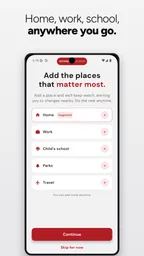
The ability to choose a location makes the app useful beyond the address where you currently live. A renter can review a prospective area before a viewing; a caregiver can become familiar with a relative’s neighborhood; a person moving to a new city can check several destinations they expect to use. These are all better use cases than treating the app as a live companion for every step of an outing.
For a realistic example, imagine that I am comparing two possible rentals. I would check each address, then separately consider the nearby places I would visit on an ordinary weekday. I would not rank the homes solely by the number or closeness of results. Instead, I would use what I see as one point to investigate, alongside practical matters such as the route, lighting, transport, and how comfortable I feel in the area at different times.
That workflow also helps avoid a common trap: treating an app as if it were a complete picture of risk. A record search can offer a specific kind of awareness, but it does not account for every person, every incident, or every circumstance that affects safety. When I need a broader view, I would consult appropriate local sources and rely on direct, current information rather than asking this one app to answer questions outside its purpose.
Offender Locator is free to download, while in-app purchases range from $4.99 to $49.99 per item. I would first decide whether the basic lookup fits my needs before considering any purchase. The range is wide enough that it is worth checking the in-app options and their terms on the app store before spending; I would not assume a paid item is necessary for everyone or that it changes the underlying meaning of the information.
Where the experience can fall short
The most important limitation is interpretive rather than cosmetic. A location result can be unsettling, and the app’s focused purpose may tempt users to treat proximity as a direct measure of danger. I would resist that leap. The responsible use of this tool is to inform awareness, not to label a neighborhood, confront a person, or make a consequential decision based on one screen.
There are also users for whom a map-first lookup may not be the right format. Someone who needs large, highly legible text, dependable spoken navigation, or a low-stimulation interface should verify those needs on their own device before depending on the app. If the interface makes it hard to distinguish a record from a location marker, a carefully chosen local information source with clearer text may be a better option.
Another barrier is emotional: the subject can provoke fear even when a result is only one piece of context. I would not recommend casual, repetitive checking if it increases anxiety without helping you make a practical choice. For a move, a commute, or a family visit, define the decision you are trying to make, check the relevant locations, and then step back to weigh other evidence.
The app runs on Android versions 8.0 and later. If your device is older, it will not meet that minimum. The Everyone content rating makes the app broadly available by age classification, but the subject matter still calls for adult guidance when a child or young teen is involved. An age label describes the store’s content category; it does not mean every conversation prompted by the results is suitable without context.
Who I would recommend it to
I would recommend Offender Locator to adults who have a clear reason to check registered-offender information around a home, a planned move, or a regular destination. Its strength is the directness of that task: it is more focused than a general safety app and less cumbersome than piecing together multiple searches when this is the specific information you need.
I would suggest skipping it, or at least not relying on it alone, if you are seeking an all-in-one neighborhood safety assessment, real-time emergency guidance, or a tool that can make decisions for you. It is also not the right choice if using this kind of information is likely to intensify anxiety, or if its visual and touch-based workflow does not suit your access needs. In those cases, a trusted local resource, direct advice from relevant authorities, or a broader service may better match the question.
Overall, I see Offender Locator as a practical, deliberately narrow reference for people who want to check a specific place and are prepared to interpret what they find with care. Its value lies less in searching as much as possible and more in choosing relevant locations, reading results slowly, and combining them with real-world context. If you keep those boundaries in mind, it can help you become more informed without pretending that a map can provide certainty.
My inclusive verdict is measured: the app is most useful when its focused lookup is accessible enough for your needs and used as one input, not the whole answer. Before depending on it, test the basic search on your own device, consider whether the presentation works for your vision and motor preferences, and decide in advance what you will do with the information. That small bit of preparation makes the tool more useful and helps keep its limitations in perspective.
What we like
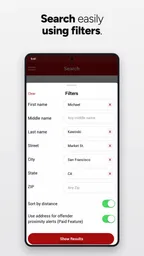
- Search for registered offenders by name or location.
- Map view helps identify nearby listings.
- Profiles may include photos and identifying details.
- Useful for checking an area before moving or traveling.
- Free access makes basic searches easy to try.
What could be better
- Coverage and update frequency vary by jurisdiction.
- Some listings may contain outdated information.
- A map location may not show an exact residence.
- Search results can be difficult to interpret without context.
- Availability and features may differ by region.





