Nintendo Switch App review
 Analysis by Appsdrops
If you have a Nintendo Switch, this companion app makes the most sense when you treat it as a small extension of the console, not as a second place to play. I found that distinction helpful from the start: it is an entertainment app from Nintendo Co., Ltd., built around supporting the Switch experience rather than replacing the console or serving as a general game store. My first useful goal would be simple: install it, sign in with the Nintendo Account you use with your console, and see which parts of the app fit the way you play.
What to expect from a phone companion
Nintendo Switch App is free, rated for Everyone, and sits in the entertainment category. It has a 3.9 average from around 78,000 ratings, with more than 10 million installs. Those figures suggest a widely used companion, though the rating also hints that it will not be equally useful to every Switch owner. Its current version is 3.6.0, and it runs on Android 9 or later.
The key question is not whether you own a Switch, but whether you want to use your phone to support something you already do on it. If you mainly want to browse games, watch general gaming videos, or chat with friends across many platforms, your usual store, video app, or messaging service will probably be more convenient. This app is narrower by design, and that focus can be a benefit when you want Nintendo-related tools in one place.
I would approach the app with modest expectations and a specific purpose. Pick one thing you hope it will help with—checking a game-related service, keeping up with Nintendo content, or using a feature connected to your play—and judge it by whether that task becomes easier. A companion app is most valuable when it saves a small amount of friction at the right moment, not when it tries to become your main gaming hub.
Because its role is tied to Nintendo Switch, it is a poor fit if you do not own the console or have no interest in Nintendo games. Even a polished phone experience cannot create much value without that connection. On the other hand, for a Switch owner who already keeps a phone nearby, it can be worth trying before deciding that the console alone is enough.
Start with a calm, low-risk setup
After installing it, open the app and follow the sign-in prompts using the Nintendo Account you associate with your gaming life. If you have more than one account in your household, pause before choosing: linking the wrong one can make the app feel empty or confusing, even when everything is working as intended. I would check the account name carefully rather than rushing through the first screen.
Once you are in, explore at a measured pace. Look at the available sections and identify which ones actually relate to games or activities you use. You do not need to configure everything immediately. A good first session is just long enough to confirm that the app opens correctly, that you are signed into the expected account, and that the content you care about is visible.
One useful habit is to test the app while the Switch is nearby. That makes it easier to understand whether a screen is offering information for later or something intended to complement a current play session. If a feature appears to depend on a particular game or account context, compare what you see on the phone with what you are doing on the console before assuming that the app is broken.
There is also a practical distinction between installing the app and getting value from it. Installation is the easy part; the meaningful setup is choosing a reason to return. For one person that might be a game-specific companion function, while another may simply want Nintendo-related material gathered in one place. If none of the visible sections maps to your routine, there is no need to keep checking it out of obligation.
Your first useful win should be small
For a first-time user, I recommend aiming for one clear success rather than trying to master every screen. Open the app, confirm the account, find one section that relates to a game you actually play, and use it to answer a real question you have. That might be checking relevant information before you sit down to play or seeing what the app makes available for a title you already own. The win is not how many menus you visit; it is finding one task the phone handles more conveniently than switching through console screens.
A realistic example: you are waiting for a friend to join a game session, with your Switch nearby and a few minutes to spare. Instead of opening unrelated social apps, you can check the Nintendo companion app for something relevant to your play or browse its Nintendo-focused material. If it helps you prepare or gives you a useful detail, that is a good reason to keep it installed. If you find yourself tapping around without a clear result, the app may not match that particular routine.
Another worthwhile test is to use it when you are away from the console, then decide whether the information or activity you found remains useful later. This helps separate genuine convenience from novelty. Phone companions can feel interesting on day one simply because they are new; after a few days, the better test is whether you remember to open them because they solve a specific problem.
My advice is to avoid treating it as a notification destination by default. Use the sections you care about deliberately, and keep your attention on the console when you are actually playing. The app should support the session, not turn every spare moment into another stream to monitor.
Where first-time users can get confused
The most common misunderstanding is expecting a general-purpose Nintendo experience on the phone. This is not the same thing as playing Switch games on a mobile device, and it should not be judged as though it were a console emulator, a full game library, or a universal chat replacement. Its value comes from supporting the Switch ecosystem in narrower ways.
Another source of confusion is assuming that every screen will be equally relevant to every owner. What you see may make more sense when you consider the game or activity it is connected to. If a section does not apply to the titles you play, that does not necessarily mean the whole app has failed; it may simply not be the part intended for your routine. I would explore only the areas that connect to your own use rather than trying to extract value from every menu.
Account mix-ups can also create a false impression that there is nothing useful inside. In a household where several people share a console or have separate Nintendo Accounts, take a moment to verify which profile you signed into. If content looks wrong, checking the account is a sensible first step before reinstalling or changing settings.
Finally, keep expectations realistic around convenience. A phone app can put supporting information within reach, but it does not erase the difference between phone and console workflows. When a task is faster on the Switch itself, use the Switch. When you are away from it or want a quick companion check, the app has a clearer role. That division is more useful than insisting the app should replace familiar tools.
How it compares with the usual alternatives
Compared with a broad gaming news app, this companion is more relevant to people already invested in Nintendo, but it is not the place I would go for coverage of every platform. Compared with a general chat app, its appeal is its connection to Nintendo play rather than a promise to handle all your conversations. And compared with opening the Switch for every small check, using your phone can be more immediate when you are away from the console.
That trade-off matters. If your main need is cross-platform group chat, your friends are spread across different services, or you want deep guides for many games, a dedicated alternative will likely serve you better. If you want a Nintendo-specific companion and already use a Switch, this app is easier to justify. It works best as one tool among the services you already use, not as a reason to abandon them.
I also would not install it just because it is free. Free removes the purchase decision, but not the cost of attention or storage. Try it with one concrete task and keep it only if it earns a place in your routine. That is a more honest standard than assuming every console owner needs every companion app.
Who will get the most from it
The strongest audience is an active Switch owner who wants a phone-based companion and is comfortable using a Nintendo Account. It is especially suitable for someone who plays regularly and likes having relevant Nintendo material or supporting functions close at hand. A newcomer can also get started without needing to be an expert: account confirmation, a quick tour, and one useful test are enough to decide whether it belongs on the home screen.
I would skip it if you do not own a Switch, rarely engage with Nintendo games, or expect a mobile game platform. It is also not the best answer for someone whose priority is managing a large cross-platform gaming community. In those cases, a general-purpose social or gaming service will probably be more useful day to day.
For families, I would be deliberate about whose account is used and what each person expects from the app. A shared console does not mean every player wants the same phone experience. Starting with the person who actually plays the relevant games reduces confusion and makes it easier to tell whether the app is helping anyone.
A sensible next step after installation
Once you have found a useful section, make a simple plan for when to return: perhaps before a session, while away from your Switch, or when you want Nintendo-specific information. If that moment comes naturally, the app has found a role. If you need to invent reasons to open it, it may be better to leave it unused or remove it.
Nintendo Switch App is best understood as a focused companion rather than an essential part of owning the console. I like that a first-time user can test its usefulness without paying, but I would not promise that it will transform how you play. Its appeal depends on the match between its Nintendo-centered tools and your habits, and some players will find that match much stronger than others.
My recommendation is straightforward: if you own a Switch, install it, sign in carefully, and look for one genuine convenience tied to a game or activity you already enjoy. Give it a real-world test rather than judging it by the first screen. Keep it if it makes a small part of your Nintendo routine easier; choose a broader alternative if your needs are mostly chat, general gaming coverage, or mobile play.
What we like
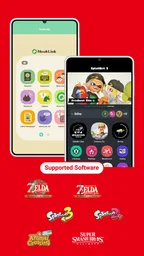
- Voice chat works with supported Nintendo Switch games.
- The app shows friends who are online and what they are playing.
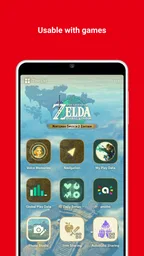
- Game-specific services can provide useful extra features.
- You can check play activity without turning on your console.
- The app is free to download and use.
What could be better
- Voice chat requires a compatible game and a Nintendo Switch Online membership.
- Voice chat quality depends on your phone and network connection.
- Not every Switch game supports the app's features.
- Some features require linking a Nintendo Account.
- The app does not replace the console's built-in game and account settings.





